3
Please note: This guide is for Thomson TG585 routers only.
This is fibre: this is the future
Welcome to the next-generation of communications: future-proof, cutting-edge technology that allows for
more entertainment, a richer experience and super-fast downloads. Seethelight deliver high-speed internet
via fibre optics that makes hi-tech applications, home working and video conferencing a reality.
Brace yourself – the broadband you’ve used in the past doesn’t compare to fibre’s stunning connectivity. It’s
worth looking out for the little dierences from traditional data services – but don’t worry, we’ll be covering
them in the next few pages.
Please ensure that you read this guide carefully to help you get the best out of your seethelight services.
Because seethelight use fibre to bring you high-speed internet, we use some equipment that you may not be
familiar with. This next section will give you a quick1234 overview of this equipment.
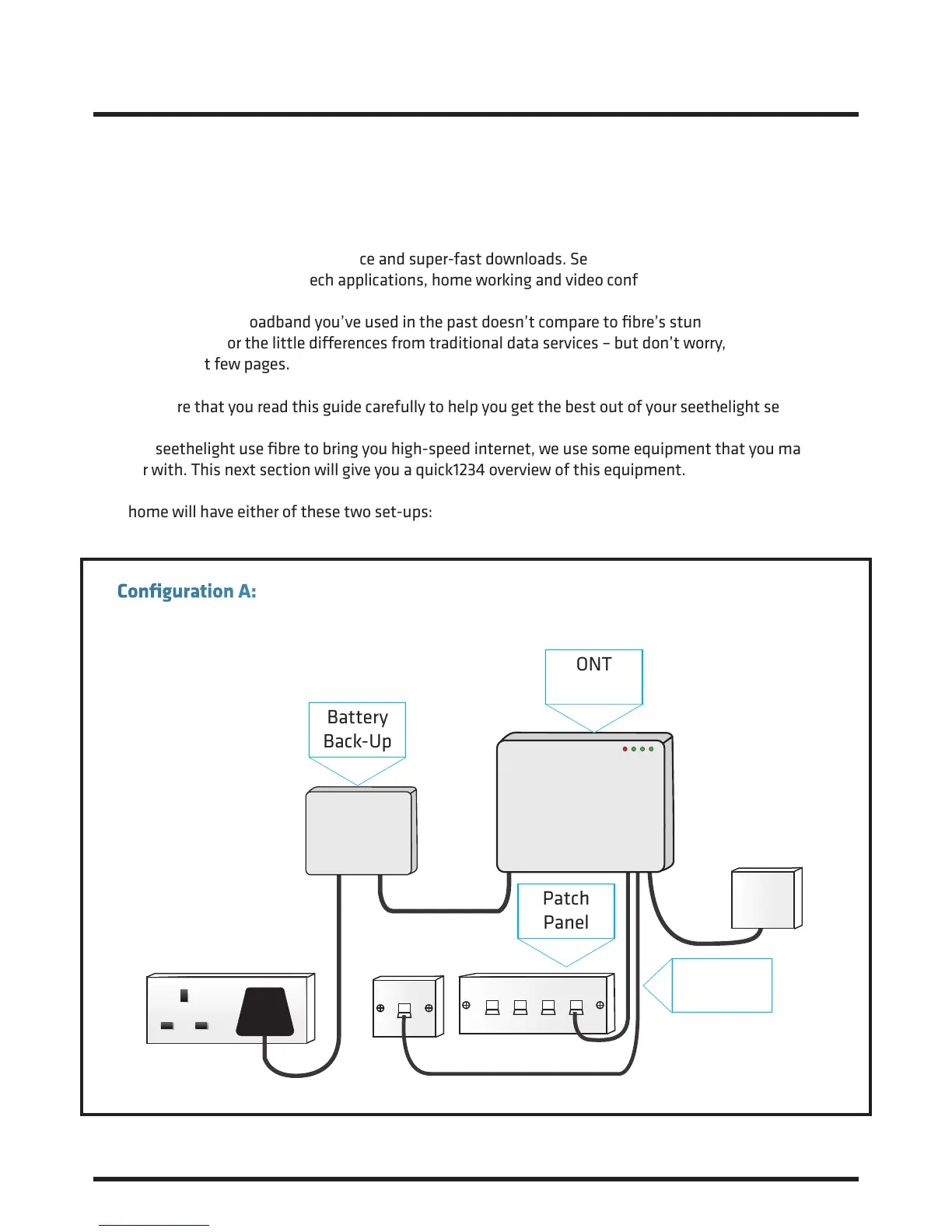
Your home will have either of these two set-ups:
1. Introduction and Your Fibre Equipment
Battery
Back-Up
ONT
Patch
Panel
Telephone
Adaptor
Configuration A: Patch panel linked to internal wiring to enable internet service in multiple rooms.*
*Exact layout of equipment may vary. Your internal wiring is the responsibility of the house owner/landlord.
To resolve an internal wiring problem please contact a qualified electrician.














 To Next Page