6
Patch Panel
This can be used to distribute data services throughout the home via internal cabling. Using the patch
cables between the socket and the ONT, you can deliver services wherever they are needed in the home
(for more on this see 2.3 A ‘wired’ connection using the patch panel)
Telephony Master Socket and Telephone Adaptor
Applicable for voice services. Please see Telephone User Guide for more information.
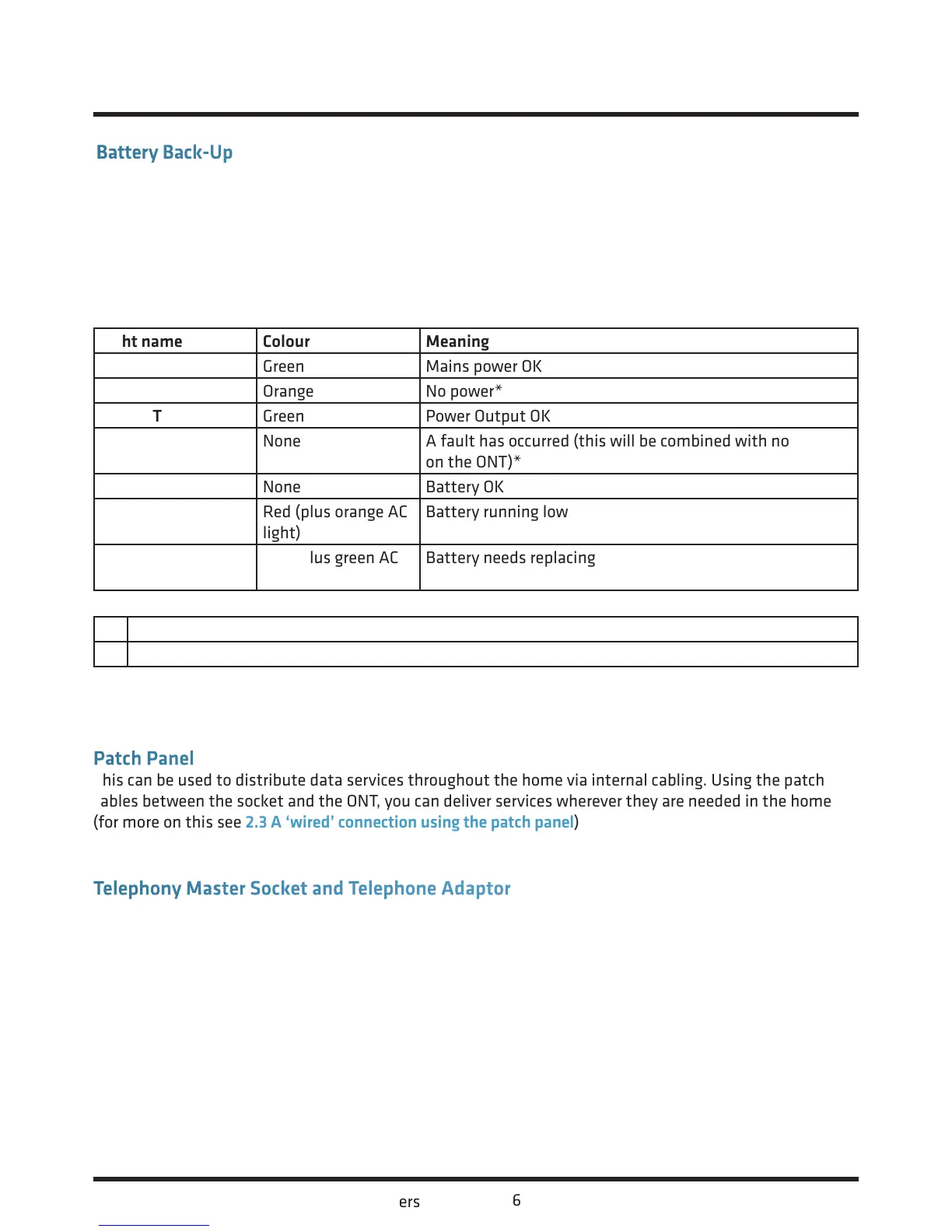
Light name Colour Meaning
AC Green Mains power OK
Orange No power*
OUTPUT Green Power Output OK
None A fault has occurred (this will be combined with no lights
on the ONT)*
Battery None Battery OK
Red (plus orange AC
light)
Battery running low
Red (plus green AC
light)
Battery needs replacing
Action
* Check the power cable is properly connected and that the mains power is on
Battery Back-Up
This useful piece of kit provides back-up battery power, so if the mains power fails, you will still be able to
make telephone calls for up to eight hours. Please note that Internet services are not supported when your
ONT is running on battery back-up power.
The Battery-Back-Up has several lights located on it which tell you its status. These lights may be useful
to help you troubleshoot any problems with your connection.
Your Fibre Equipment continued...














 To Next Page