Home
THOMSON
Cell Phone
TLINK475
Page 62
THOMSON TLINK475 - Page 62
73 pages
Manual
Save Page as PDF
To Next Page
To Next Page
To Previous Page
To Previous Page
Loading...
-
5
9
-
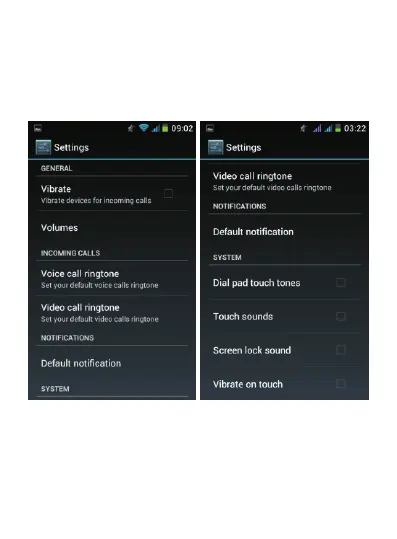
T
a
p
“
G
e
ne
r
a
l
”
(d
o
n
o
t
t
a
p
t
he
bl
u
e
b
u
tt
o
n
,
t
ap
th
e
w
o
r
d
“
Ge
n
e
ra
l
” d
i
re
c
t
ly
)
. F
r
o
m t
h
e n
ex
t
sc
r
e
en
,
yo
u c
a
n c
h
a
ng
e
t
he
r
in
g
t
on
e
,
r
i
ng
e
r
v
o
lu
m
e,
v
i
br
a
te
m
o
de
,
a
s
w
e
ll
a
s
t
he
a
le
r
t t
on
e f
o
r no
t
i
fi
c
at
i
o
ns
.
61
63
Table of Contents
Main Page
Table of Contents
2
Important Safety Information
4
Getting Started
11
Selecting the Operator for First Use
11
Turning off Your Phone, Activating Flight Mode, Silent Mode and Vibrate Mode
15
Activating Mobile Data
16
Activating Wi-Fi
24
Main Functions
27
Downloading Applications from 1Mobilemarket
27
Sending Emails from Your Phone and Synchronizing Your Contacts and Calendar
31
Browsing the Internet
33
Activating Geolocation and GPS
36
Multimedia Applications
41
Connecting to a Computer
42
Discovering the Interface of Your Phone
44
Navigation Buttons
45
Favorites Bar
46
Shortcuts
46
Shortcut Icons
48
Widgets
50
Switching between Applications
53
Using the Touch Screen
53
Locking the Screen
55
Notifications
56
Other Settings of Your Phone
58
Enabling the French Word Prediction for Keyboard
58
Changing the Phone Language
60
Changing the Ringer Volume or Ringtone
61
Setting the Brightness, Wallpaper, Screen Timeout Period and Font Size
63
Data Usage and Enabling/Disabling Mobile Data
64
Activating Hotspot
65
Dual SIM Management: Assigning a Telephone Number to SIM Card
67
Troubleshooting Common Problems
70
Related product manuals
THOMSON TLINK535
68 pages
THOMSON Serea 67
65 pages



 To Next Page