© 2017 Thorlabs GmbH
4 First Steps
15
4.3 Gateway Mode
The PC that controls the TXP5004 via USB, can serve as a gateway to a local area network.
This way, any other PC logged on to the same LAN can take over the control.
Therefore,
- the PC that controls the TXP5004 via USB, must be logged on the the LAN;
- the 2nd PC must be registered in the same network domain as the USB control PC (For
details on network registering and logging in, please contact your administrator)
- the TXP software package is installed to the remote PC as well.
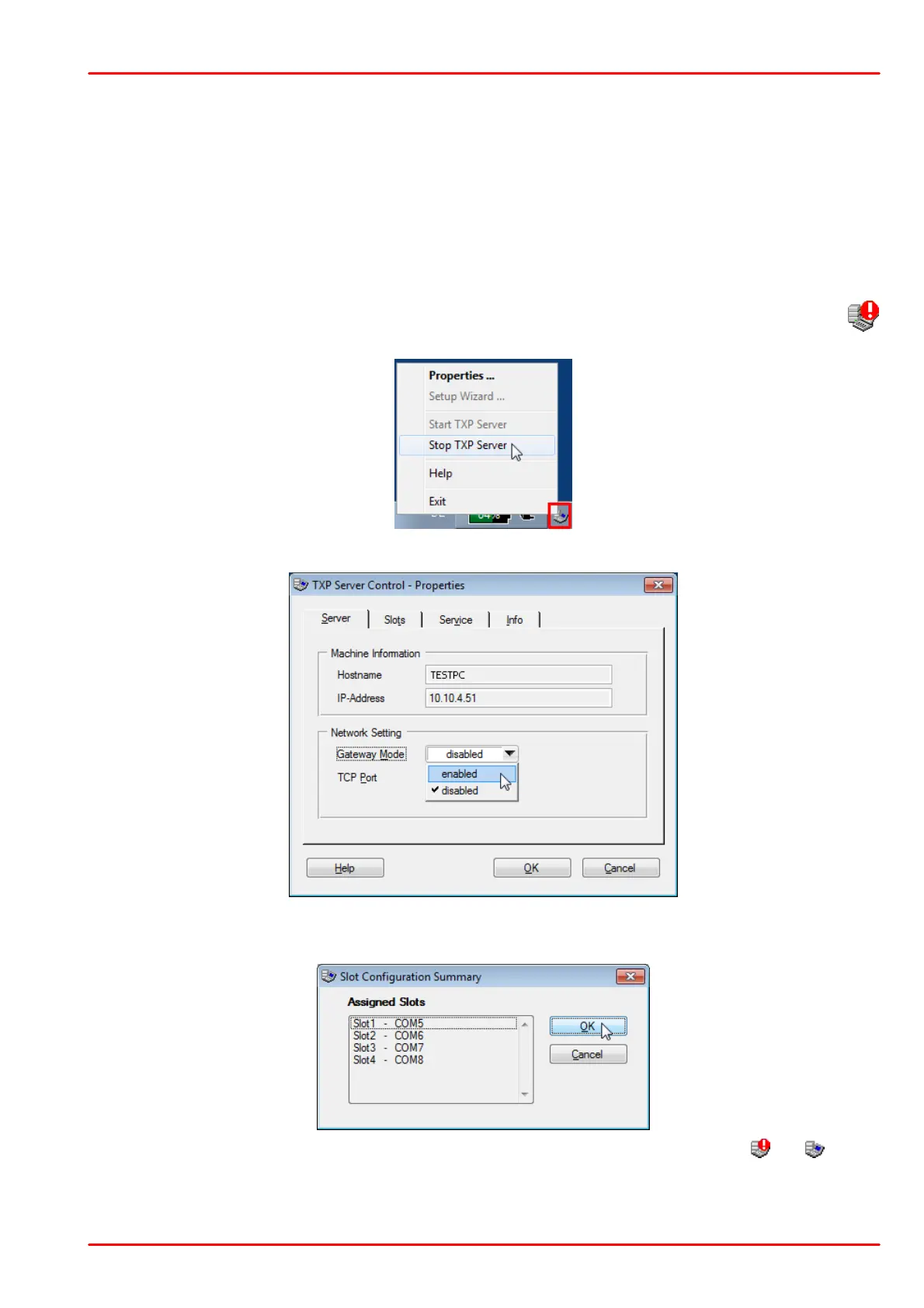
The gateway mode can be enabled only if the the TXP Server is stopped. The icon
indicates this condition. Right click to this icon and select "Properties":
The TXP Server Control panel opens
Select "enabled" and remember the host name and/or IP address. Then click "OK". A summary
of the assigned COM ports appears, click OK to continue:
Start the TXP Server and wait, until it's icon in the task bar changes from to . The
gateway is now enabled and active. From the remote PC now a TXP module GUI can be
started.



 To Next Page