THUNDER LASER NOVA-
35
www.thunderlaser.com DONGGUAN THUNDER LASER EQUIPMENT
CO.,LTD
tech@thunderlaser.com Shatian Town, Shatian Dadao, Mintian
Tel :(86)769 826653 Dongguan City, Guangdong Province,
China
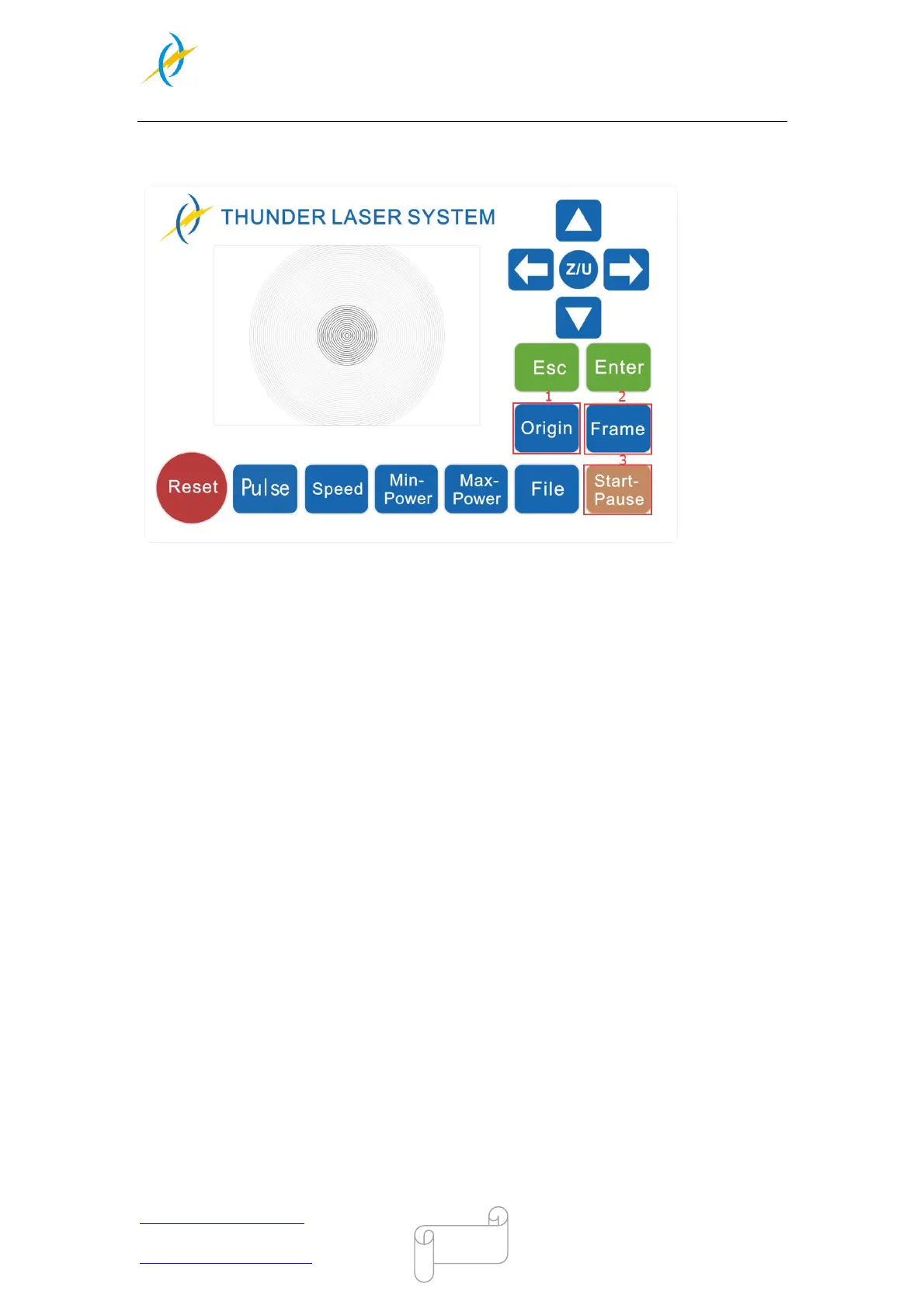
7. Click “Original” and “Frame” on the display, please make sure that the material is in the
right location and there is enough space for working.
① Control arrow button to move the laser head;
② Click “Origin” button to select the start point;
③ Click “Frame” button to be sure the working area;
④ Click “Start-Pause” to run the program;
8. Please check the water cooling system is working properly; the water is running into
and filling the laser tube. Please do not start your work if the laser tube isn’t full of water,
because that may led to laser tube damage due to the high temperature.
9. Finally press the “Start-Pause” button in the display, to start the engraving process.
10. While the laser is engraving, you can generate the next graphic.
11. When the engraving is complete, the laser machine will give out the notification sound
and the laser head will go back to the original point, and the warning light will return to
the green light, then you can repeat engraving.



 To Next Page