21
20
Operation
Operation
Operation
Operation (QR Code Scan)
Start to Charge
Start to Charge
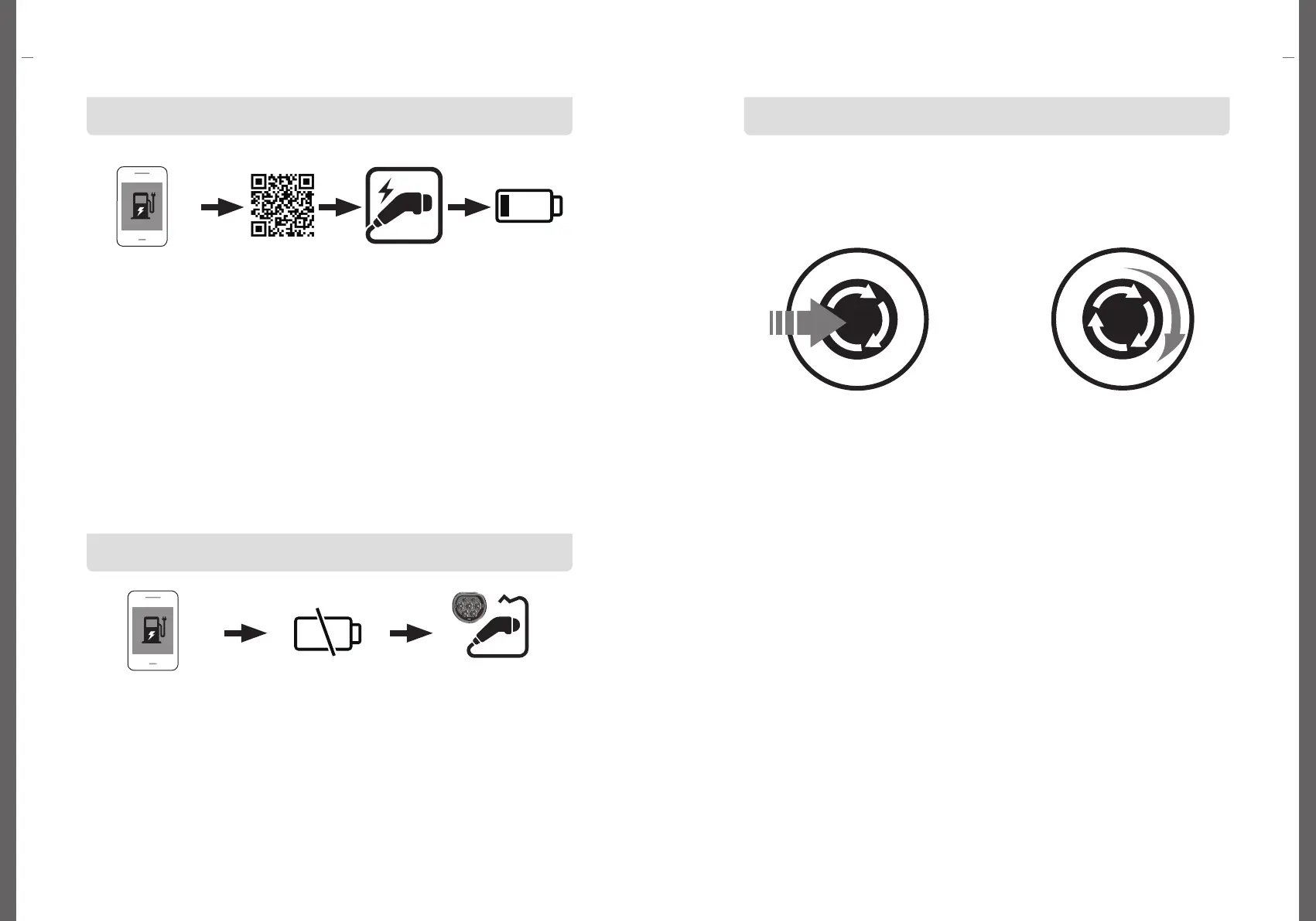
Emergency stop
-When charging, if you press the emergency stop button on the front, the
charging will immediately stop.
-The emergency stop button must be used only in an emergency.
-Incorrect use may cause product operation problems.
Press the emergency
stop button
Release the emergency
stop button by turning it to
the right.
Run the app
Stop charging in app
QR Code Scan Connect EV and
charging connector
Start to Charge
Stop to Charge Disconnect EV and
charging connector
1. Run the charger app.
For how to install the charger app, refer to the charger app description.
2. Scan the QR code to start charging.
For how to use the charger app, refer to the charger app description.
3. Connect the connector of the charging cable to the EV.
If there is moisture in the charging connector, remove it before connecting.
4. When charging starts normally, the charging time is measured on the OLED
window as soon as the charging starts, and the amount of charge (kWh) is
also displayed, and the unit is displayed in units of 0.01 kWh.
1. Users can stop charging at any time during charging.
2. Stop charging using the charger app.
3. Charging stops, and disconnect the charging connector connected to the EV.
4. For how to stop charging in the charger app, refer to the charger
app description.


 To Next Page