23
22
Other Troubleshooting Methods to Try
Other Troubleshooting Methods to Try
When encountering issues during product use, please first check the
following items. If the problem persists, please contact the service center or
our headquarters for further assistance.
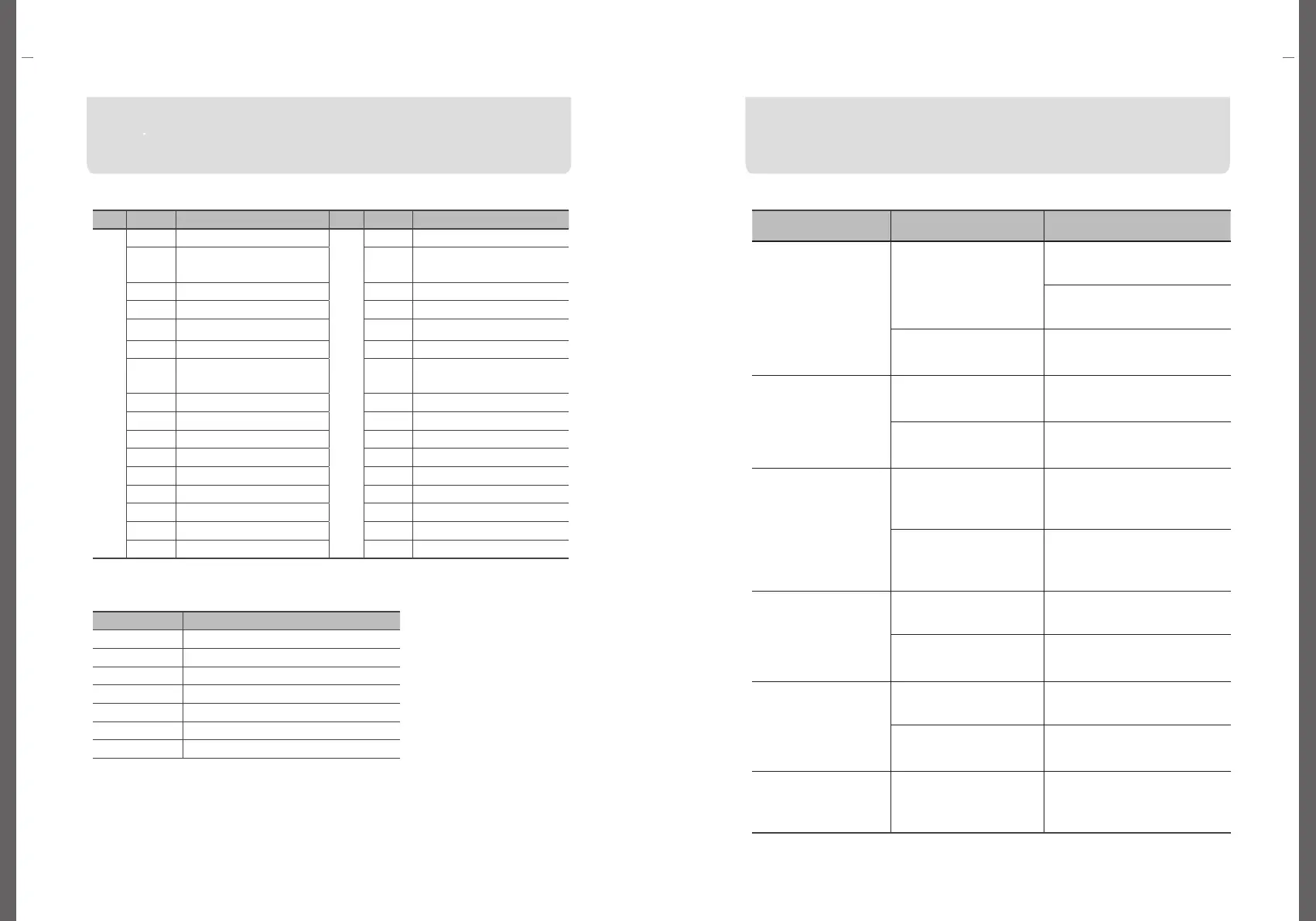
Error Code
Error Code
If you encounter any issues while using the product, please check the
following items first. If the issue persists, please contact either our service
center or head office for further assistance.
Error Code of Charger
Error Code of Card
If the product is not operating normally, please contact our A/S center or
manufacturer for repair assistance. To expedite the process, please have the model
name, serial number, and year of purchase ready when you call our main phone
number.
Code Description Code Description
E
r
r
o
r
C
o
d
e
E103 Emergency Stop button
F
a
i
l
u
r
e
C
o
d
e
E201 Stop chsrging on sever
E104
Disconnection for the
charging connector
E202 Damage on charger
E105 EV Charger Reset E203 Storage Capacity Excess
E106 EV Charing Fail E204 CP Signal Abnormality
E107 Authentication Failure E208 Overcurrent
E108 Authorization timeout E209 Overvoltage
E109
Timeout for maximum
charging time
E210
Damage on
Electricity Meter
E110 CP Signal Abnormality E211 Damage on Relay
E112 Charger Ground fault E212 Damage on Card Reader
E114 Overcurrent Detection E214 Low Voltage
E115 Overvoltage Detection E216 Network Abnormality
E116 Electricity Meter Error E240 Others
E117 Relay Error
E118 Card Reader Error
E120 Low Voltage Detection
E140 Others
Code failure description
E301 Unregistered Card
E302 Expired Card
E303 Abnormal Card
E304 Currently Being Used Card
E305 Mismatched Card
E306 Offline Authentication Failure
E309 Others
Problem
Probable Cause
Corrective Measures
The power is being supplied
to EV charger, but
EV charger is not turning on
Is the system power OFF?
Please, turn on the circuit breaker
switch inside the charger
Please, turn on the main board power
switch inside the charger
Is the circuit breaker in the
distribution panel turned OFF?
Please, turn on the circuit breaker
in the distribution panel inside the
charger.
User authentication can not
be identified.
Is it the registered card?
User authentication can only be
performed with registered, authorized
cards
Is the card used to stop
charging the same as the card
used to start charging?
To stop charging, the user must
tag the same card used to start the
charging session for authentication.
Charging can not be unable
to proceed.
Does the OLED screen display
error messages, and is there
an Error LED on the charger
body?
Please, check "Error Code of
Charger”
Have you connected the
charging connector to the EV
and tagged the product body
with an NFC to start charging
Please, get your NFC tag to start
charging.
Charging ends shortly after
starting to charge
Is the EV battery fully charged?
If the EV battery is fully charged,
charging will end automatically
Is the EV unable to charge?
Please, check the EV status. If there
are any problems, please contact the
manufacturer.
Charging stops repeatedly
during charging.
Does the function of stop
charging repeatedly happen?
Please, check the condition of the EV.
Do you find it difficult to
determine the cause of the
issue?
To request service, please contact
either the A/S center or the
manufacturer
The charging connector
cannot be connected to the
EV.
Is there a problem with the EV
charging connector?
Please, check the EV charging
connector socket. The charging
connector locking device may be
engaged.


 To Next Page