14 15
Setup
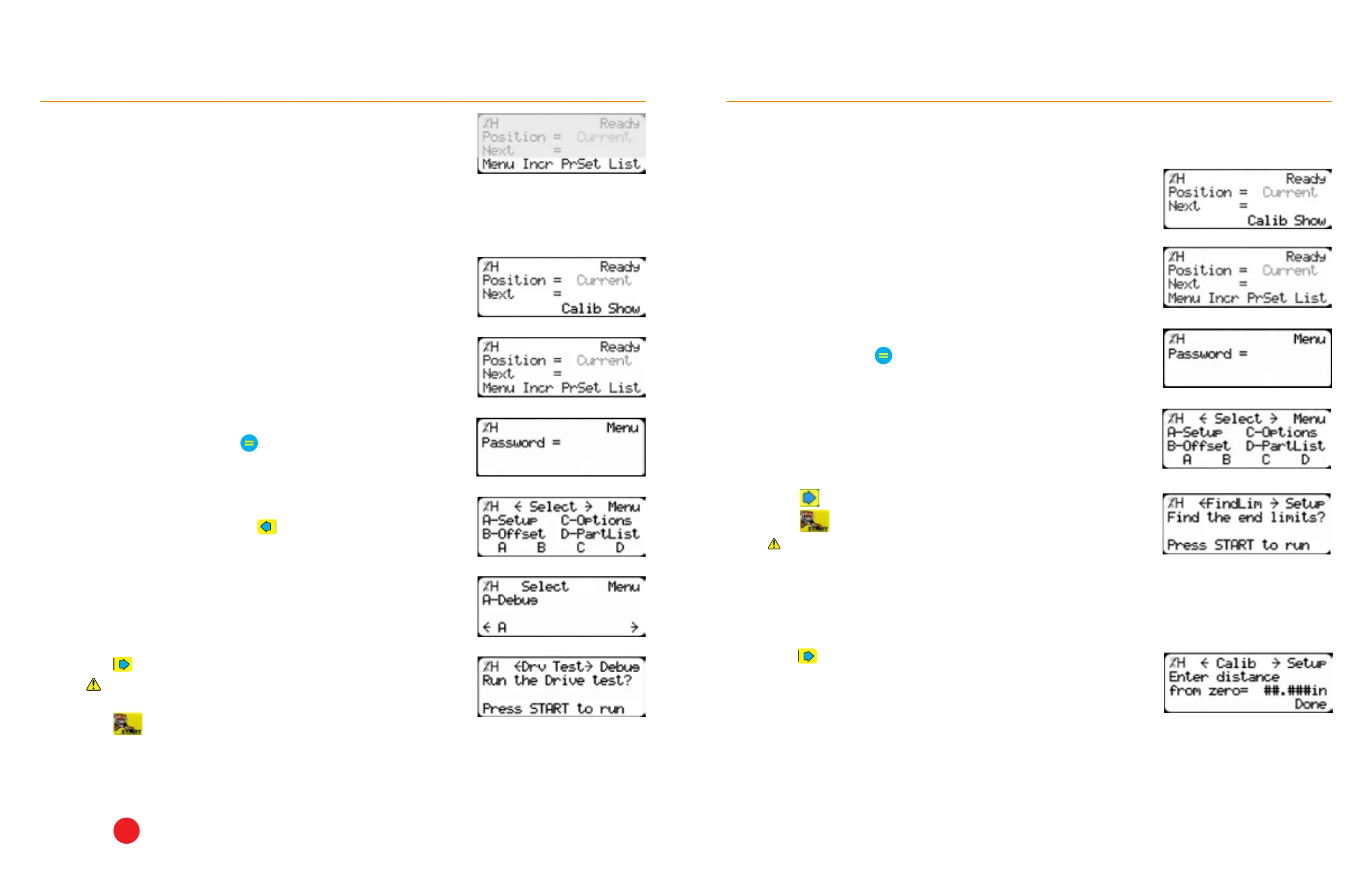
Run Drive Test
The drive test measures diculty of movement.
1. From the Ready Screen, press the [Show] soft key.
2. Press the [Menu] soft key.
3. TigerFence requires a password to access all menu options.
Enter the password and press
• By default, the TigerFence password is the serial number.
4. At the Menu Select screen, press
Line 4 displays the soft key prompts. These prompts determine what the
soft keys below them do. These change when accessing dierent screens.
5. Press the [Debug] soft key.
6. Press
until reaching the Drv Test screen.
Ensure the area is clear. TigerFence moves automatically
during this test.
7. Press to run the test.
8. Record the test results in the maintenance log. If the Drv, MxP or MxN are higher than 15,000, then the
TigerFence is improperly installed. Do NOT put TigerFence into service. Remove TigerFence from the table
and ensure the mounting surface is flat. Then remount TigerFence and ensure that the mounting hardware is
not over- tightened. Run the drive test again to ensure that it is below 15,000.
9. Press
STOP
to exit the test.
Setup
3. TigerFence requires a password to access all menu options. Enter the
password and press
• By default, the TigerFence password is the serial number.
4. At the Menu Select screen, press the [Setup] soft key.
5. Press until reaching the FindLim screen.
6. Press to run the Find End Limit routine.
Ensure TigerFence can move its entire length without obstruction.
2. Press the [Menu] soft key.
Find the End Limits
1. From the Ready Screen, press the [Show] soft key.
Automatically sets the minimum and maximum limits.
Calibrate
After the Find End Limits routine has finished:
1. Press until you get to the Calibrate setting.
2. Measure the distance between the fence and the saw blade.
3. Enter the measurement and press the [Done] soft key.


 To Next Page