30 31
Deleting a List
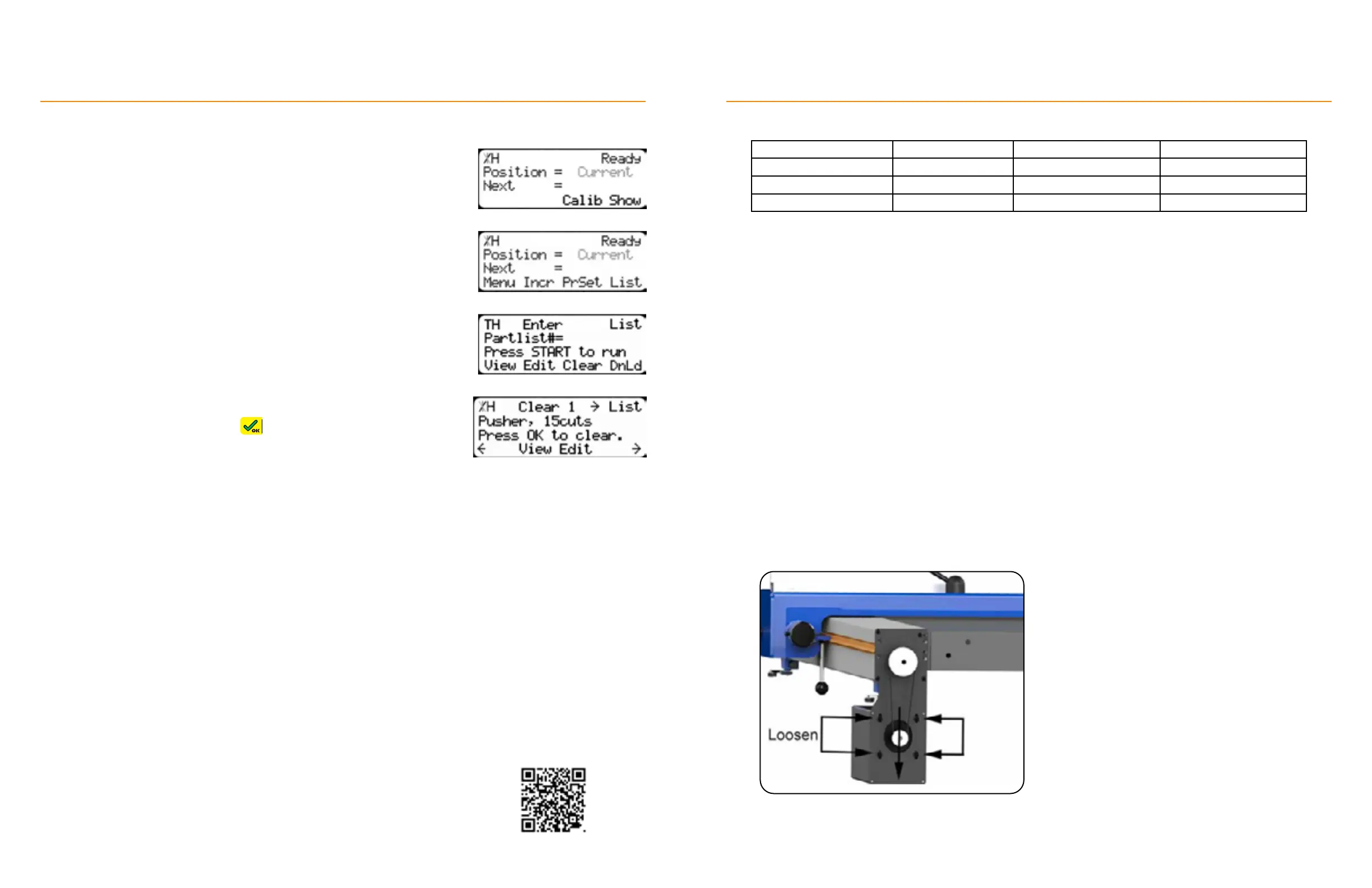
1. From the Ready Screen, press the [Show] soft key.
2. Press the [List] soft key.
3. Enter the list number to delete and then press the [Clear] soft key.
4. Review the list’s details. Press to confirm deletion.
TigerStop
®
Standard Controller Basic Functions
To download the complete TigerStop
Standard Controller manual, visit:
https://www.tigerstop.com/download/tigerstop-users-guide
Maintenance Schedule
Record Important Settings
Setting Value Setting Value
Serial # Scale
Min Limit Kerf
Max Limit Lash
Daily
• Clean all dust and debris from drive areas.
• Check all exposed cabling for damage.
• Check calibration and calibrate, if necessary.
Quarterly
• Run the drive test. Ensure the Drv, MxP and MxN are all below 15,000.
Yearly
• Inspect the condition of the drive belt and replace, if necessary.
• Ensure belt is tight.
Tighten The Belt:
1. Remove belt cover.
2. Loosen the 4 motor mount bolts.
3. Pull down on the motor assembly until belt is tight.
4. Tighten the motor mount bolts.


 To Next Page