22 23
Preset Programing
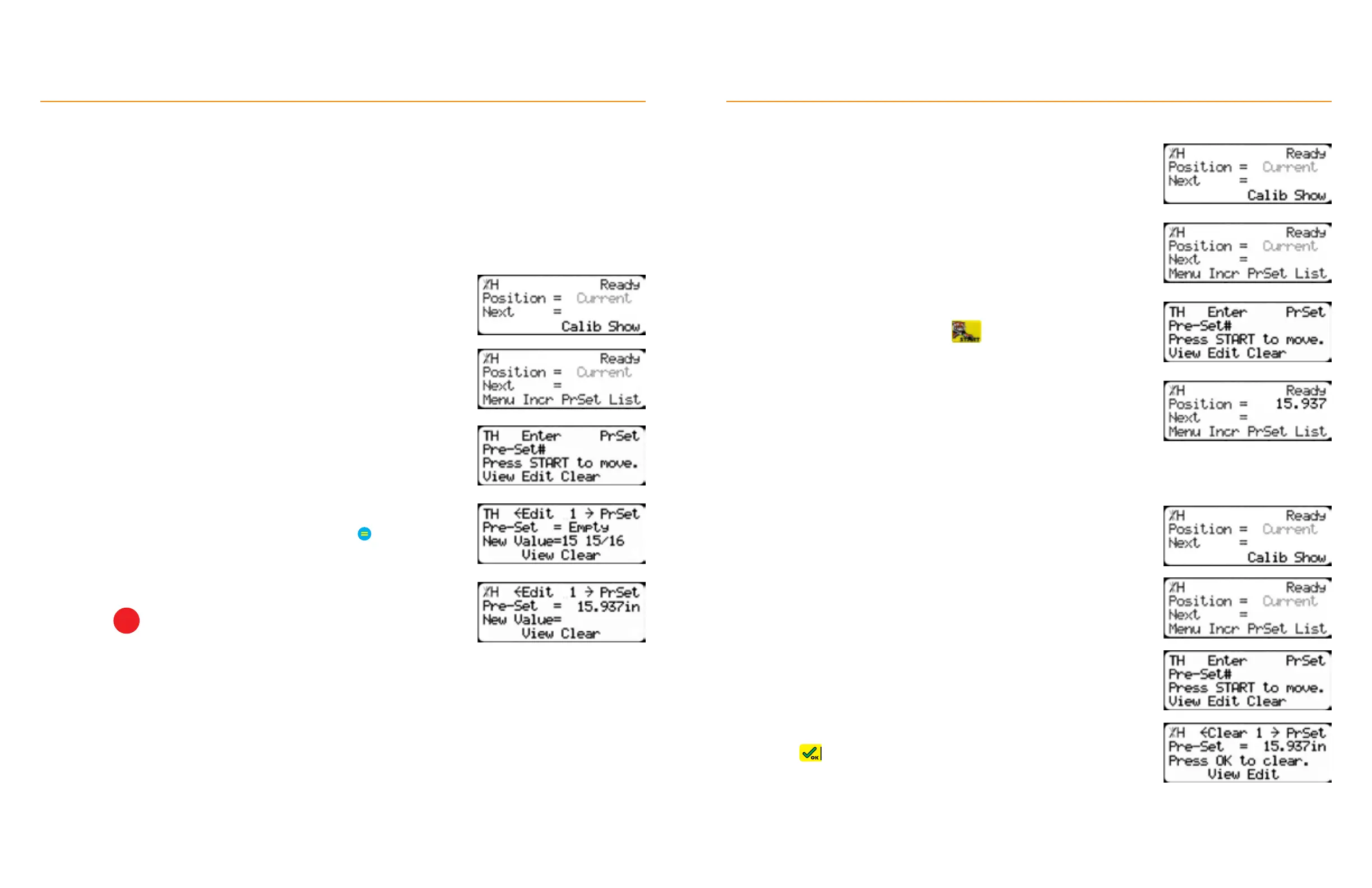
1. From the Ready Screen, press the [Show] soft key.
2. Press the [PrSet] soft key to access the preset feature.
4. Enter the length you want the preset to be and press
• The preset value is now set.
5. Press
STOP
to go back to the Ready Screen.
3. Enter the preset number you want to program and then
press the [Edit] soft key.
Preset
The Preset function is a set of 100 programmable hot keys for quickly accessing common lengths.
Presets:
• Can be used in Set point, Pusher or Increment mode.
• Can be programed in Preset slots number 1 - 100.
TigerStop
®
Standard Controller Basic Functions
Preset Use
1. From the Ready Screen. press the [Show] soft key.
2. Press the [PrSet] soft key to access the preset feature.
4. TigerFence moves to the preset position.
3. Enter the preset number and press
TigerStop
®
Standard Controller Basic Functions
Preset Deletion
1. Start at the Ready Screen.
2. Press the [Show] soft key.
3. Press the [PrSet] soft key to access the preset feature.
4. Enter the preset number for deletion and press the [Clear] soft key.
5. Press to clear.


 To Next Page