26 27
TigerStop
®
Standard Controller Basic Functions
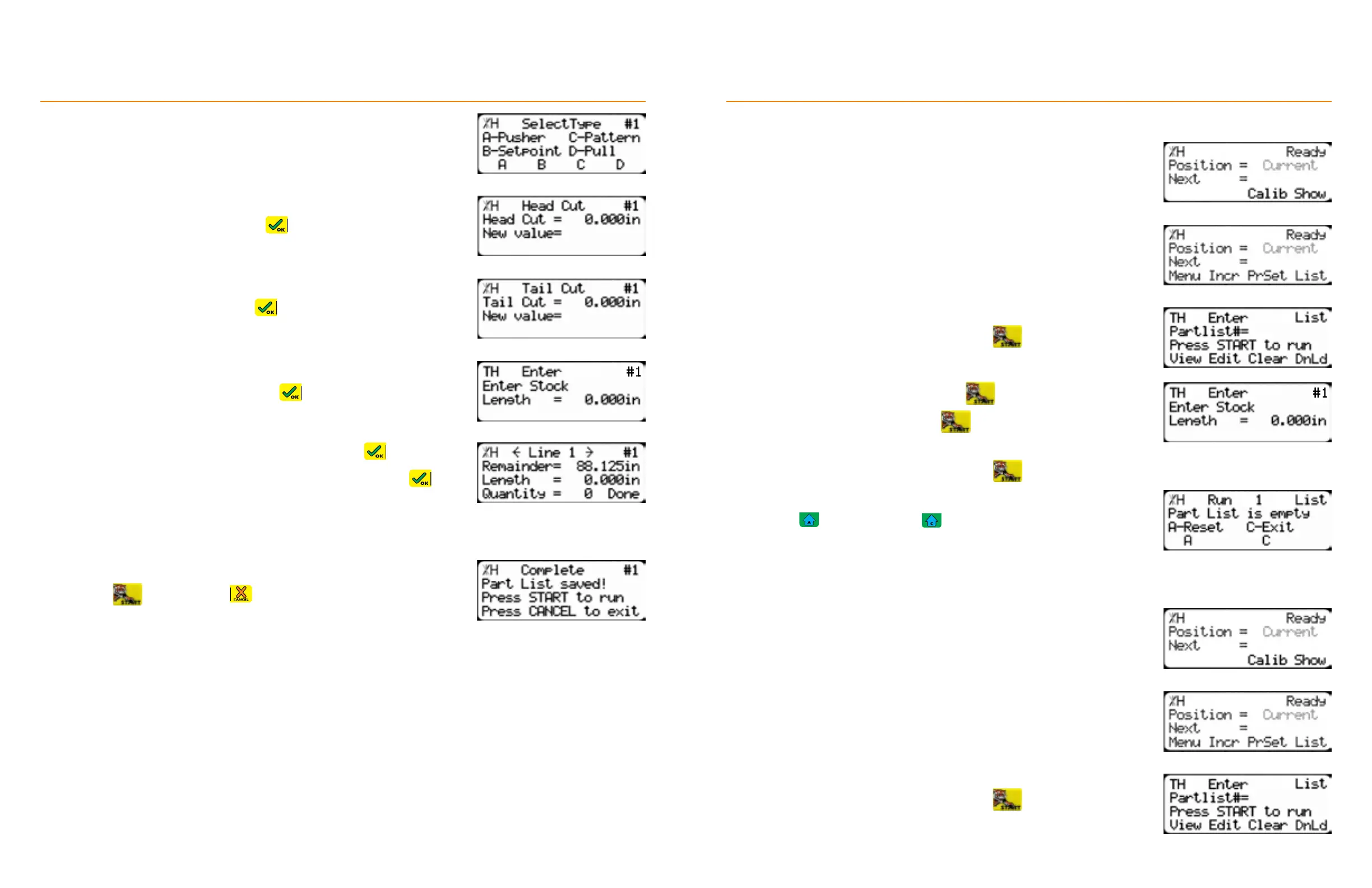
4. Select the [Pattern] soft key.
5. Enter the head cut value and press
6. Enter the tail cut value and press
7. Enter the stock length and then press
8. Enter the length of the part to process and then press
9. Enter how many parts to process at that length and then press
10. Repeat steps 9 & 10 to enter additional part lengths and quantities.
• The total length of all parts + quantities cannot exceed the stock
length. The ‘Remainder’ line keeps track of how much stock is
available.
11. Press the [Done] soft key.
12. Press
to run the list or to exit.
TigerStop
®
Standard Controller Basic Functions
Running a Pusher List
1. From the Ready Screen, press the [Show] soft key.
2. Press the [List] soft key.
3. Enter the list number to run and then press
4. Enter the stock length and then press
5. Load the material and then press to begin processing.
6. Repeat steps 5 & 6, as needed.
7. Unload the remaining stock and then press
8. Press to re-run the list or to exit.
Running a Set Point List
1. From the Ready Screen, press the [Show] soft key.
2. Press the [List] soft key.
3. Enter the list number to run and then press


 To Next Page