EasyManua.ls Logo

Time2 MIP11 - Managing Camera Settings

Time2 MIP11
24 pages
Print Icon
To Next Page IconTo Next Page
To Previous Page IconTo Previous Page
Loading...
- 17 -
Please see link below for the options available:
Managing your camera settings
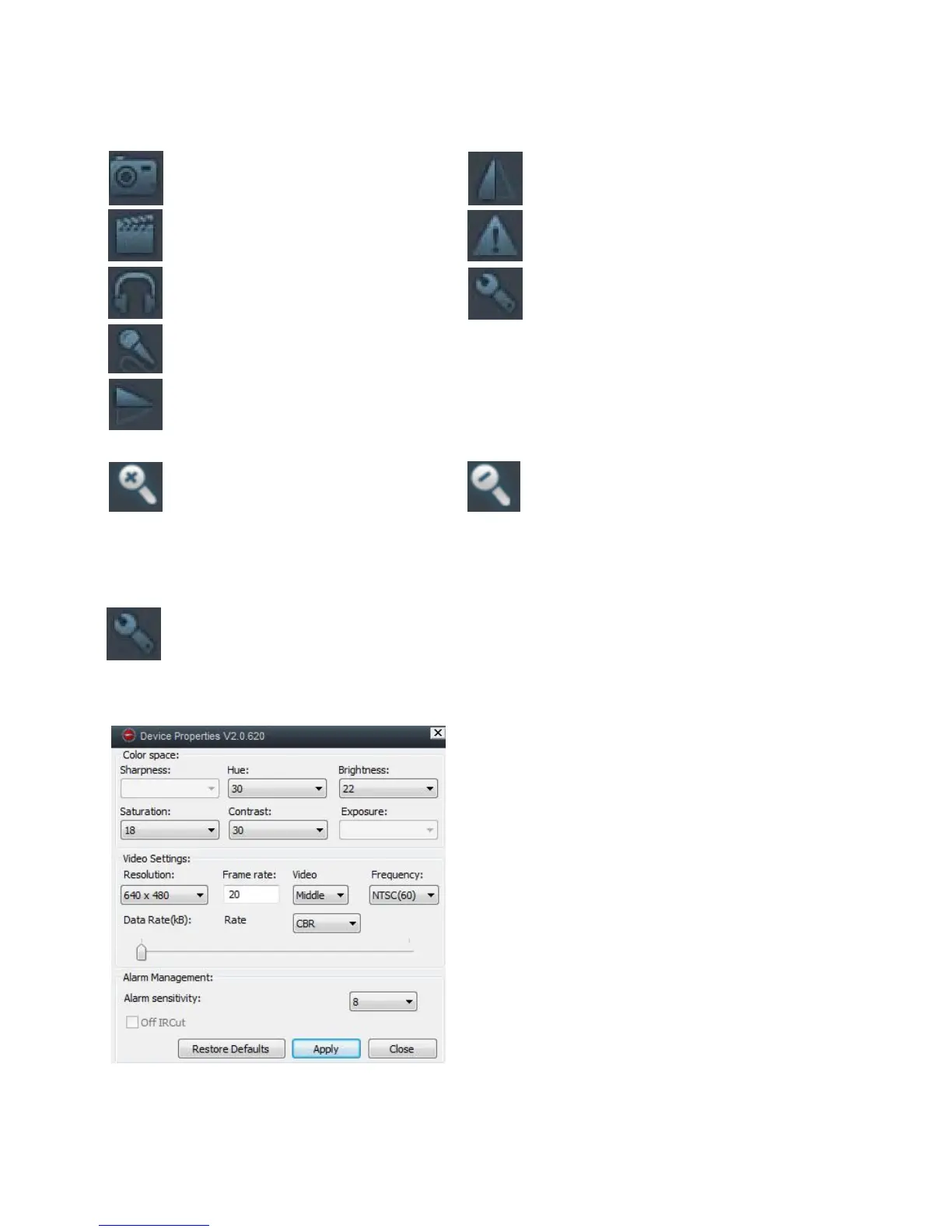
Click on the settings icon to adjust the camera settings. The night
vision is automatic
The following window will appear:
Resolution – This will change the
quality of the image.
Alarm sensitivity – This changes the
sensitivity of the motion detection
feature. The higher the setting, the
more sensitive motion will trigger the
alarm.
Apply – This will save the settings you
have changed
Restore to default – This will restore
the settings back to default.
Mirror

Flip the image
vertically
Talk
click to activate
microphone.
Capture
take a snapshot of
what the camera is seeing.
Record
click to start recording.
Click again to stop recording.
Listen
click to activate
s
eaker.
Vertical flip
Flip the image
horizontally
Alarm Log
This will let you see a
log of the alarms
Settings
Change the camera
settings.
Zoom In
Use this to zoom in
on the image
Zoom out
Use this to zoom
out of the image

Other manuals for Time2 MIP11