- 19 -
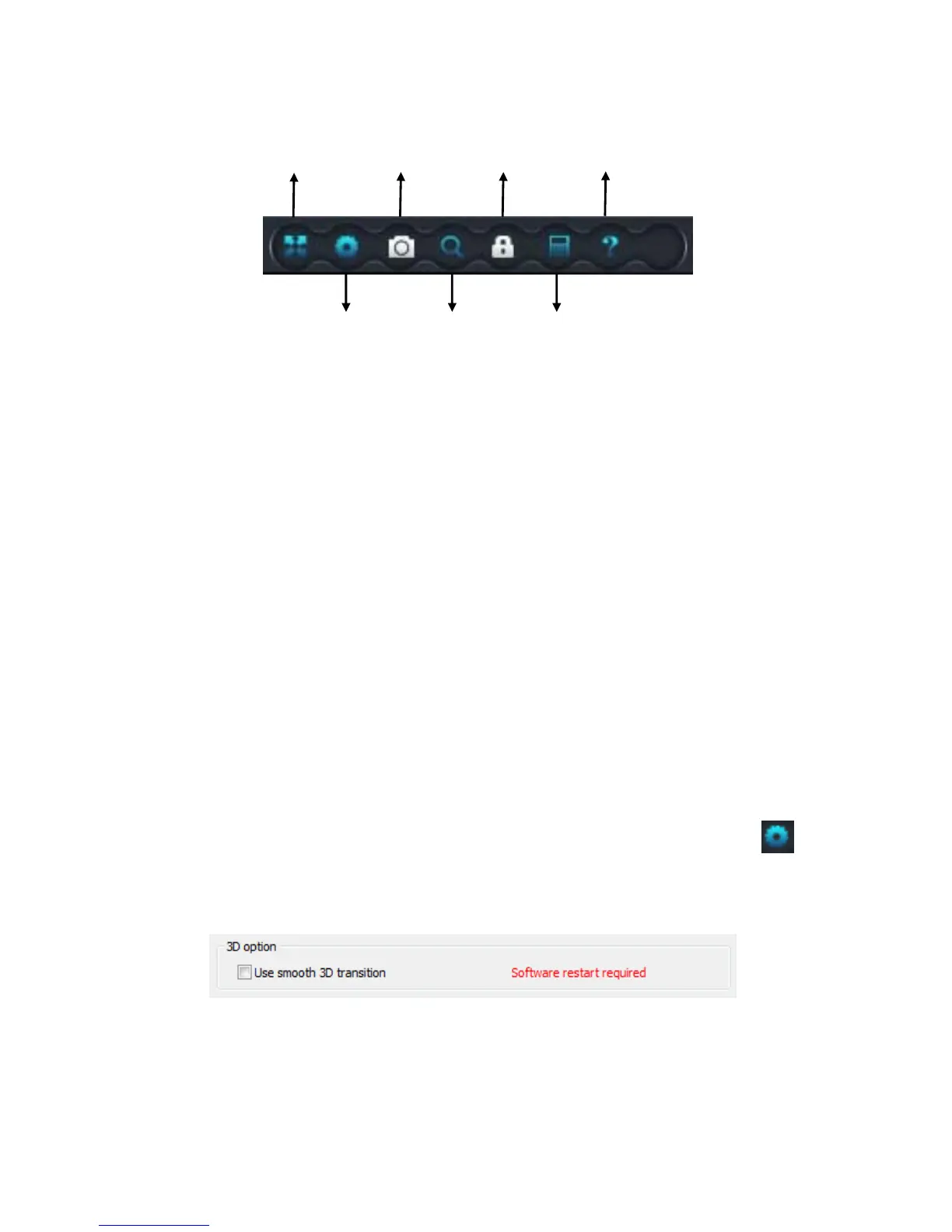
Main menu features
Full screen - Live video will become full screen. To exit the Full screen
please click the button in the screen top right hand corner or “Esc” in the
keyboard.
Settings - This is where you can change the settings of the system, video,
alarm and net.
Capture image – This will capture an image on the viewing screen
Search – This will allow you to search for any recordings.
Change password – This is where you can change the password of your IP
camera / Registered account.
Log – This will show you a log of the alarm and videos.
Help – This will provide help regarding the software and set-up.
Turning on the Zoom features.
To turn on the zoom feature, go to the settings on the main features .
Under system, you will see a 3D Option. This will ask you to ‘Use smooth
3D transition as shown below.
Tick the box to turn this on. Once you have turned on the 3D transition,
restart the software. The zoom feature will now work.
Full Screen
Settings
Capture image
Search
Change password
Log
Help


 To Next Page