PK-232 MBX – OPERATING MANUAL RADIO INSTALLATION
4/91 3-8 32
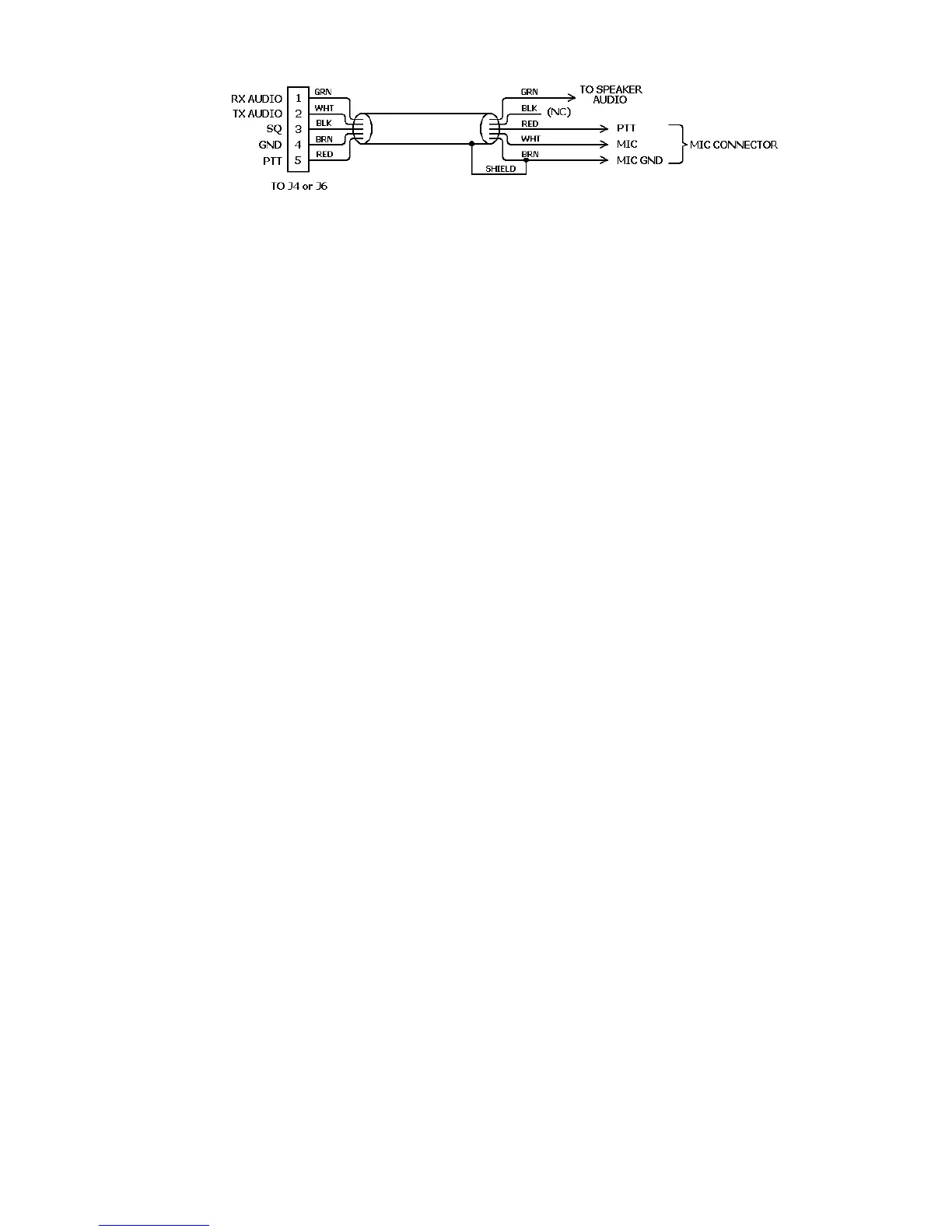
Figure 3-6 Radio-to-PK-232 Connections
4. If you are using a Timewave or AEA program such as PC-PAKRATT II, COM-
PAKRATT or MACRATT, you must enter the Dumb Terminal mode to access the CALI-
BRATE Mode as described below.
5. Enter the Calibrate mode by typing: CAL <Enter>.
NOTE: In the Calibrate mode only, the K key toggles the transmitter PTT line on
and off. The "SPACE BAR" toggles the PK-232's tone generator from "Mark"
(the lower pitched tone) to "Space" (the higher pitched tone). The PK-232
has a transmit watchdog timer circuit that unkeys your transmitter automati-
cally after sixty (60) seconds. As you perform the following adjustments, un-
key periodically, then rekey the transmitter by typing K.
6. Press the K key on the keyboard to key the transmitter. You should hear a continu-
ous tone in the monitor receiver.
7. Tap the space bar several times until the higher pitched of the two tones ("space")
is heard.
8. With the PK-232 keying the transmitter and sending the higher of the two tones, ad-
just the transmit audio level as follows:
o Listen to the monitor receiver; turn the PK-232's rear panel AFSK Output
Level adjustment screw clockwise (CW) until you hear no increase in output
level in the monitoring receiver.
o Rotate the AFSK Output Level adjustment screw counterclockwise (CCW) un-
til the audio signal on the monitoring receiver is slightly but noticeably re-
duced from the maximum level.
9. Type K to return to receive mode.
10. Type Q to "Quit" (exit) the calibration routine.
You've now set your FM transmitter's deviation to an approximate level which will be ad-
equate for initial operation.
11. With your radio in the receive mode, open the squelch control so that a steady hiss
or noise is heard on a speaker.
12. Set the PK-232's THRESHOLD control to the "2 o'clock" position.
13. Set the receiver's volume control so the DCD LED on your PK-232 just lights with
the receiver unsquelched. This is the approximate proper level for best receive per-
formance from your PK-232's modem.
14. Reset your receiver's squelch control for normal operation.



 To Next Page