11
Access Internet Radio Mode
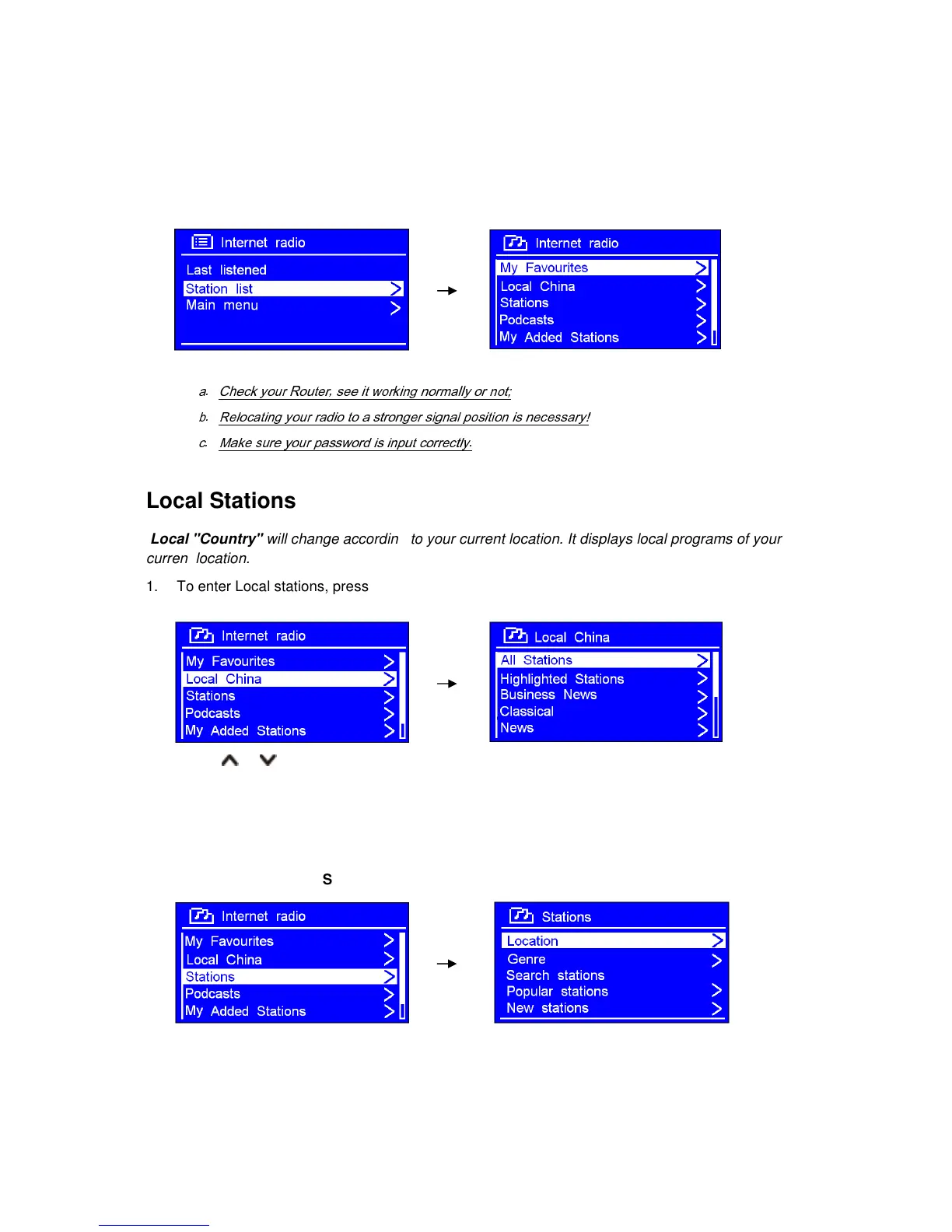
1. Display will show 'Main menu' after 'Setup wizard' completed. Press OK button to select
Internet radio mode.
2. While 'Station list' is highlighted, press OK button to confirm.
3. Then refer the following section to choose stations. If failed to connect to network, please follow:
a.
Check your Router, see it working normally or not;
b.
Relocating your radio to a stronger signal position is necessary!
c.
Make sure your password is input correctly.
Local Stations
Local "Country" will change according to your current location. It displays local programs of your
current location.
1. To enter Local stations, press MENU button > Station list > Local "Country", press OK button
to confirm.
2. Press or button to select options, and then press OK button to confirm.
3. Step by step to the program you desired.
Choose a Station
1. Press MENU button > Station list > Stations, press OK button to confirm.
2. In 'Stations' menu:
‘
Location’ enables you to choose from the radio stations provided by any country which you
choose from a list.
a. While 'Location' is highlighted, press OK button to confirm.



 To Next Page