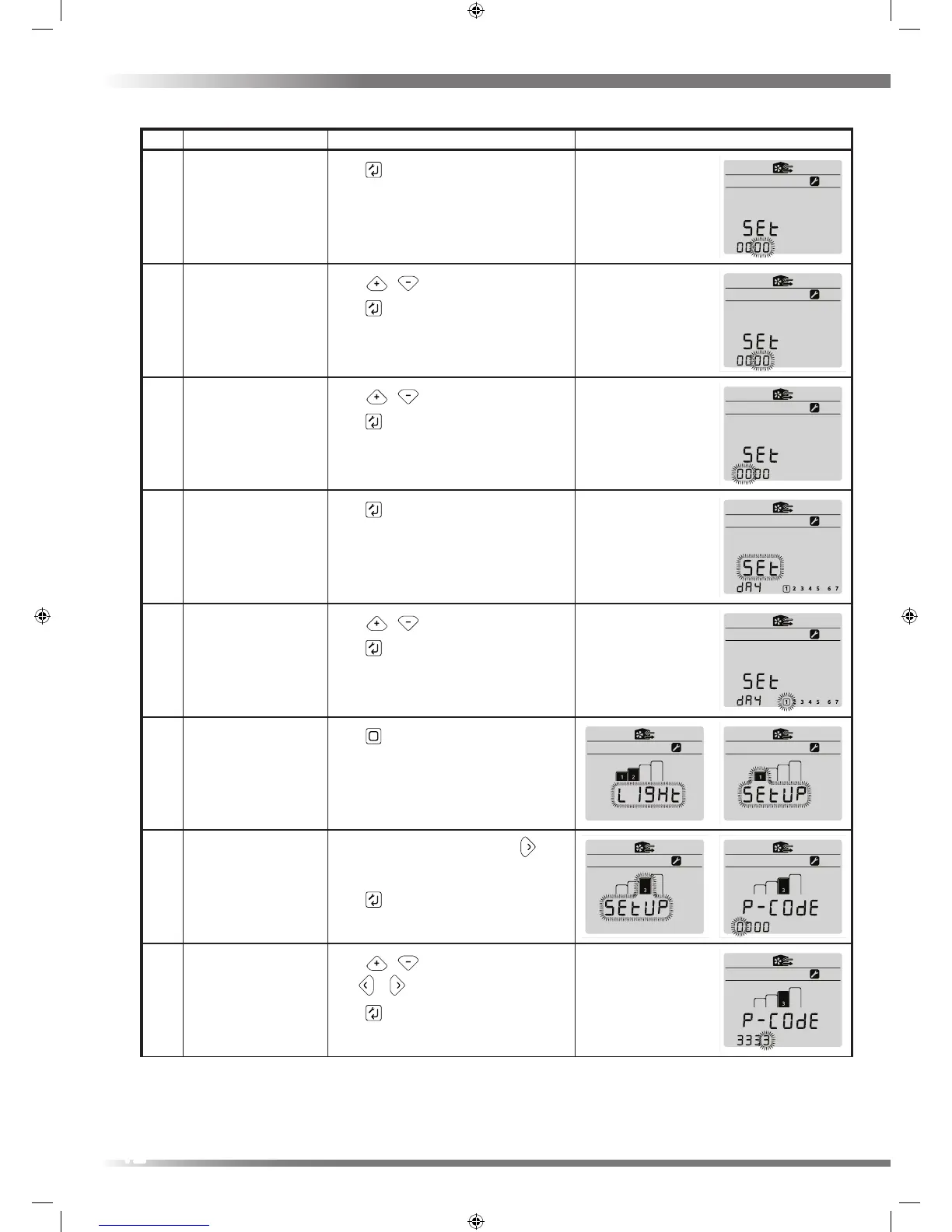
Step Action Button Press(es) Screen(s)
4 Enter Clock setup
Press
key, to enter clock edit
5 Edit minutes
Using
/ keys to edit mins value
Press key, to enter mins and move to
next menu item
6 Edit Hours
Using
/ edit hours value
Press key, to enter hours and move to
next menu item
7 Enter Day setup
Press
key, to enter day setup
8 Change Day
Using
/ edit day
Press key, to enter Day and move to next
menu item
9 Exit SETUP1 menu
Press
key, to return to SETUP1 menu
10 Enter SETUP3 menu
Move to SETUP3 menu by pressing
key
twice
Press key to enter SETUP3 menu
11 Enter Pass Code
Using
/ edit the individual digits.
Use / to move digits.
Press key,
Enter Pass Code 3333
12


 To Next Page