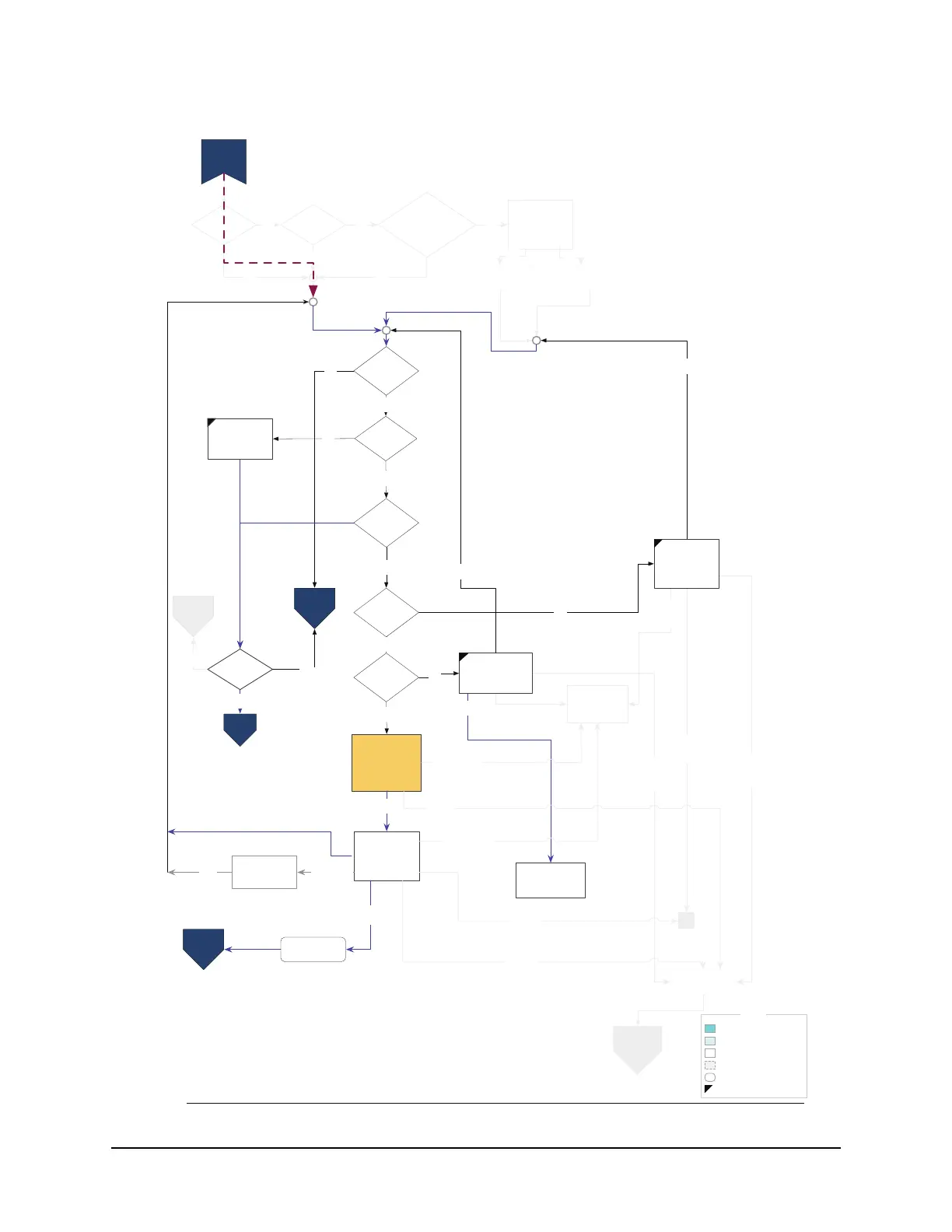
LEGEND
“Rarely used” screen
LEFTing disallowed
“Sometimes used” screen
“Always used” screen
“Invisible” (logic only) screen
Action
In wormhole to Setup
Network?
N
Y
Broadband
Internet?
Y
N
Use
phone
for
now
Use
phone
for
now
Skip
for
now
Choose
Network
Hookup
Phone
for now
Skip
for now
4
Link to the
Internet
Info
Is phone
available?
Y
N
wireless
Wired,
Wireless, or
MOCA?
Wired ethernet
* On return to FSM (LEFT), show Network
Hookup found if previous screen was an
error handling screen.
4: Connection type is phone; skip for now
and begin Phone Connection #1 (D2)
5: Flag “Network Unavailable” and return to
A1.5
Pressing Bail buttons on these screens
goes to the “Stop Now?” screen, outside of
Guided Setup.
“Network hookups found” implies on-board
ethernet with link, Wireless USB adapter
detected, or MoCA enabled, with link.
Set connection
type to Network
Set connection
type to Phone
Set connection
type to Phone
Demo Mode? N
Y
No network
(Demo Mode)
Skip
(Demo
Mode)
TiVo Central
(Demo)
Timeout/Skip (Demo)
About Network
Hookup/
Network
Connection
Required
Choose/
Continue
Phone
I don’t have
a network
(Demo Mode)
TiVo Wireless
N Adapter
OK Wireless N
C1:
Network
Setup
C1.7: WPS
Setup
C3:
TCP/UP
Setup
Multiple
network
hookups?*
Any network
hookup?*
N
N
Unsupported
USB device?
Previous
hookup attempt
failed?
N
N
Y
Network
Hookups
Found
MoCA
Y
I have another adapter
Adapter
Unsupported
Network
Not Found / No
Connection
Found
C3: Initial
Phone Setup
OK, hooked up correctly now
Y
C1.5
Network
(MoCA)
Ethernet-MoCA
Bridgeable and
Ethernet link?
N
Y
Y
*Note: For coax to be considered a network hookup, MoCA must already be
turned on, otherwise hookups are only Ethernet cable or wireless usb adapters.
Enable MoCA
C1.5
Network
(MoCA)
MoCA


 To Next Page