EasyManua.ls Logo

TKH KEYPROCESSOR Pluto - Connecting card reader; RS485 card reader; Connection of RS485 card reader

TKH KEYPROCESSOR Pluto
67 pages
Print Icon
To Next Page IconTo Next Page
To Previous Page IconTo Previous Page
Loading...
24
Figure T-
568B
7.2 Connecting card reader
7.2.1 RS485 card reader
Choosing the option to connect RS485 card readers to the controller offers the following
advantages:
‘Key information’ from the card reader is transferred to the controller. The card reader
is always publicly accessible, while the controller is located in a secure and concealed
area. This means that the settings required for reading cards are located in the controller
instead of in the card reader.
Communication between cards and the system can be secured by means of AES
encryption.
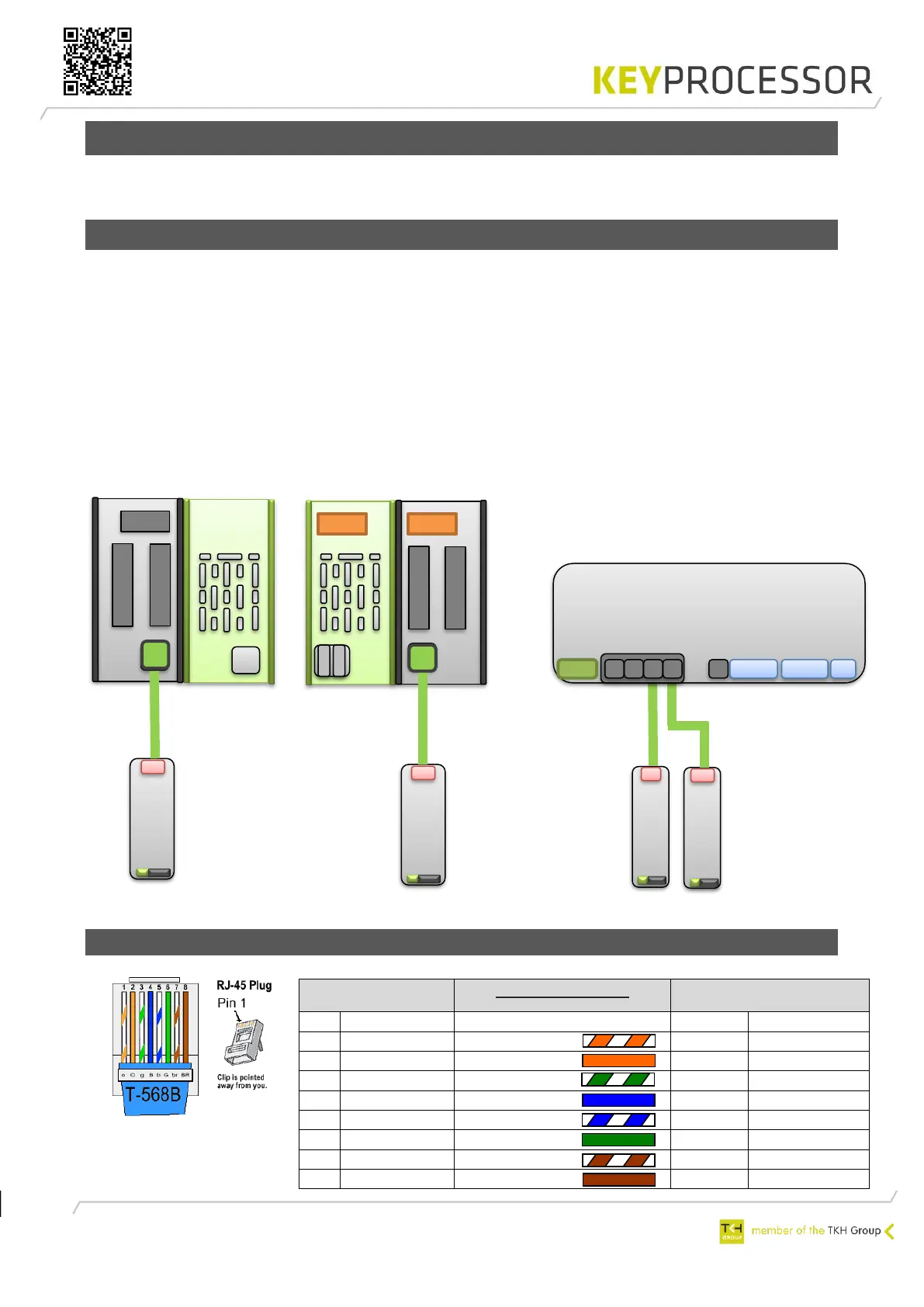
When (the maximum of) four Orions are connected to a Pluto (see figure 13), a maximum
of eight RS485 card readers can be connected.
7.2.1.1 Connection of RS485 card reader

PRT1(A)- 2(L)
TIA/EIA-568-B
Sirius i-serie
Nr.
Description
Wire color
Sticker
Description
1
B
White/Orange
2
B
2
A
Orange
1
A
3
B (Z)
White/Green
2
B
4
12Vdc
Blue
Vcc
Vcc
5
GND
White/Blue
GND
GND
6
A (Y)
Green
1
A
7
GND
White/Brown
GND
GND
8
GND
Brown
GND
GND
Polyx
1 2 3
RS485
N D
Front
Rear
RS485
N
PRT2
Orion Pluto
USB
PRT1
RS485
L
A
Max. 4x Orion
Max. 4x Orion
Figure 15: Polyx with
RS485 card reader
Figure 16: Pluto with
RS485 card reader
X

Table of Contents

Related product manuals