1.
2.
3.
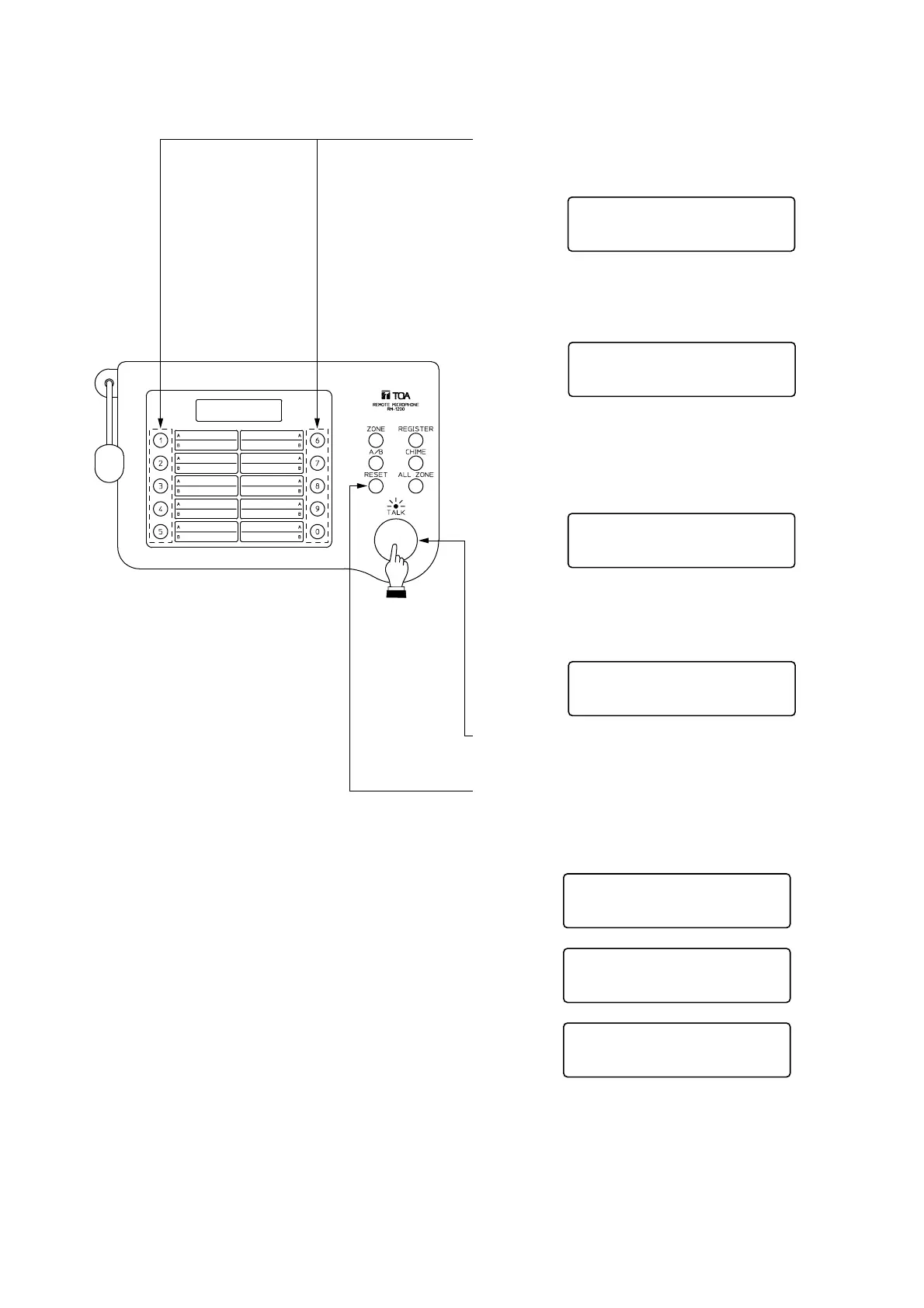
Press the [1]-[0] (numerical) key to select the
desired broadcast group (1-0).
To select multiple groups, press the
corresponding numerical keys continuously.
To cancel the entry, press the RESET key.
When selecting the group of [B], press the A/B
group selector key, and the indication [B] is
displayed at the upper right of the screen.
Then, press the [1]-[0] (numerical) key to
select the desired broadcast group (1-0).
Speak into the microphone while holding down
the TALK key. (The In-use indicator lights.)
Press the RESET key to terminate the
announcement.
B
I
nseuA
A1 ,
If the [1] key is pressed, this message appears.
I nseuA
A1 , 3 , A7 ,A
If the [3] and [7] keys are pressed continuously,
this message appears.
I nseuB
B2 , 3 ,B
If the [2] and [3] keys are pressed continuously,
this message appears.
In seuA
A1 , 3 , A7 ,A
In
seuB
A1 , 3 , A7 ,A
In
seuB
A1 , 3 , A7 , B2 , B3A,
[Simultaneous broadcast to both groups A and B]
1. Press the [1]-[0] (numerical) key to select the desired
broadcast group (1-0) of A.
2. Press the A/B group selector key and confirm that the
indication B is displayed at the upper right of the screen.
Press the numerical key to select the group of B.
3. Speak into the microphone while holding down the TALK key. (The In-use indicator lights.)
4. Press the RESET key to terminate the announcement.
Note
When [1. 10] is selected in the setting of "8.3. Usable Group Numbers" (p. 14), the indication A appears even
if the A/B key is pressed. Broadcast can be made only to the group (1-0) of A.


 To Next Page