4
2. GENERAL DESCRIPTION
The conference system can be easily installed by merely connecting the center amplifier (TS-700) to the
conference units (TS-701 chairman unit and TS-702 delegate unit) using the supplied cable. It can be put
away quickly after the conference is finished.
3. FEATURES
• Speech can be amplified by simply connecting the center amplifier to the conference units using the supplied
cables.
• Up to 70 conference units can be connected. (35 units per line x 2 lines)
• The conference unit's microphone is detachable, and storage space can be saved.
• The number of simultaneously-usable delegate units can be limited to avoid unnecessary confusion.
• Wiring can be performed cleanly thanks to TOA's unique wiring method.
• Delegate unit microphones can be made to turn off automatically if a speaker forgets to turn off the
microphone after use.
• The contents of the conference can be recorded using the AR-71B alternate recording machine (optional).
• The center amplifier functions as an expansion amplifier as well. Up to two expansion amplifiers can be
connected per system, and up to 140 conference units connected.
4. NOMENCLATURE
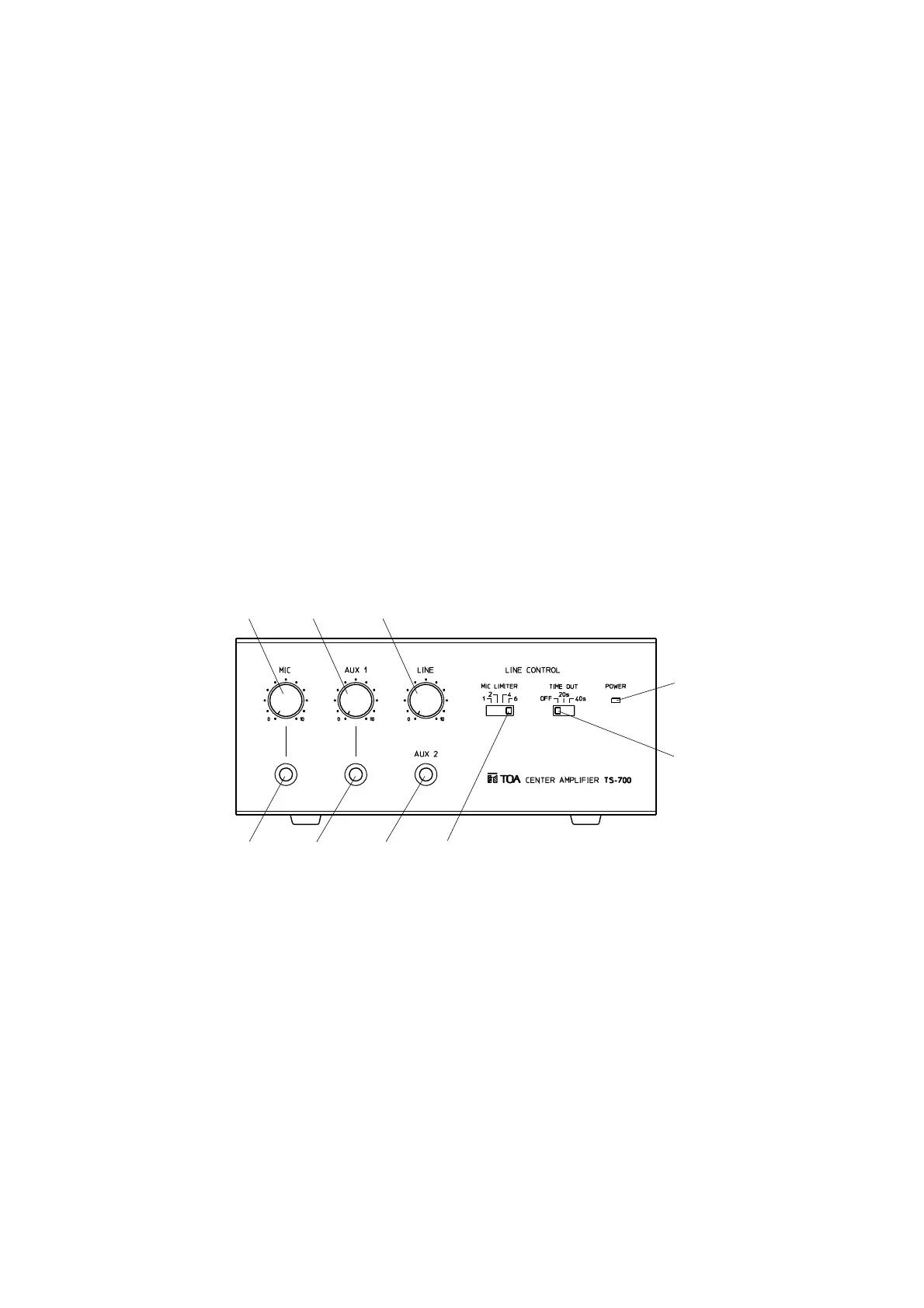
4.1. Center Amplifier TS-700
[Front panel]
① Microphone volume control [MIC]
Adjusts the volume of the microphone connected
to the microphone input jack.
② AUX1 volume control [AUX1]
Adjusts the volume of equipment connected to
AUX1 input jack.
③ Line volume control [LINE]
Adjusts the volume of the conference unit's built-in
speaker.
④ Power indicator lamp
Lights when the power switch on the rear panel is
set to ON.
⑤ Automatic mic-off setting switch [TIME OUT]
Automatically turns off the conference unit's
microphone after speaking.
⑥ Speaker restriction switch [MIC LIMITER]
Sets the number of delegate units that can be
used simultaneously.
⑦ AUX2 input jack [AUX2]
Connects to a CD or cassette deck. (Adjust the
volume at the connected equipment.)
⑧ AUX1 input jack [AUX1]
Connects to a CD or cassette deck.
⑨ Mic input jack [MIC]
Connects to a microphone.



 To Next Page