EasyManua.ls Logo

Topcom BUTLER E600 TWIN - Installing the Charger; Keys and Icons; Keys and LEDs

Topcom BUTLER E600 TWIN
188 pages
Print Icon
To Next Page IconTo Next Page
To Previous Page IconTo Previous Page
Loading...
English
19
Getting started
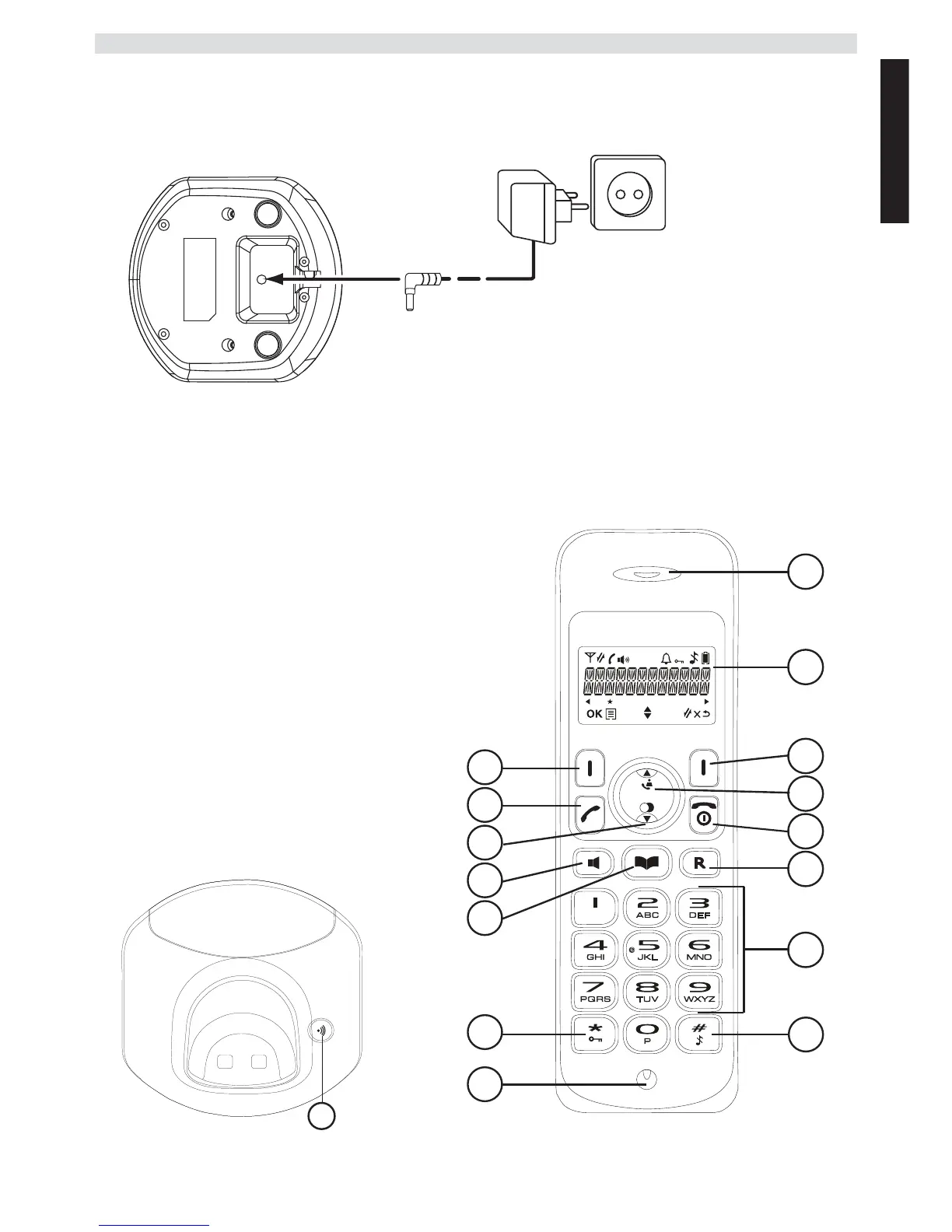
1.3 Installing the charger (Only for Butler E600 Twin/Triple/Quattro)
Plug one end of the adaptor in the power outlet and the other end into the adaptor jack at the bottom
of the charger.
1.4 Keys / LED’s
Handset
1. Earpiece speaker
2. Display
3. Right menu key
4. Up / call log key
5. Power on-off / on-hook key
6. Flash key
7. Alphanumeric keys
8. Ringer on-off
9. Microphone
10. Keypad lock key
11. Phonebook key
12. Handsfree key
13. Down / redial key
14. Off-hook key
15. Left menu key
Base
16. Paging key
A
- 1C Charger -
A. Adaptor with power cable
1
3
4
5
6
7
2
8
11
10
9
12
13
14
15
- 1D Handset -
16
- 1E Base -

Table of Contents

Other manuals for Topcom BUTLER E600 TWIN

Related product manuals