EasyManua.ls Logo

Topens RK990 - User Manual

Topens RK990
22 pages
Print Icon
To Next Page IconTo Next Page
Loading...
Sliding Gate Opener
User’s Manual
Model:
TOPENS Website
www.topens.com
Email: support@topens.com
VER 21b
RK990(T)
Please read and follow all warnings,
precautions and instructions before
installation and use.
Periodic checks of the opener are required to ensure safe operation.
Save this manual.
C030421

Questions and Answers

  • P
    Patricia WhiteJul 27, 2025
    Why is my Topens Gate Opener remote control not working?
    • L
      lleJul 27, 2025
      If your Topens Gate Opener remote control isn't working, first check the battery by observing the indicator light. Replace the battery if needed. If that doesn't solve the issue, try using the remote closer to the opener. Also, ensure the remote is correctly programmed for the receiver; if unsure, erase and reprogram the remote control codes. If problems persist, the control board may need to be checked and possibly replaced.
  • K
    Kenneth PetersonAug 1, 2025
    Why Topens RK990 does not run but the Power LED is ON?
    • J
      Jonathan DuffyAug 1, 2025
      If your Topens Gate Opener does not run and the Power LED is ON, several factors could be at play. Ensure the remote control has been properly programmed to the control board. If the opener has been working for a long time, the thermal protector may be active due to high temperature; wait about 20 minutes for the motor to cool down. Also, verify the installation position of the magnets, as the opener won't run if both limit switches are activated by one magnet. Check the limit switch by removing the wire connection connected to the 9#, 10#, and 11# terminals of the control board and try again. If the motor runs in both directions after this, replace the limit switch. As a last resort, check the control board and replace it if necessary.
  • C
    Caitlin BrownAug 4, 2025
    How to fix a Topens RK990 Gate Opener when it doesn't run and the Power LED is OFF?
    • J
      Jamie MullinsAug 5, 2025
      If your Topens Gate Opener does not run and the Power LED is OFF, start by checking the input voltage of the control board to ensure it matches your local AC electricity. Then, make sure the power switch is turned ON. If it still doesn't work, inspect the fuse in the control board and replace it if it's burnt out. If none of these steps work, the control board may need to be replaced.
  • J
    John DuranAug 9, 2025
    What to do if Topens Gate Opener opens, but stops and will not return?
    • L
      Louis BaileyAug 9, 2025
      If your Topens Gate Opener opens but then stops and won't return, check the position of the magnets to make sure both limit switches aren't being activated by a single magnet. Also, inspect the limit switch by disconnecting the wire connections from terminals 9#, 10#, and 11# on the control board and testing again. Replace the limit switch if the motor then operates in both directions. If these steps don't resolve the issue, the control board might need to be checked and replaced.
  • T
    trivasAug 13, 2025
    What to do if Topens RK990 starts but immediately stops or reverses?
    • M
      Michelle HughesAug 14, 2025
      If your Topens Gate Opener starts but immediately stops or reverses, it could be due to a few reasons. First, the opening or closing force might be set too low. Try adjusting Potentiometer A&B to increase the force. Also, disconnect the gate from the opener to ensure it slides freely without any obstructions. If the issue continues, the control board might need to be checked and replaced if necessary.
  • J
    Jacqueline LeeAug 17, 2025
    Why Topens Gate Opener can open, but fails to close?
    • G
      Grant MezaAug 18, 2025
      If your Topens Gate Opener can open but won't close, the photocell might be obstructed. Remove any obstructions. You should also check the limit switch by removing the wire connection of the limit switch which is connected to the 9#, 10#, and 11# terminals of the control board and then try it again. Replace the limit switch if the motor could run in both directions. If problems persist, the control board may need to be replaced.
  • A
    Alison LaraAug 22, 2025
    What to do if Topens RK990 motor runs but the gate doesn’t move?
    • A
      Albert CarterAug 22, 2025
      If the motor of your Topens Gate Opener runs but the gate doesn’t move, ensure that the clutch for emergency release is properly adjusted and not slipping.

Summary

Contact Us

Customer Support Details

Provides email address and phone number for technical assistance and inquiries.

Pre-Installation Checks

General Safety Precautions

Crucial safety warnings and precautions for installation and use.

Installation Preparation

Gate Structure Requirements

Details on gate linearity, smoothness, strength, and proper mounting.

Gate Opener Components

Standard Parts List

Lists all parts included in the gate opener package.

Optional Accessories List

Lists optional accessories available for purchase separately.

Technical Specifications

Product Features Overview

Highlights key operational features like midway mode and auto-closing.

Replacement Parts Identification

Lists available replacement components for the opener.

Installation Guide

Installation Overview and Tools

Visual guide showing component placement and necessary tools for installation.

Opener Installation Steps

Step-by-step instructions for physically installing the gate opener unit.

Operation and Rack Fitting

Manual Operation Procedure

Procedure for disengaging the motor for manual gate movement.

Fitting the Gate Rack

Instructions for attaching the gate rack to the opener's gear.

Limit Switches and Power

Limit Switch Magnet Installation

Guides on positioning magnets for open/close limit switch activation.

Power Supply Connection

Instructions for safely connecting the gate opener to the main power source.

Control Board Wiring

Control Board Connection Diagram

Detailed wiring diagram for connecting components to the control board.

Control Board Configuration

Control Board Settings Overview

Explains how to adjust control board settings for gate operation.

Component Wiring Details

Specific wiring instructions for motor, switches, sensors, and accessories.

DIP Switch Functions

Midway Mode and Auto-Close Settings

Configures midway mode, auto-close timers, and open/close direction.

Remote and Force Settings

Potentiometer Force Adjustment

Adjusting OPEN and CLOSE stall force using potentiometers.

Remote Control Programming

Step-by-step guide to pair and remove remote controls.

Advanced Operation

Remote Control Usage

Explains the function of each button on the remote control.

Keypad Programming and Security

Instructions for programming and setting passwords for the wireless keypad.

Troubleshooting Issues

Opener Not Running or Responding

Solutions for when the opener does not run or power LED is off/on.

Gate Movement and Remote Problems

Solutions for remote control issues and gate stopping/reversing.

Maintenance and Troubleshooting

Gate Operation Faults

Solutions for when the gate opens but fails to close or doesn't move.

Routine Maintenance Tasks

Recommended periodic checks and lubrication for proper unit operation.

Overview

The TOPENS RK990(T) is a sliding gate opener designed for automating the opening and closing of sliding gates. This user-friendly device is engineered for ease of installation and minimal maintenance, making it a practical solution for enhancing property access and security. The opener is built to handle various gate sizes and weights, providing reliable operation for residential and light commercial applications.

Function Description

The primary function of the TOPENS RK990(T) is to automate the movement of a sliding gate. It operates by engaging with a rack system attached to the gate, driving it open or closed along its track. The opener is equipped with a motor that provides the necessary force to move the gate smoothly and efficiently.

Key operational features include:

  • Automatic Operation: The gate opener can be controlled via remote controls, wireless keypads, or other wired accessories, allowing for convenient and automated gate movement.
  • Midway Mode: This feature allows the gate to open to a partial width, enabling quick passage for pedestrians or smaller vehicles without fully opening the gate. This mode is particularly useful for managing traffic flow and reducing waiting times.
  • Adjustable Auto-Closing: The opener includes a built-in timer that can be set to automatically close the gate after a specified period (0, 30, 60, or 90 seconds). This enhances security by ensuring the gate does not remain open unnecessarily.
  • Safety Reversal: A crucial safety feature, the opener is designed to reverse its direction if it encounters an obstruction during the closing cycle. Similarly, it will stop if an obstruction is detected during the opening cycle, preventing potential damage or injury.
  • Electromagnetism Limit Switches: The system utilizes electromagnetism limit switches for precise control over the gate's open and close positions. These switches ensure the gate stops accurately at its intended endpoints, which are adjustable for optimal performance.
  • Emergency Release: In the event of a power failure, the opener can be manually disengaged using an emergency release key. This allows the gate to be operated by hand, ensuring access even without electrical power.
  • Maximum Motor Running Time (MRT): For enhanced safety, the opener has a maximum motor running time of 90 seconds. This feature acts as a safeguard, preventing the motor from continuously running beyond a safe duration, which could indicate a malfunction or obstruction.
  • Direction Selection: The opening and closing direction of the gate can be easily selected and adjusted, accommodating different installation configurations (left-open or right-open).

Usage Features

The TOPENS RK990(T) is designed for versatile use with a range of control options and safety enhancements:

  • Remote Control Operation: The system supports multiple remote controls, allowing users to open, close, or stop the gate from a distance. Each remote typically has four buttons, which can be programmed to control up to four different TOPENS gate openers or a combination of sliding and swing gate openers. For instance, button A might control the sliding gate, while buttons C or D could control a swing gate.
  • Wireless Keypad Integration: A wireless keypad can be programmed to operate the gate, providing a secure access method using a customizable PIN. This is ideal for family members or authorized personnel who need to enter the property without a remote control.
  • Photocell Beam System (PBS): For advanced safety, the opener can be integrated with a photocell beam system. If the infrared beam is interrupted by an obstruction (e.g., a person or vehicle) while the gate is closing, the gate will automatically reverse or stop, preventing collisions.
  • Warning Light: An optional warning light can be connected to the system, flashing during gate operation to alert pedestrians and drivers of the gate's movement.
  • Push Button Control: A wired push button can be installed for simple open-stop-close-stop-open operation, offering a direct control point near the gate.
  • Exit Wand (Vehicle Sensor): For convenient exit, an exit wand can be installed. This sensor detects vehicles approaching the gate from inside the property and automatically opens the gate, allowing for hands-free departure.
  • External Receiver Compatibility: An optional external receiver (such as the TOPENS ERM12 Universal External Receiver) can be connected to expand the number of remote controls the system can support, up to 250 pieces. This external receiver is also compatible with other brands of gate and garage door openers, offering broader integration possibilities.
  • Stall Force Adjustment: The opener features potentiometers (A and B) to adjust the OPEN and CLOSE stall forces. This allows users to fine-tune the motor's sensitivity to obstructions, ensuring optimal safety and performance. When setting the stall force to maximum, it is strongly recommended to install a photocell sensor for entrapment protection.

Maintenance Features

Regular maintenance is essential to ensure the long-term reliability and safe operation of the TOPENS RK990(T) gate opener. The manual outlines several key maintenance checks to be performed every six months:

  • Lubrication: It is important to lubricate the shafts and sprockets of the opener to ensure smooth mechanical movement and reduce wear and tear.
  • Cleanliness: Keeping the opener clean at all times helps prevent debris buildup that could interfere with its operation.
  • Anchor Bolt Inspection: Periodically check and tighten the anchor bolts that secure the opener to its concrete pad. This ensures the opener remains firmly mounted and stable.
  • Wiring Inspection: Inspect all wiring for any loose connections or corrosion. Secure or replace any compromised wires to maintain proper electrical conductivity and safety.
  • Earthing Check: Verify that the opener is properly earthed and correctly terminated. A good earth connection is critical for electrical safety.
  • Obstruction Detection Function Test: Regularly test the Stop/Reverse in case of obstruction function. This is a vital safety mechanism, and if it fails to operate correctly, the opener should be removed from service immediately until the cause of the malfunction is identified and corrected by qualified personnel.

By adhering to these maintenance guidelines, users can ensure their TOPENS RK990(T) gate opener continues to function safely and efficiently for many years. The design emphasizes user safety and operational convenience, making it a robust choice for gate automation.

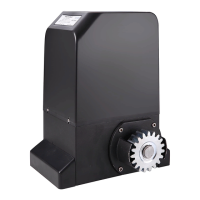
Topens RK990 Specifications

General IconGeneral
Power SupplyAC 220V/50Hz
Motor TypeDC Motor
Control MethodPush Button/Remote Control
Operating Temperature-4°F to +122°F (-20°C to +50°C)
Safety FeaturesAuto Stop
Remote Control2 Remotes Included
Warranty1 Year

Related product manuals