EasyManua.ls Logo

Topens KD702 - User Manual

Topens KD702
27 pages
Print Icon
To Next Page IconTo Next Page
Loading...
Dual Swing Gate Opener
User’s Manual
Model:
TOPENS Website
http://www.topenstool.com/
VER 20a
KD702
Please read and follow all warnings, precautions and instructions before
installation and use.
Never connect the solar panel to the control board directly to charge the battery.
Periodic checks of the opener are required to ensure safe operation.
Save this manual.
C030407
Question and Answer IconNeed help?

Do you have a question about the Topens KD702 and is the answer not in the manual?

Summary

Safety Installation Information

Intended Use and Hazard Awareness

Specifies gate opener use for Class I vehicular gates and awareness of potential hazards.

Gate Installation and Clearance

Covers gate installation, clearance for entrapment reduction, and pedestrian access.

Safety Features and Control Placement

Discusses safety sensors, control accessibility, and warning placards.

KD702 Parts List

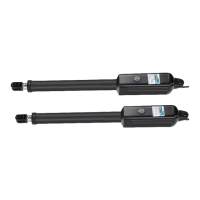
Gate Opener Actuators and PSO Parts

Lists the main gate opener actuators and PSO parts.

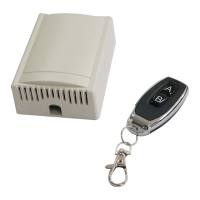
Control Box and Remote Control

Details the control box and remote control components.

Brackets and Warning Signs

Shows post brackets, gate brackets, and warning signs.

Accessories and Tools

Included Accessories

Lists accessories supplied with the gate opener.

Optional Accessories

Lists optional accessories available for purchase.

Required Tools

Lists the tools necessary for installation.

Technical Specifications & Features

Gate Opener Specifications

Details model, input voltage, power, current, speed, travel, and temperature.

Gate Capacity Table

Provides a table showing gate opener capacity based on weight and length.

Key Operational Features

Lists operational features like soft start, emergency release, and auto-close.

Installation Overview

System Diagram

Illustrates the placement of openers, control box, solar components, and accessories.

Cable Protection Note

Provides an important note on protecting the second gate opener cable with conduit.

Preparation for Installation

Installation Type: Pull-to-Open vs Push-to-Open

Explains the two installation types and the need for PSO parts.

Post Bracket Mounting Guidelines

Details mounting post brackets to wooden or concrete posts and stability considerations.

Pull-to-Open Mounting Angles

Provides a table for determining post bracket position for opening angle.

Push-to-Open Installation Steps

Mounting Post and Gate Brackets

Details attaching brackets using bolts, washers, and nuts.

Release Key Operation

Explains using the release key to manually move the actuator rod.

Temporary Bracket Securing

Describes using C-clamps to temporarily secure brackets during alignment.

Gate Opener Installation Checks

Clearance and Binding Checks

Ensures 2.5cm clearance and no binding between opener and brackets.

Pull-to-Open Final Securing

Securing the post pivot bracket with an M8x30 bolt after clearance is set.

Push-to-Open Final Installation

Marking and Drilling for Brackets

Marking and drilling holes for post and gate brackets.

Attaching Post and Gate Brackets

Securing post brackets with M10 bolts and gate brackets with M10x75 bolts.

Securing Gate Opener with Clevis Pins

Connecting the opener to brackets using clevis pins and hairpin clips.

Mounting the Control Box

Control Box Mounting Location

Recommends secure surface, 100cm above ground for safety and longevity.

Connecting Gate Opener Cables

Routing cables through strain relief and into the control box.

Connecting Power and Control Board

Power Supply Connection

Details connecting Live and Neutral lines to the control board terminals.

Motor Wiring for Pull-to-Open

Specifies wire connections for Motor 1 and Motor 2 in Pull-to-Open mode.

Connecting System Components

Motor Wiring for Push-to-Open

Details motor wire connections for Push-to-Open mode.

Wiring for Optional Accessories

Covers connections for warning light, battery, photocell, push button, and keypad.

Remote and Keypad Operation

Programming and Erasing Remotes

Instructions for programming, erasing, and managing remote controls.

Operating the Gate with Remote

Explains how to use the remote buttons to operate the gate opener.

Wireless Keypad Setup

Guides on programming and changing passwords for the wireless keypad.

Setting of the Control Board

Single;Dual Gate Set

Configures the system for single or dual gate operation.

Master;Slave Gate Set

Designates one gate opener as master and the other as slave.

Open Interval Setting

Sets the time delay between master and slave gate opening.

Control Board Settings (Continued)

Close Interval Setting

Sets the time delay between master and slave gate closing.

Obstruction Sensitivity;Stall Force Adjustment

Configures sensitivity to obstructions and stall force for gate openers.

Advanced Control Board Settings

Max Motor Running Time (MRT)

Sets the maximum time the motor runs per cycle.

Safety Photocell Beam System (PBS)

Enables or disables the photocell safety system.

Automatic Closing Time

Configures the time delay before the gate automatically closes.

Soft Start and Fast Running Periods

Adjusts soft start and fast running periods for smooth operation.

Final Control Board Settings and Limit Switches

Return to Factory Settings

Resets all settings to factory defaults.

Digital Display Indicators

Explains the meaning of indicators on the digital display.

Adjusting Limit Switches

Guides on setting limit switches for gate open and closed positions.

How to Operate the Gate Opener

Gate Operation with Remote

Describes operating the gate using the remote control for opening and closing.

Gate Behavior During Operation

Explains how the gate stops, reverses, or continues based on commands and obstructions.

Maintenance and Care

Cleaning and Lubrication

Instructions for cleaning the shaft and applying silicone spray.

Regular Checks and Adjustments

Advises checking hinges, hardware, and the surrounding area.

Trouble Shooting Guide

Opener Issues: No Power or No Run

Addresses power, transformer, fuse, and cable checks.

Gate Movement Problems

Solves issues related to gate weight, installation, and immediate stops.

Trouble Shooting (Continued)

Gate Opens But Does Not Close

Solves problems with PBS function, photo eyes, and limit switches.

Limit Switch Issues

Addresses problems with shorted wires or faulty limit switches.

Unintended Gate Movement

Resolves gates opening, closing, or stopping unexpectedly.

Quick-Setting Guide

Single;Dual Gate and Master;Slave Setup

Guides setting up gate modes and master/slave configuration.

Interval and Stall Force Settings

Covers setting open/close intervals and obstruction force levels.

MRT and Photocell Settings

Details setting motor run time and photocell functionality.

Quick-Setting Guide (Continued)

Automatic Closing and Soft Start Setup

Configures auto-close timers and soft start periods.

Fast Running Period Adjustment

Adjusts the fast running period for soft stop functionality.

Quick-Setting Guide Finalization

Factory Reset and Standby Mode

Resets settings to factory defaults and enters standby mode.

User Maintenance Notice

Recommends regular silicone spray for actuator shafts.

Contact and Support Information

WEEE Directive Information

Provides information on the disposal of electrical and electronic equipment.

TOPENS Support Channels

Lists contact methods including email and phone for inquiries.

Summary

Safety Installation Information

Intended Use and Hazard Awareness

Specifies gate opener use for Class I vehicular gates and awareness of potential hazards.

Gate Installation and Clearance

Covers gate installation, clearance for entrapment reduction, and pedestrian access.

Safety Features and Control Placement

Discusses safety sensors, control accessibility, and warning placards.

KD702 Parts List

Gate Opener Actuators and PSO Parts

Lists the main gate opener actuators and PSO parts.

Control Box and Remote Control

Details the control box and remote control components.

Brackets and Warning Signs

Shows post brackets, gate brackets, and warning signs.

Accessories and Tools

Included Accessories

Lists accessories supplied with the gate opener.

Optional Accessories

Lists optional accessories available for purchase.

Required Tools

Lists the tools necessary for installation.

Technical Specifications & Features

Gate Opener Specifications

Details model, input voltage, power, current, speed, travel, and temperature.

Gate Capacity Table

Provides a table showing gate opener capacity based on weight and length.

Key Operational Features

Lists operational features like soft start, emergency release, and auto-close.

Installation Overview

System Diagram

Illustrates the placement of openers, control box, solar components, and accessories.

Cable Protection Note

Provides an important note on protecting the second gate opener cable with conduit.

Preparation for Installation

Installation Type: Pull-to-Open vs Push-to-Open

Explains the two installation types and the need for PSO parts.

Post Bracket Mounting Guidelines

Details mounting post brackets to wooden or concrete posts and stability considerations.

Pull-to-Open Mounting Angles

Provides a table for determining post bracket position for opening angle.

Push-to-Open Installation Steps

Mounting Post and Gate Brackets

Details attaching brackets using bolts, washers, and nuts.

Release Key Operation

Explains using the release key to manually move the actuator rod.

Temporary Bracket Securing

Describes using C-clamps to temporarily secure brackets during alignment.

Gate Opener Installation Checks

Clearance and Binding Checks

Ensures 2.5cm clearance and no binding between opener and brackets.

Pull-to-Open Final Securing

Securing the post pivot bracket with an M8x30 bolt after clearance is set.

Push-to-Open Final Installation

Marking and Drilling for Brackets

Marking and drilling holes for post and gate brackets.

Attaching Post and Gate Brackets

Securing post brackets with M10 bolts and gate brackets with M10x75 bolts.

Securing Gate Opener with Clevis Pins

Connecting the opener to brackets using clevis pins and hairpin clips.

Mounting the Control Box

Control Box Mounting Location

Recommends secure surface, 100cm above ground for safety and longevity.

Connecting Gate Opener Cables

Routing cables through strain relief and into the control box.

Connecting Power and Control Board

Power Supply Connection

Details connecting Live and Neutral lines to the control board terminals.

Motor Wiring for Pull-to-Open

Specifies wire connections for Motor 1 and Motor 2 in Pull-to-Open mode.

Connecting System Components

Motor Wiring for Push-to-Open

Details motor wire connections for Push-to-Open mode.

Wiring for Optional Accessories

Covers connections for warning light, battery, photocell, push button, and keypad.

Remote and Keypad Operation

Programming and Erasing Remotes

Instructions for programming, erasing, and managing remote controls.

Operating the Gate with Remote

Explains how to use the remote buttons to operate the gate opener.

Wireless Keypad Setup

Guides on programming and changing passwords for the wireless keypad.

Setting of the Control Board

Single;Dual Gate Set

Configures the system for single or dual gate operation.

Master;Slave Gate Set

Designates one gate opener as master and the other as slave.

Open Interval Setting

Sets the time delay between master and slave gate opening.

Control Board Settings (Continued)

Close Interval Setting

Sets the time delay between master and slave gate closing.

Obstruction Sensitivity;Stall Force Adjustment

Configures sensitivity to obstructions and stall force for gate openers.

Advanced Control Board Settings

Max Motor Running Time (MRT)

Sets the maximum time the motor runs per cycle.

Safety Photocell Beam System (PBS)

Enables or disables the photocell safety system.

Automatic Closing Time

Configures the time delay before the gate automatically closes.

Soft Start and Fast Running Periods

Adjusts soft start and fast running periods for smooth operation.

Final Control Board Settings and Limit Switches

Return to Factory Settings

Resets all settings to factory defaults.

Digital Display Indicators

Explains the meaning of indicators on the digital display.

Adjusting Limit Switches

Guides on setting limit switches for gate open and closed positions.

How to Operate the Gate Opener

Gate Operation with Remote

Describes operating the gate using the remote control for opening and closing.

Gate Behavior During Operation

Explains how the gate stops, reverses, or continues based on commands and obstructions.

Maintenance and Care

Cleaning and Lubrication

Instructions for cleaning the shaft and applying silicone spray.

Regular Checks and Adjustments

Advises checking hinges, hardware, and the surrounding area.

Trouble Shooting Guide

Opener Issues: No Power or No Run

Addresses power, transformer, fuse, and cable checks.

Gate Movement Problems

Solves issues related to gate weight, installation, and immediate stops.

Trouble Shooting (Continued)

Gate Opens But Does Not Close

Solves problems with PBS function, photo eyes, and limit switches.

Limit Switch Issues

Addresses problems with shorted wires or faulty limit switches.

Unintended Gate Movement

Resolves gates opening, closing, or stopping unexpectedly.

Quick-Setting Guide

Single;Dual Gate and Master;Slave Setup

Guides setting up gate modes and master/slave configuration.

Interval and Stall Force Settings

Covers setting open/close intervals and obstruction force levels.

MRT and Photocell Settings

Details setting motor run time and photocell functionality.

Quick-Setting Guide (Continued)

Automatic Closing and Soft Start Setup

Configures auto-close timers and soft start periods.

Fast Running Period Adjustment

Adjusts the fast running period for soft stop functionality.

Quick-Setting Guide Finalization

Factory Reset and Standby Mode

Resets settings to factory defaults and enters standby mode.

User Maintenance Notice

Recommends regular silicone spray for actuator shafts.

Contact and Support Information

WEEE Directive Information

Provides information on the disposal of electrical and electronic equipment.

TOPENS Support Channels

Lists contact methods including email and phone for inquiries.

Overview

This document is a user's manual for the TOPENS KD702 Dual Swing Gate Opener, providing comprehensive instructions for its installation, operation, and maintenance. The manual emphasizes safety precautions and offers detailed guidance to ensure proper setup and long-term functionality of the gate opener.

The primary function of the TOPENS KD702 is to automate the opening and closing of dual swing gates. It is designed for vehicular swing gates classified as Class I, meaning gates associated with dwellings, garages, or parking areas. The system allows for both "Pull-to-Open" and "Push-to-Open" installations, with specific instructions and components required for each type. The opener is equipped with features that enhance convenience and safety, making it suitable for residential and light commercial applications.

Key usage features of the KD702 gate opener include:

  • Soft Start and Soft Stop: This functionality ensures a smooth and gradual acceleration and deceleration of the gate, reducing wear and tear on the motor and gate hardware, and contributing to quieter operation.
  • Emergency Release Key: In the event of a power failure, an emergency release key is provided, allowing manual operation of the gate. This is a critical safety and convenience feature, ensuring access even without electricity.
  • Dual/Single Gate Running Mode: The opener supports both dual gate operation (two gate leaves moving simultaneously or with a set interval) and single gate operation, offering flexibility based on the gate configuration.
  • Adjustable Opening/Closing Interval: Users can set a specific time interval between the master and slave gates during opening and closing cycles. This allows for customized operation to prevent collision or accommodate specific access needs.
  • Obstruction Sensing: The system is designed to detect obstructions during gate movement. If an obstruction is encountered during opening, the gate will stop. If an obstruction is detected during closing, the gate will reverse direction, enhancing safety and preventing damage to the gate or objects.
  • Adjustable Auto-Close: The opener has a built-in adjustable auto-close function, allowing users to set a delay (from 0 to 99 seconds) after which the gate will automatically close. Setting the delay to "00" disables this feature.
  • Maximum Motor Running Time (MRT): This feature allows users to set a maximum running time for the motor, providing an additional layer of safety by preventing continuous operation beyond a specified period, even if limit switches fail.
  • Digital Display: A digital display on the control board indicates the current running situation and provides a menu for settings adjustments, simplifying configuration and troubleshooting.
  • Electromagnetism Limit: The system incorporates reliable electromagnetism limits for easy adjustment, which helps in precisely defining the gate's open and closed positions.
  • Accessory Compatibility: The KD702 can be equipped with a wide range of optional accessories, such as warning lights, photo eye beam sensors, wireless keypads, wired keypads, external receivers, and smartphone remote controls, to enhance functionality and security.
  • Easy Installation and Minimum Maintenance: The manual emphasizes that the opener is designed for straightforward installation and requires minimal maintenance, making it user-friendly.

The installation process involves several steps, starting with preparation, which includes determining the appropriate installation type (Pull-to-Open or Push-to-Open) and ensuring the gate does not open into public areas. Detailed instructions are provided for mounting the gate opener actuators to the gate and posts, including the use of Post Brackets and Gate Brackets. The manual includes tables and illustrations to help determine the proper mounting positions based on gate dimensions and desired opening angles. It also highlights the importance of ensuring a minimum clearance between the gate and the opener to prevent binding.

Mounting the control box is another crucial step, with recommendations to install it in a secure, well-ventilated, and protected location, at least 100 cm (40 inches) above the ground to avoid environmental damage. The manual provides clear guidance on connecting the power supply and the motor wires to the control board, specifying different wiring configurations for "Pull-to-Open" and "Push-to-Open" installations. It also details the connection of various optional accessories like warning lights, photocell beam systems, push buttons, external receivers, and wired keypads.

Programming the remote controls is a straightforward process, allowing users to program up to 8 remotes directly to the opener, or up to 250 remotes with an optional external receiver. The manual also explains how to erase all remote codes for security purposes. Instructions for programming wireless keypads are also provided, including how to set and change the password.

The control board settings offer extensive customization options:

  • Single/Dual Gate Setting: Users can configure the system for single or dual gate operation.
  • Master/Slave Gate Setting: For dual gates, one gate can be designated as the master and the other as the slave, influencing their operational sequence.
  • Open Interval Setting: The time delay between the opening of the master and slave gates can be adjusted.
  • Close Interval Setting: Similarly, the time delay between the closing of the master and slave gates can be set.
  • Obstruction Sensitivity/Stall Force Adjustment: This critical safety feature allows users to adjust the force level at which the gate opener will detect an obstruction and reverse or stop. The manual provides a warning about the importance of proper adjustment to prevent injury and ensure the safety reversal system functions correctly.
  • Max Motor Running Time (MRT) Adjustment: The maximum duration for which each motor can run can be set, acting as a failsafe.
  • Safety Photocell Beam System (PBS) Setting: The PBS function can be enabled or disabled. If enabled, the gate opener will not operate until the PBS system is equipped, and it will return to its open position if the beam is obstructed during closing.
  • Automatic Closing Time Setting: The auto-close delay can be configured from 1 to 99 seconds, or disabled.
  • Period of Soft Start Setting: The duration of the soft start phase can be adjusted.
  • Fast Running Period (FRP) to Achieve Soft Stop Function (SPP): This setting allows for adjustment of the fast running period, which indirectly controls the soft stop duration.

Maintenance features are outlined to ensure the longevity and safe operation of the gate opener:

  • Regular Cleaning and Lubrication: Users are advised to regularly wipe the gate opener shaft with a clean, dry cloth and apply silicone spray to reduce friction, especially in cold climates to prevent freeze-up.
  • Hinge Checks: Periodic checks of gate hinges are recommended to ensure smooth and free swinging, with lubrication as needed.
  • Hardware and Post Checks: The installation hardware and posts should be checked periodically for shifts, and brackets or hardware tightened as necessary.
  • Clearance Maintenance: The area around the gate should be kept free of objects that could obstruct the gate's movement.
  • Professional Inspection: It is suggested that inspections and service be performed by a qualified professional if any malfunction is observed or suspected.
  • Voltage Verification: Using a digital voltmeter, users should verify that the incoming voltage to the opener is within ten percent of its rating.
  • Gate Force and Sensitivity Adjustments: Instructions are provided on how to check and adjust the gate force and sensitivity settings.

Troubleshooting guidance is also included to address common issues such as the opener not running, powering up but not moving, or stopping immediately after starting. These sections provide practical steps to diagnose and resolve problems, including checking power connections, motor cables, gate hinges, and safety devices. The manual emphasizes the importance of ensuring correct wiring for "PULL TO OPEN" or "PUSH TO OPEN" installations if the gate opens, closes, or stops on its own. It also addresses issues related to the gate ignoring limit switches, advising checks on wiring and replacement of faulty switches.

Topens KD702 Specifications

General IconGeneral
Protection LevelIP44
Motor TypeDC 24V
Control MethodRemote control, push button, keypad
Operating Temperature-4°F to +122°F (-20°C to +50°C)
Operating Voltage24V DC
Remote Control Range30 m
Opening Speed12 seconds
Safety FeaturesObstacle detection
Power SupplyAC 110V or AC 220V
Max Gate Weight660 lbs (300 kg)
Max Gate Length12 ft (3.66 m)

Related product manuals