2 Setup
2.5 Switching on for the first time 13
NOTE
You cannot view high definition video by means of the Com-
posite video output.
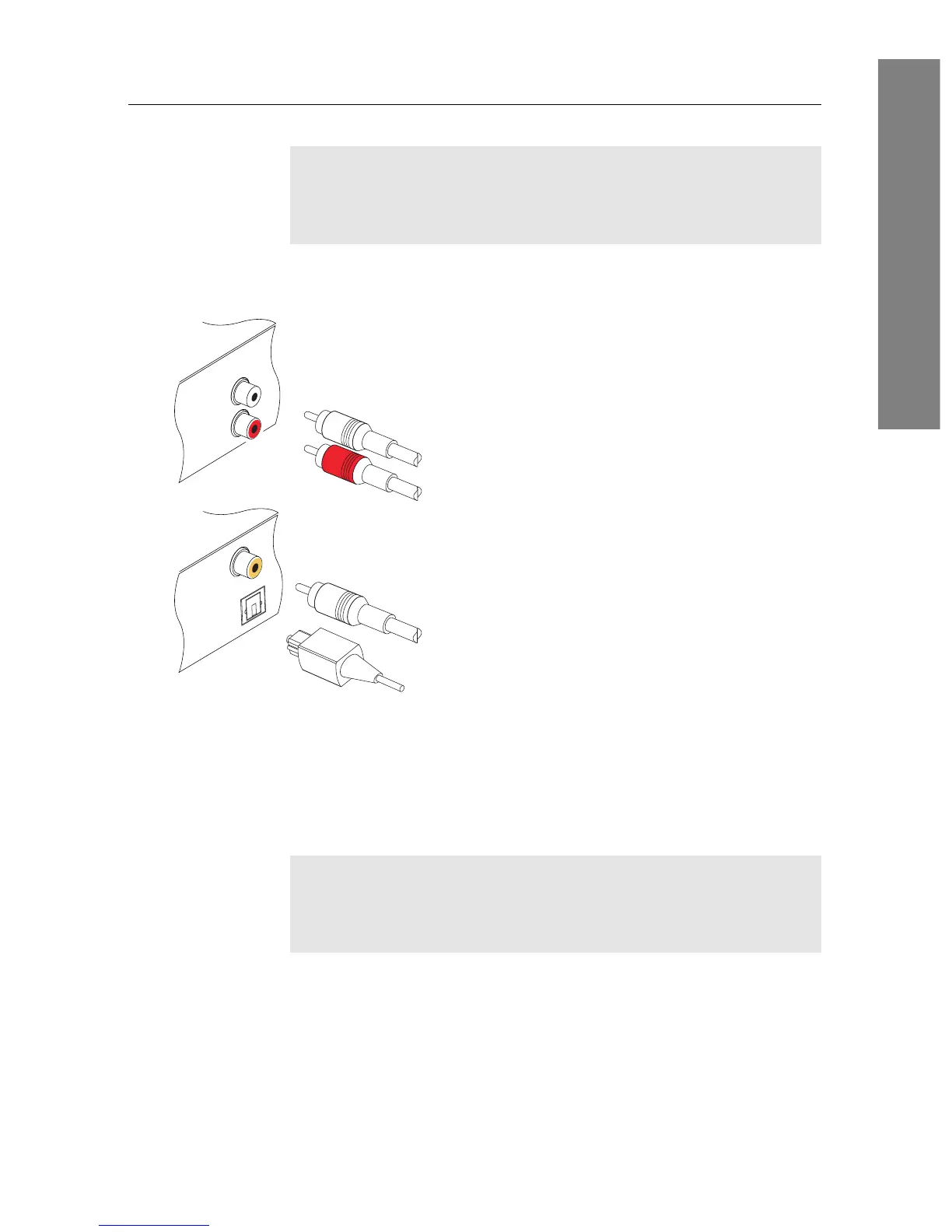
To make the audio connection
You need to obtain an audio cable (RCA ca-
ble) to link the audio connectors. Plug one
ends of the cable into the AUDIO L (white)
and AUDIO R (red) sockets on the digi-
tal receiver, and plug the other ends into
the matching sockets on your television or
audio-video receiver.
To enjoy Dolby Digital audio, your television
or audio-video receiver must be able to de-
code Dolby Digital audio, and you need to
obtain an S/PDIF cable.
If you want to use the COAXIAL connec-
tor, prepare a coaxial S/PDIF cable (RCA ca-
ble); otherwise to use the OPTICAL connec-
tor, prepare an optical S/PDIF cable. Plug
one end of the cable into the S/PDIF socket
on the digital receiver, and plug the other end
into the matching socket on your audio-video
receiver.
NOTE
Enable Dolby Digital output by changing the audio setting
to bitstream. See §4.1.3 for more details.
2.5 Switching on for the first time
Now that you have your digital receiver connected, you should
plug it into a wall socket. Ensure that your television set is















 To Next Page