OPERATION MANUAL
44
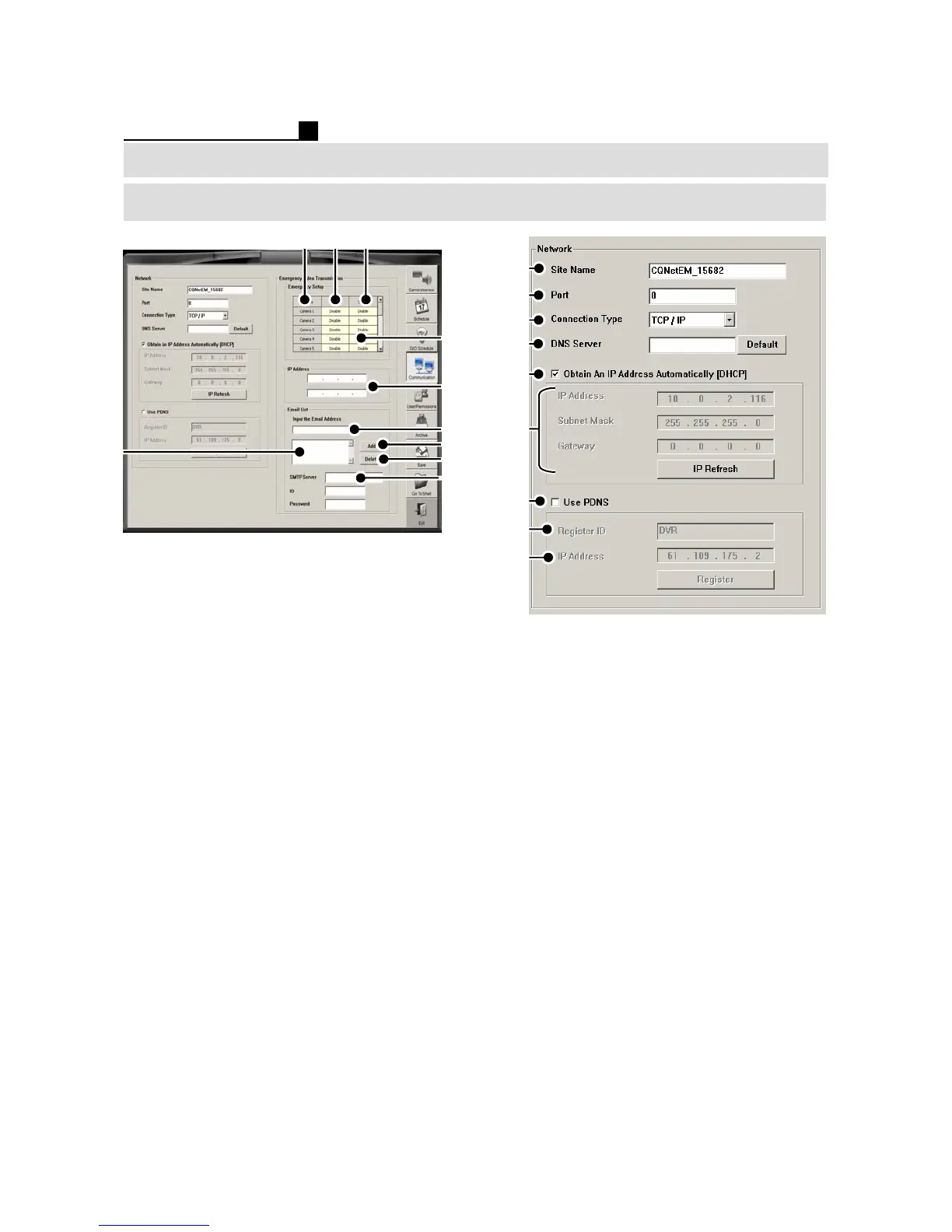
SETUP (TOPS SERIES)
① Camera No.
② Motion for Network Transmission
③ Sensor for Network Transmission
④ Set Transmission (Enable/Disable)
⑤ IP Address -Type IP address of PC to
have transmission
⑥ E-mail Address –Type E-mail address
to have transmission
⑦ Add E-mail Address
⑧ E-mail List Window
⑨ Delete the list
⑩ SMTP Server
Note:
Emergency program must be installed at
the PC to receive the transmission
①
②
⑥
③
⑤
④
⑦
⑧
⑨
①Site Name
② Port No. (0 is default)
③ Network Connection Type
④DNS Server
⑤ DHCP ON/OFF
⑥ IP Setting
⑦ PDNS ON/OFF
⑧ Type the DVR ID for PDNS recognition
⑨ PDNS Server IP Address
Note:
We recommend to use the default IP
address 61.109.175.2 that TOPS
provides.
⑧
①②③
⑥
⑦
④
⑩
⑤
⑨
Network



 To Next Page