OPERATION MANUAL
45
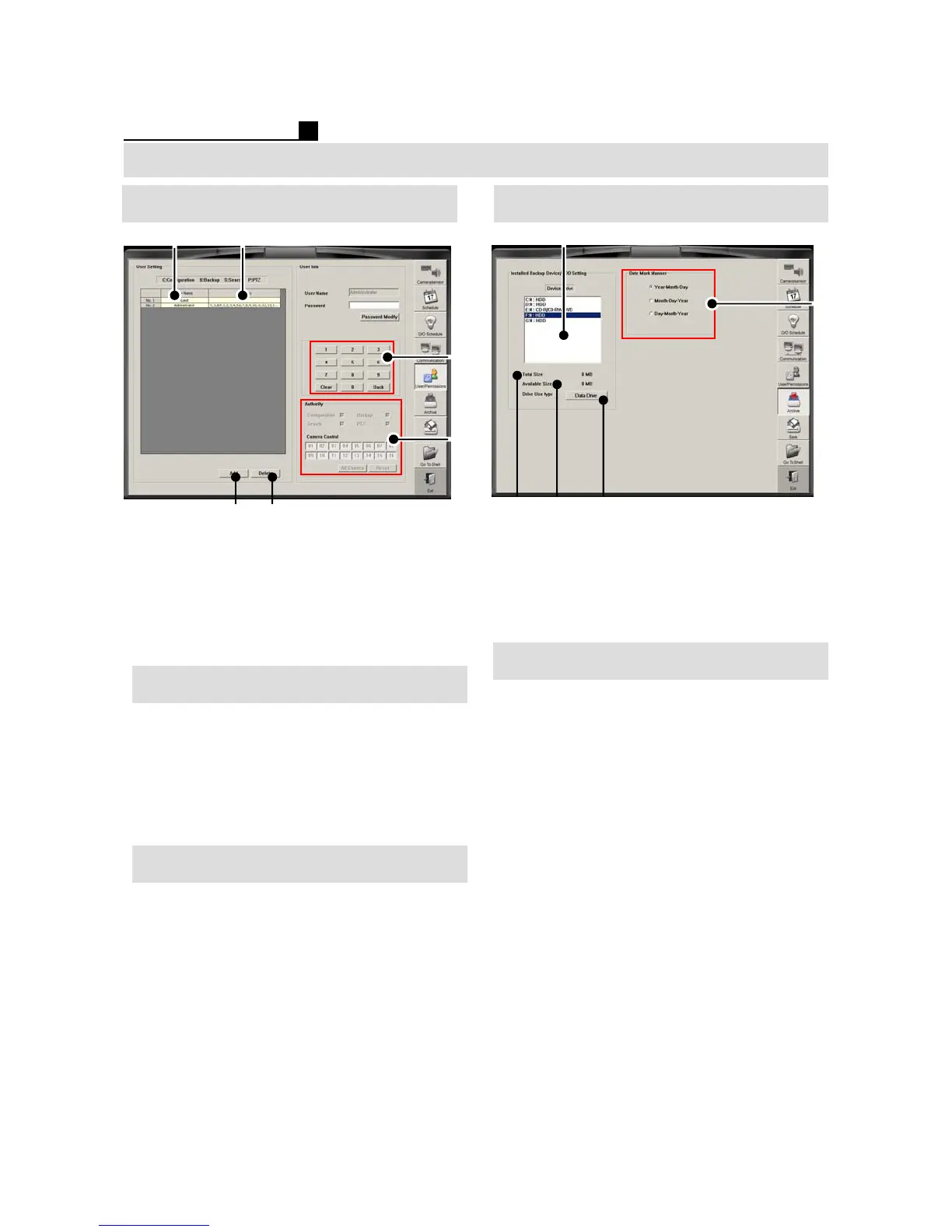
① Registered User Name
②Available Functions
③ PASSWROD Input Window
④ Choose Functions for each User
⑤Add User
⑥ Delete user
Password Change
① Choose user
②Input P/W
③ Click “Password Modify” button
④ Input New P/W and confirm the P/W
⑤ E-mail LIST for emergency transmission
⑥ SMTP SERVER
User Authority Change
① Choose user
② Change “Authority”
CONFIGURATION, BACKUP, SEARCH,
PTZ, CAMERA
③SAVE & EXIT
① Show HDD,CD/DVD on DVR
② Total Capacity
③ Free Capacity
④ Set Data/Backup Drive
⑤ Date Format
SETUP (TOPS SERIES)
①②
⑤
⑥
④
③
①
②
④
③
⑤
User/Password Backup
① Go to Backup Device/HDD Setting
② Choose a drive
Ex) D:, E:, F:
③ Press “Data Drive”for Backup drive
④Save & Exit
Backup Drive Setting



 To Next Page