separately.Connectthecables,positive(+)cablerst,and
coattheterminalswithpetroleumjelly.
WARNING
Batteryterminalsormetaltoolscouldshortagainst
metalmachinecomponents,causingsparks.Sparks
cancausethebatterygassestoexplode,resulting
inpersonalinjury.
•Whenremovingorinstallingthebattery,donot
allowthebatteryterminalstotouchanymetal
partsofthemachine.
•Donotallowmetaltoolstoshortbetween
thebatteryterminalsandmetalpartsofthe
machine.
WARNING
Incorrectbatterycableroutingcoulddamagethe
machineandcables,causingsparks.Sparkscan
causethebatterygassestoexplode,resultingin
personalinjury.
•Alwaysdisconnectthenegative(black)battery
cablebeforedisconnectingthepositive(red)
cable.
•Alwaysconnectthepositive(red)batterycable
beforeconnectingthenegative(black)cable.
StoringtheBattery
Ifyouarestoringthemachinemorethan30days,removethe
batteryandchargeitfully.Eitherstoreitonashelforonthe
machine.Donotconnectthecablesifyoustoreitonthe
machine.Storethebatteryinacoolenvironmenttoprevent
thebatteryfromdischargingrapidly.Topreventthebattery
fromfreezing,makesurethatitisfullycharged.Thespecic
gravityofafullychargedbatteryis1.265to1.299.
CheckingtheFuses
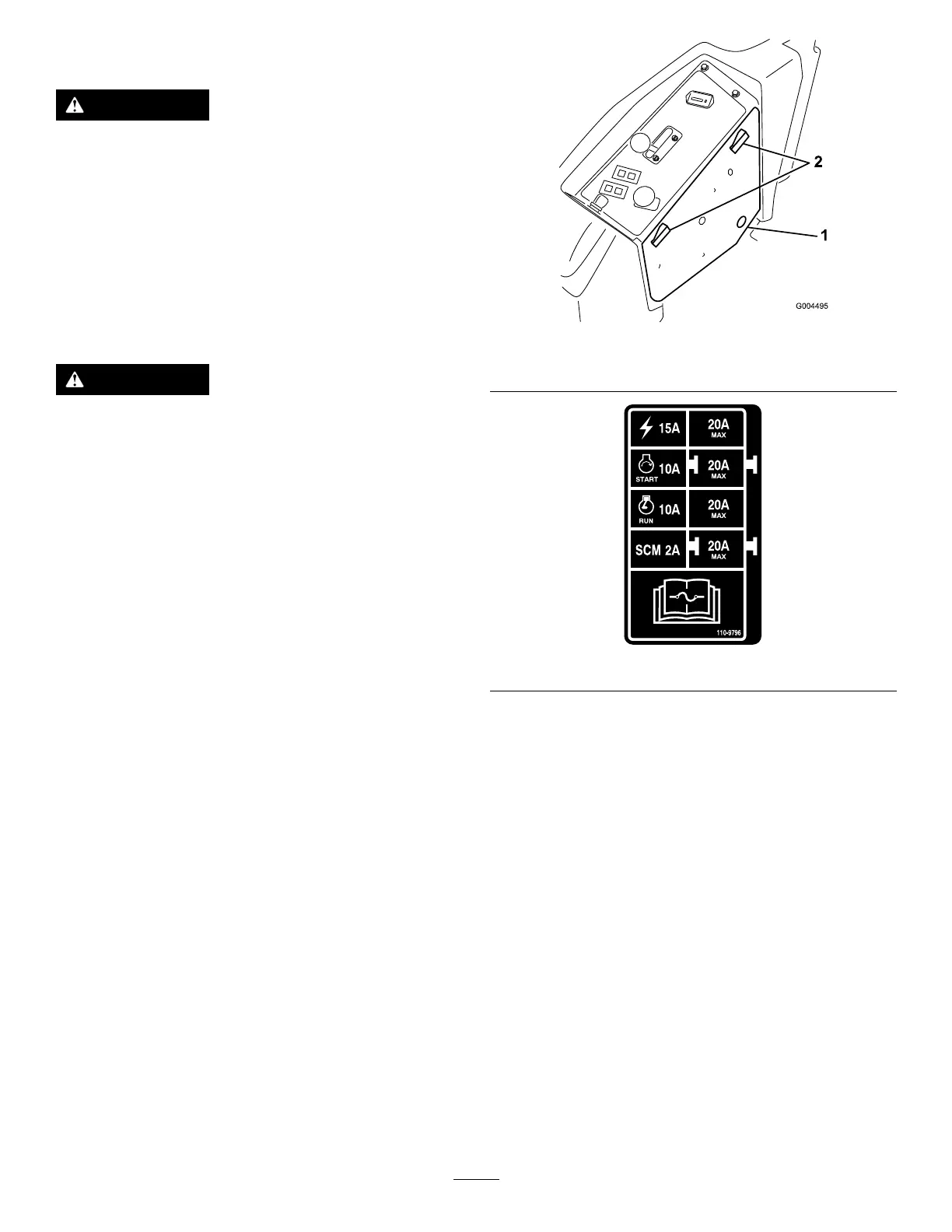
Themachinefusesarelocatedunderthecontrolpanel.
Accessthemthroughthesidepanelcover(Figure34).To
openthesidepanelcover,releasethe2latchesandpullout
onit.
Ifthemachinestopsorhasotherelectricalsystemissues,
checkthefuses.Graspeachfuseinturnandremovethem1
atatime,checkingifanyareblown.
Important:Ifyouneedtoreplaceafuse,alwaysusethe
sametypeandamperage-ratedfuseastheoneyouare
replacing,otherwiseyoucoulddamagetheelectrical
system.Refertothedecalnexttothefusesforadiagram
ofeachfuseanditsamperage(Figure35).
Note:Ifafuseblowsfrequently,youprobablyhaveashort
intheelectricalsystemandshouldhaveitservicedbya
qualiedservicetechnician.
Figure34
1.Sidepanelcover
2.Latches
Figure35
28



 To Next Page