Operation
15
Adjusting
Dial-A-Height
The Dial-A-Height control (Fig. 19) is used to limit
the downward travel of the attachment. The
Dial-A-Height knob is rotated to change the location
of this stop, up or down.
1. Raise the attachment lift lever: Refer to Raising
Attachments. In the raised, position the
Dial-A-Height knob (Fig. 19) can be rotated to
change the stop location. Turn clockwise to raise
and counterclockwise to lower the height of the
attachment.
2. The Dial-A-Height indicator (Fig. 19) will show
the change, high to low, in attachment lift height
as adjustment is made.
Adjusting
Anti-Scalp Wheels
The anti-scalp wheels must be adjusted in the proper
hole location for each height-of-cut position.
1. After adjusting height-of-cut. raise the
attachment lift lever: Refer to Raising
Attachments.
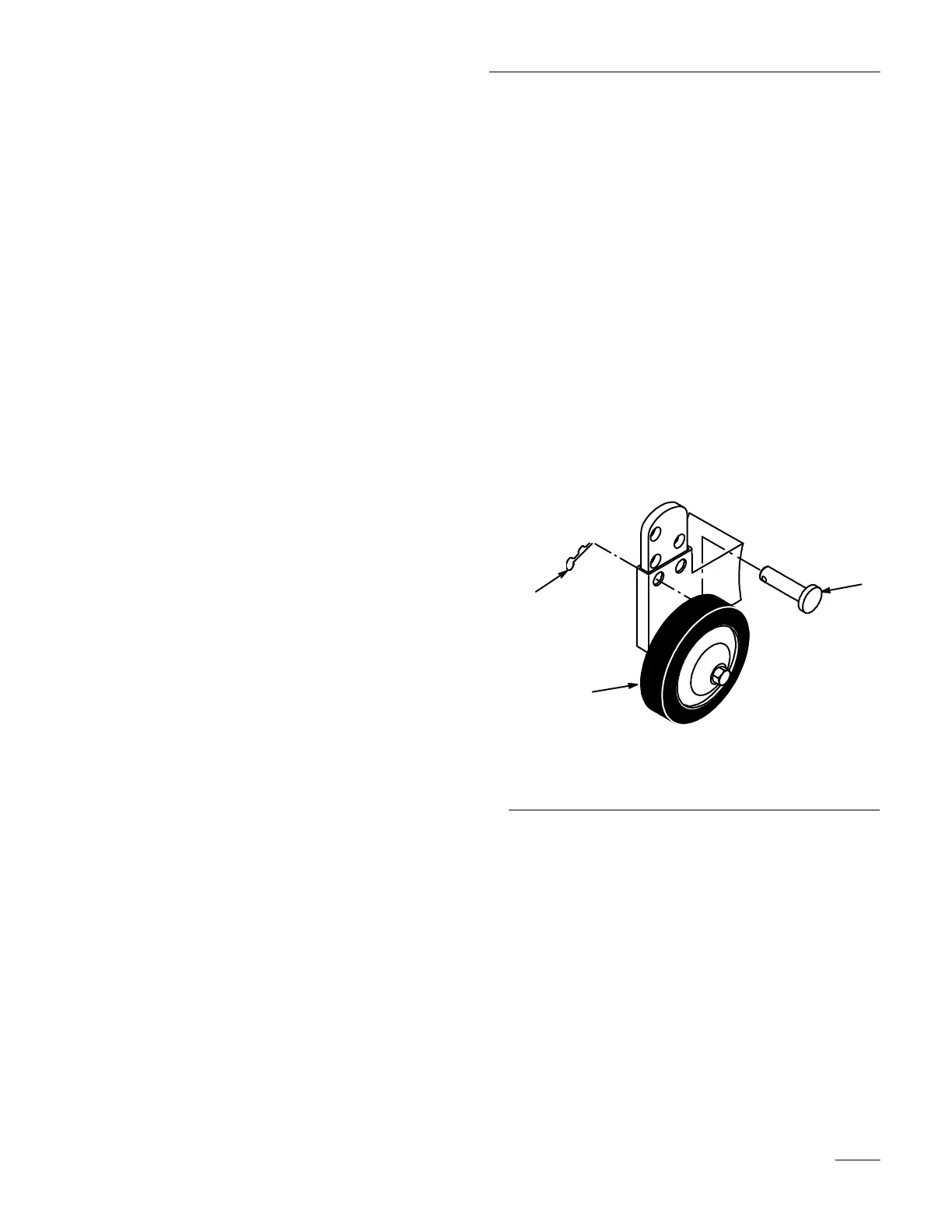
2. Remove hairpin cotter and pin to change hole
location (Fig. 21).
3. Select a hole position so the anti-scalp wheel is
3/8” (9.5 mm) off the ground for the
height-of-cut to be used (Fig. 21).
4. Insert pin and secure with hairpin cotter.
5. Repeat adjustment on other anti-scalp wheels.
1233
1
2
3
Figure 21
1. Wheel
2. Pin
3. Hair
pin Cotter



 To Next Page