InfoCenter LCD Display (continued)
InfoCenter Menu Items (continued)
Settings Menu
Menu Item Description
Language Use this setting to change the language used on the InfoCenter.
Units Use this setting to change the units used by the InfoCenter. The menu choices are
English and Metric.
LCD
Backlight
Use this setting to increase or decrease the brightness of the LCD display.
LCD
Contrast
Use this setting to change the contrast between the dark and light areas of the LCD
display.
About Menu
Menu Item Description
Model Lists the model number of the machine.
SN Lists the serial number of the machine.
S/W Rev Lists the revision number of the machine software.
Note: If you inadvertently change the language or contrast to a setting where you can no
longer understand or view the display, contact your authorized Toro distributor for assistance
in resetting the display.
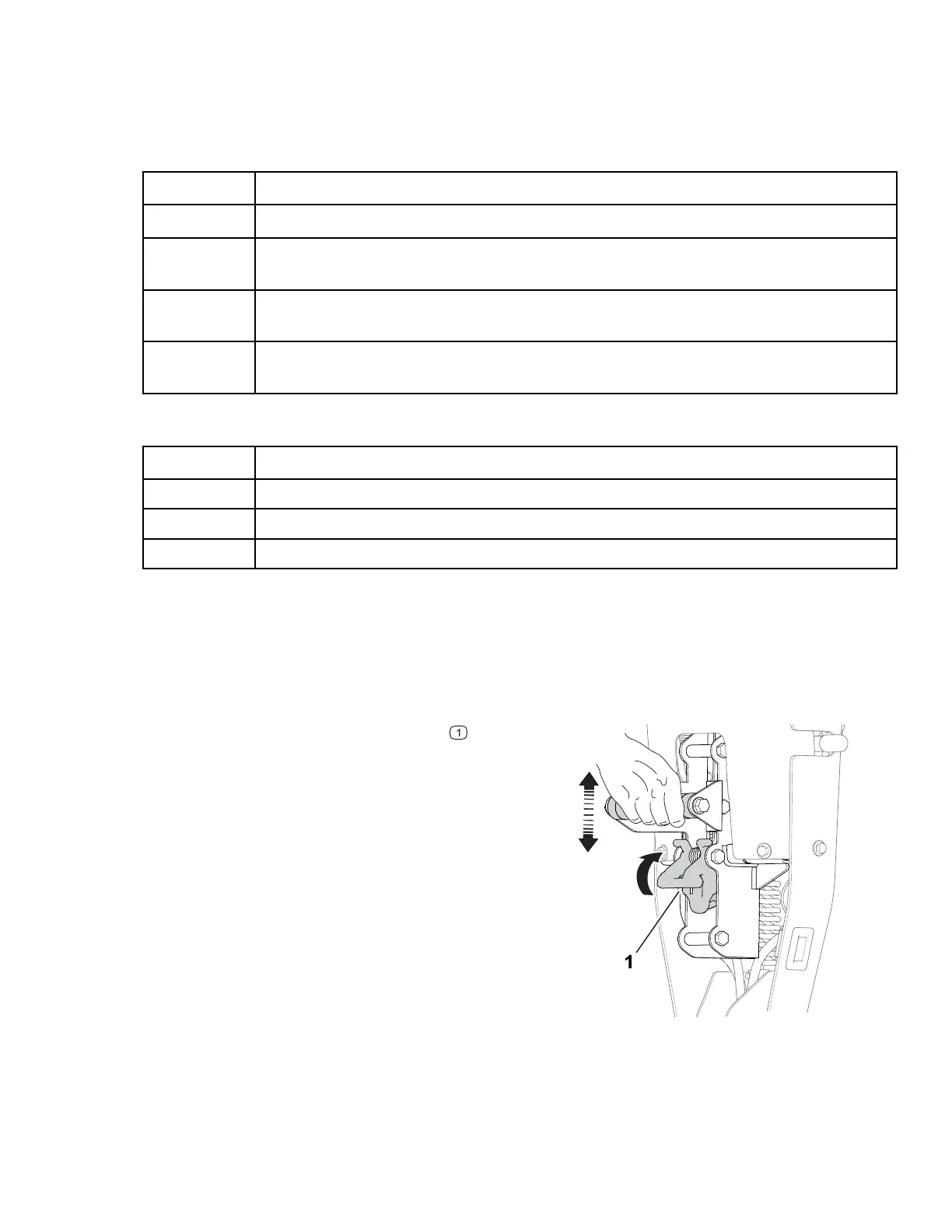
Handle-Height Adjuster
G404702
Pull up on the handle-height adjuster and raise
or lower the handle height to a comfortable
operating position.
Kickstand
Use the kickstand when you install or remove the transport wheels or the cutting unit.
3460-892A Page 4–8 Product Overview: Controls




 To Next Page