- 32 - tousek / EN_ST-63_02 / 25. 03. 2020
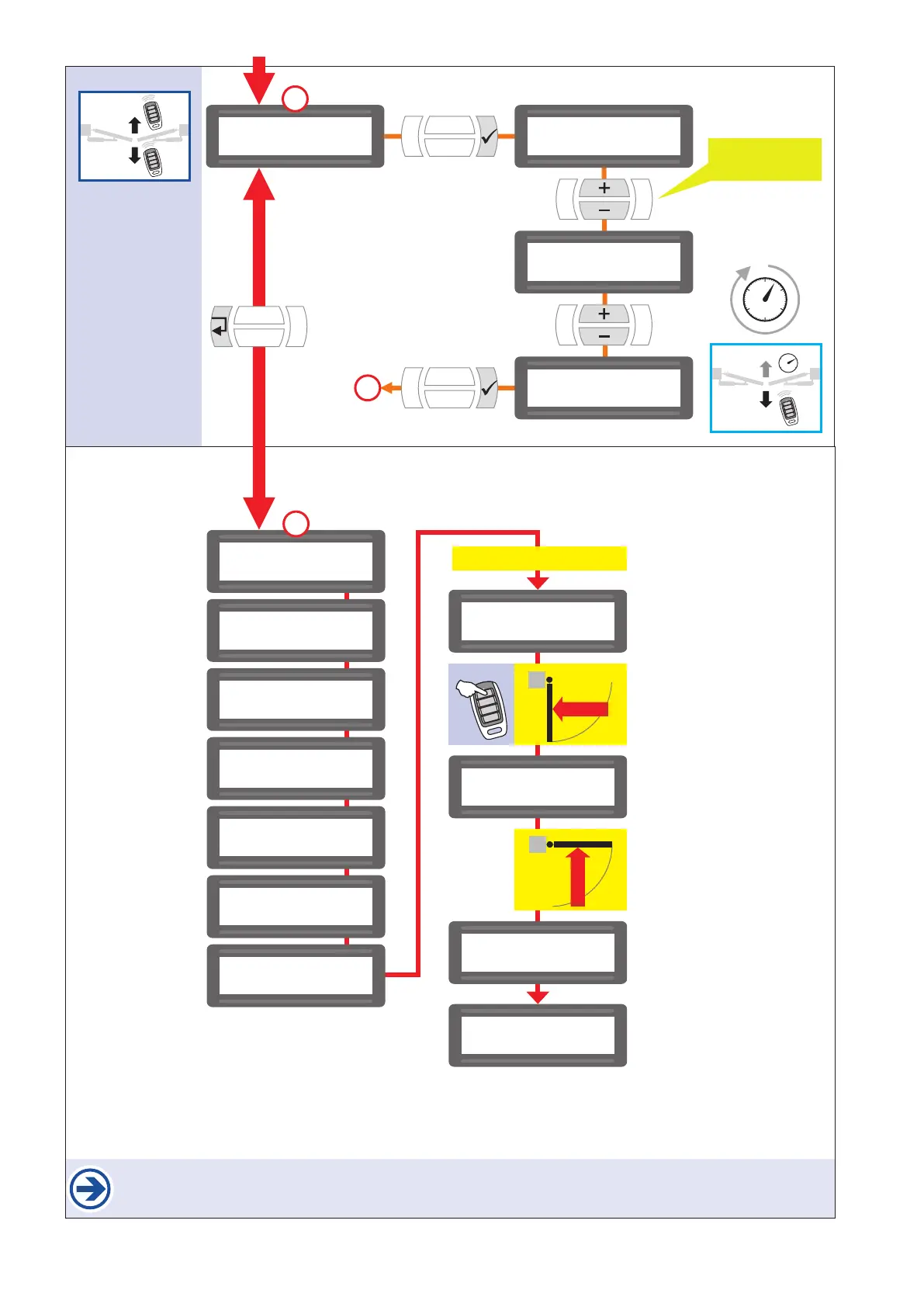
*) Impulse with impulse button or transmitter.
After giving the impulse to automatically program the end positions, no other impulse must be given.
Also the safety devices mustn´t be triggered. This would lead to an interruption of the programming process.
$$$$$$$$$$$$$$$$
$$$$$$$$$$$$$$$$
end position
being detected
$$$$$$$$$$$$$$$$
$$$$$$$$$$$$$$$$
open position
being detected
$$$$$$$$$$$$$$$$
$$$$$$$$$$$$$$$$
close position
being detected
$$$$$$$$$$$$$$$$
$$$$$$$$$$$$$$$$
ready
automatic positioning
START
*)
OPEN
automatic
CLOSE
$$$$$$$$$$$$$$$$
$$$$$$$$$$$$$$$$
system check
PHC inside
$$$$$$$$$$$$$$$$
$$$$$$$$$$$$$$$$
system check
PHC outside
$$$$$$$$$$$$$$$$
$$$$$$$$$$$$$$$$
system check
safety edge LL1
$$$$$$$$$$$$$$$$
$$$$$$$$$$$$$$$$
system check
safety edge LL2
$$$$$$$$$$$$$$$$
$$$$$$$$$$$$$$$$
system check
safety edge RL1
$$$$$$$$$$$$$$$$
$$$$$$$$$$$$$$$$
system check
safety edge RL2
$$$$$$$$$$$$$$$$
$$$$$$$$$$$$$$$$
system check
PHC back area
factory settings
$$$$$$$$$$$$$$$$
$$$$$$$$$$$$$$$$
operating mode $$$$$$$$$$$$$$$$
$$$$$$$$$$$$$$$$
operating mode
impulse mode
$$$$$$$$$$$$$$$$
$$$$$$$$$$$$$$$$
operating mode
aut. close 5s
$$$$$$$$$$$$$$$$
$$$$$$$$$$$$$$$$
operating mode
aut. close 10s
change? YES
conrm
time:
1–255s
e.g. 10s
10
11
10
Select a setting (+/-):
impulse mode
automatic 1–255s


 To Next Page