EasyManua.ls Logo

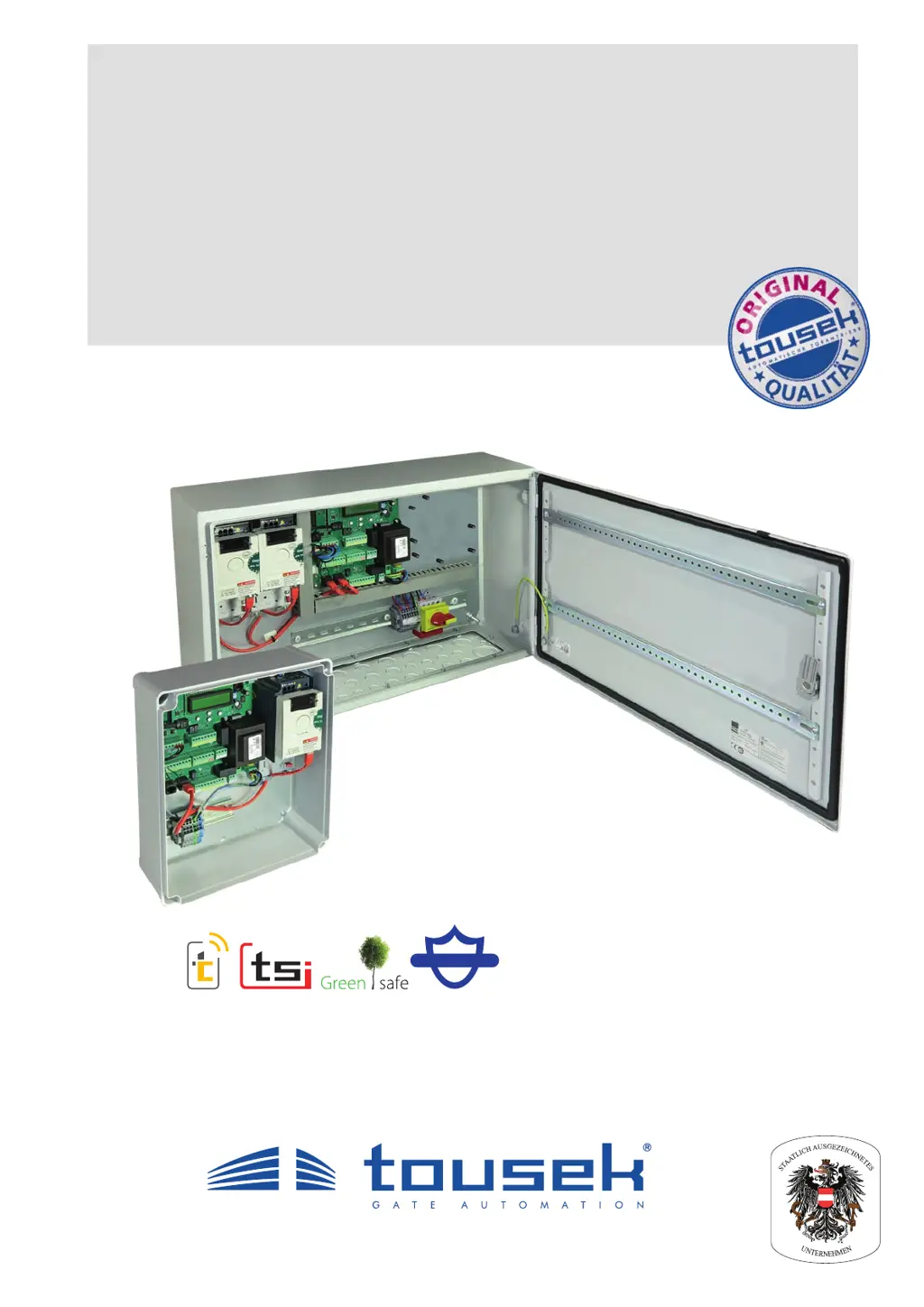
tousek ST 63 - User Manual

tousek ST 63
40 pages
Print Icon
To Next Page IconTo Next Page
Loading...
Connection and installation manual
ST 63 control unit
for folding and swing gates
Safety Sensor

Questions and Answers

Summary

General Warning and Safety Notes

Professional Installation and Servicing

Instructions for installation, connection, adjustments, operation, and servicing by trained professionals.

Power Supply Safety and Liability

Emphasizes turning off power supply and outlines manufacturer's liability.

Installation Compliance and Checks

Mandates compliance with rules and post-installation checks.

Product Usage Restrictions

Warns against use in hazardous areas and non-conforming purposes.

Maintenance Procedures

Qualified Personnel Requirement

Maintenance tasks are restricted to qualified personnel only.

ARS Safety System Check

Recommends monthly checks of the ARS safety reverse system sensitivity.

EU Manufacturers Declaration

Directive Compliance Statement

Statement confirming the ST 63 control unit's compliance with specified EU directives.

1. General ST 63 Control Unit

Product Features Overview

Lists key features of the ST 63 control unit for folding and swing gates.

Operating Modes Explained

Describes the available operating modes like impulse, automatic, and dead man.

Technical Data Specifications

Provides detailed technical specifications for the ST 63 control unit variants.

2. Control Unit Operation

Control Unit Safety Warnings

Crucial warnings regarding electrical shock, explosion hazards, and proper handling.

Frequency Converter Danger Notes

Critical safety instructions for installation, adjustment, and maintenance of the frequency converter.

2.1 Control Box Components

Control Box Part Identification

Identifies and lists the components within the control box, including converters and terminals.

Optional Steel Housing Components

Lists optional components available for installation within the steel housing.

Frequency Converter Setting Warning

Important warning about not changing frequency converter settings to avoid voiding the warranty.

Optional Components for Steel Housing

ST 63 Additional Module Information

Details on optional components like traffic light and dropbolt modules for ST 63.

Wiring Standard and Optional Components

Explains wiring for standard components and optional modules.

2.2 ST Control Board Overview

Control Board Layout

Overview of the ST control board, showing display, buttons, and terminals.

Moisture Damage Prevention for Circuit Board

Important note to prevent damage to the electronic circuit board from moisture.

Control Board Component Descriptions

Lists and describes the function of each component on the ST control board.

Optional Module Connection Socket

Important note on connecting optional modules to the specified socket (D).

2.3 Terminal Assignment Details

Pre-Connection Danger Warnings

Critical danger warnings and safety instructions before performing connection works.

KL1 Terminal Block Connections

Details the terminal assignments for KL1 on the control board for various functions.

STOP Button and Emergency Stop Function

Instructions for the STOP button connection and its emergency stop function.

KL2 Terminal Block on DIN Rail

Describes the terminal block KL2 on the DIN rail for power supply and sensor connections.

2.4 SWING X-TP Operator Wiring

Motor and Sensor Wire Handling

Key information regarding the connection and routing of motor and sensor wires.

Sensor Wire Connection to KL2

Specifies how to connect sensor wires to terminal block KL2, including length and shielding.

Motor Wire Connection to Frequency Converter

Details the connection of motor wires to the frequency converter (FU-L and FU-R).

Operator Wiring Diagram

Illustrates the wiring diagram for connecting operators to the control unit.

SWING X-TP Cable Extension

Using Connection Box for EMC

Instructions for using a connection box for EMC conform cable extension.

2.5 Programming the ST 63 Unit

Programming Buttons and Display Usage

Explains the use of programming buttons and the text display for adjustments.

Programming Menu Structure

Describes the structure of the programming menu, including BASIC SETTINGS and MENU CONTROL.

Initial Basic Settings Configuration

Details the basic settings required for initial motor operation.

Advanced Menu Control Access

Explains how to access advanced settings through the MENU CONTROL.

Menu Structure: Core Settings

Buttons and Switches Configuration

Configuration options for buttons and switches like impulse, pedestrian, and stop.

Photocell Function Settings

Settings for photocell functions, including inner, outer, and back area photocells.

Safety Edge Configuration

Configuration options for safety edges on left and right leaves.

Left Leaf Specific Settings

Settings related to the left gate leaf, including delays, force, and speed.

Right Leaf Specific Settings

Settings related to the right gate leaf, including delays, force, and speed.

Operating Mode Selection

Options for selecting operating modes like impulse, automatic, and pedestrian opening.

Menu Structure: Additional Features

Light and Lamp Settings

Configuration options for signal lamps, prewarning lights, and courtyard lighting.

Peripheral Device Configuration

Settings for peripheral devices like traffic lights and locks.

Locking Mechanism Setup

Configuration for electric lock, magnetic clamp, or drop bolt locking.

Additional Module Configuration

Settings for additional modules such as status display.

System Diagnosis Menu

Options for system diagnosis, status display, and factory reset.

2.6 Connections and Adjustments

Pre-Connection Safety Precautions

Critical danger warnings and safety instructions before performing connection works.

Button and Switch Wiring Details

Details on connecting and adjusting various buttons and switches for gate control.

Impulse Button Connection and Settings

Connection and adjustment options for the impulse button on terminals KL1 30/32.

Pedestrian Button Connection and Settings

Connection and adjustment options for the pedestrian button on terminals KL1 30/34.

Input Channel Configuration

ILD Channel Functionality

Describes the ILD channel connection and its function in traffic light or deadman modes.

STOP Switch and Emergency Stop

Details the STOP switch connection and emphasizes its non-emergency stop function.

CLOSE Button Operation

Explains the CLOSE button connection and its operation in deadman mode.

OPEN Button Operation

Describes the OPEN button connection and its operation in deadman mode.

Emergency Mode Switch Setup

Details the connection of the EMERGENCY MODE switch and its behavior.

Photocell Installation and Functionality

Important Photocell Notes

Key notes on photocell connection, power supply, and contacts.

Photocell Connection Diagram

Illustrates the connection of inner, outer, and back area photocells.

SYNC Function Mounting Instructions

Instructions for mounting photocells with SYNC function to avoid interference.

Photocell Self-Monitoring Feature

Describes the self-monitoring function for photocells and its error response.

Advanced Photocell and ILD Settings

Back Area Photocell Configuration

Configuration options for the back area photocell.

ILD;PHC Pause Time Settings

Settings affecting pause time based on ILD/PHC triggers.

Photocell Self-Test Options

Options to activate or deactivate the photocell self-test function.

Photocell Self-Test Deactivation Warning

Warning regarding deactivation of self-test function and safety category requirements.

Photocell Connection Examples

Illustrates connection examples for outer and inner photocells with SYNC function.

Photocell Wiring Examples

LS 26 Outer Photocell Wiring

Wiring diagram for the Tousek LS 26 outer photocell.

RLS 620 Back Area Photocell Wiring

Wiring diagram for the Tousek RLS 620 back area reflective photocell.

Jumper Adjustment for Photocell Components

Important note on adjusting jumpers for transmitter and receiver consistently.

Safety Edges Configuration

Safety Sensing Edge Operation

Explains the function and activation of safety sensing edges for obstacle detection.

Important Safety Edge Programming

Crucial notes for programming end positions and safety device triggering.

Left Leaf Safety Edge Settings (LL1;LL2)

Configuration options for safety edges LL1 and LL2 on the left gate leaf.

Right Leaf Safety Edge Settings (RL1;RL2)

Configuration options for safety edges RL1 and RL2 on the right gate leaf.

Safety Edge Status Display

Displays the status of safety sensing edges, including triggered or disconnected states.

Left Gate Leaf Adjustment Parameters

Delay Settings for Left Leaf

Settings for opening and closing delay of the left leaf.

Time Delay for Left Leaf

Adjustable time delay for the left leaf at opening or closing.

Force Adjustment for Left Leaf

Adjustment of operator force for the left leaf.

Speed Adjustment for Left Leaf

Adjustment of motor speed for the left leaf.

Soft Speed for Left Leaf

Adjustment of soft speed for the left leaf.

Soft Stop Settings for Left Leaf

Setting for soft stop time in opening and closing directions for the left leaf.

Right Gate Leaf Adjustment Parameters

Delay Settings for Right Leaf

Settings for opening and closing delay of the right leaf.

Time Delay for Right Leaf

Adjustable time delay for the right leaf at opening or closing.

Force Adjustment for Right Leaf

Adjustment of operator force for the right leaf.

Speed Adjustment for Right Leaf

Adjustment of motor speed for the right leaf.

Soft Speed for Right Leaf

Adjustment of soft speed for the right leaf.

Soft Stop Settings for Right Leaf

Setting for soft stop time in opening and closing directions for the right leaf.

Operating Mode Settings

Impulse Logic Configuration

Configuration of impulse logic for gate operation, including pause time.

Selection of Operating Modes

Options for selecting operating modes like impulse, automatic, and pedestrian opening.

Pedestrian Opening Functionality

Settings for pedestrian opening, defining partial opening based on total opening.

Automatic Mode Configuration

Configuration of automatic closing modes based on pause time.

Pause Time Logic Behavior

Settings for pause time logic, including influence and permanent ON modes.

Light and Lamp Functions

Prewarning Signal Lamp Settings

Settings for prewarning signal lamp activation during opening and closing movements.

Courtyard Light Configuration

Configuration for courtyard lighting, including afterglow and timed activation.

Traffic Light Phase Duration Settings

Adjustment of green phase duration and clearance time for traffic lights.

Traffic Light Logic Options

Logic settings for traffic light operation, such as continuous red or green on one side.

Peripheral Device Configuration

Traffic Light System Activation

Activation of the traffic light function and its connection via bus system.

Locking Mechanism Setup

Setup for electric lock, magnetic clamp, or drop bolt locking mechanisms.

Electric Lock;Magnetic Clamp Details

Specific settings and operation details for electric lock and magnetic clamp.

Magnetic Clamp Delay Setting

Setting the delay time for releasing the magnetic clamp before gate movement.

Electric Lock Operation Details

Configuration for electric lock activation period based on gate situation.

Drop Bolt Locking Configuration

Configuration options for drop bolt locking in open, closed, or both positions.

Drop Bolt Reverse Stroke Function

Configuration of reverse stroke for drop bolt operation to loosen the bolt.

Electric Drop Operation Modes

Modes for electric drop bolt operation: OPEN and CLOSE, OPEN only, CLOSE only.

Additional Module Functions

Gate Status Display 1 Configuration

Configuration for gate status display 1 using signal contacts K1 and K2.

Gate Status Display 2 Configuration

Configuration for gate status display 2, including movement and stop status.

Optional Electric Lock;Magnetic Clamp Module

Module Connection Procedure

Step-by-step guide for connecting the electric lock/magnetic clamp module.

Optional Dropbolt Module Installation

Information and steps for installing the optional dropbolt module.

Dropbolt Module Connection Steps

Details on connecting the dropbolt module (E) to the control unit (ST).

SAFELOCK Dropbolt System Connection

Dropbolt Wiring to Motor Boards

Instructions for wiring dropbolts directly to the terminal blocks (K) of the motor print boards.

SAFELOCK Dropbolt Control Unit

Overview of the SAFELOCK dropbolt control unit, installed on the steel cabinet door.

System Diagnosis and Information

Status Display Code Interpretation

Explains the meaning of status display codes for various inputs and states.

End Position Deletion Option

Option to delete the determined gate end positions ('gate closed' and 'gate open').

Factory Settings Reset Procedure

Procedure to reset all settings back to factory defaults.

Software and Serial Number Display

Displays the software version and serial number of the control unit.

Protocol Log Viewer

Details on how to view the protocol list of all recorded events.

3. Connecting the Receiver

Receiver Installation and Important Notes

Guide for plugging in the receiver board and key notes on its use and programming.

4. Initial System Operation

Essential Preparation Steps

Crucial preparation steps before putting the system into operation, including safety.

Language and Gate Type Selection

Guide for selecting language and gate type (swing/folding) during initial operation.

Basic Settings Adjustment for Motor

Steps for adjusting the most important motor settings in the 'Basic Settings' menu.

Factory Settings: Photocell and Safety Edge Adjustments

Outer Photocell Settings Adjustment

Adjusting the settings for the outer photocell.

Back Area Photocell Settings Adjustment

Adjusting the settings for the back area photocell.

Left Leaf Safety Edge LL1 Adjustment

Adjusting the settings for safety edge LL1 on the left leaf.

Left Leaf Safety Edge LL2 Adjustment

Adjusting the settings for safety edge LL2 on the left leaf.

Right Leaf Safety Edge RL1 Adjustment

Adjusting the settings for safety edge RL1 on the right leaf.

Right Leaf Safety Edge RL2 Adjustment

Adjusting the settings for safety edge RL2 on the right leaf.

Factory Settings: Operating Mode and Positioning

Operating Mode Selection and Configuration

Selecting and configuring the operating mode from factory settings.

Automatic Positioning Process Guide

Guide for the automatic positioning process of gate end points.

5. Optional Traffic Light Unit STA 11

STA 11 General Information and Features

General information about the STA 11 traffic light control unit and its capabilities.

STA 11 Technical Data

Provides technical specifications for the STA 11 traffic light control unit.

5.1 STA 11 Traffic Light Functionality

STA 11 Functional Description

Describes the operational functions of the STA 11 traffic light system.

Traffic Light Operational Sequence

Outlines the sequence of traffic light operations, including prewarning and green phases.

5.2 STA 11 Control Board and Terminals

Traffic Light Board Component Identification

Lists and describes the components of the traffic light control board STA 11.

STA 11 Control Housing Safety Warnings

Critical safety warnings for opening the control housing and handling powered units.

Preventing Moisture Damage to Electronics

Warning to ensure electronics are not damaged by moisture during maintenance.

ST 63 Limit Switch Connection Note

Note that limit switch connection is not necessary for ST 63; terminals 60/61 must be bridged.

5.3 STA 11 Connections and Adjustments

Induction Loop Connections for STA 11

How to connect induction loops for green request using the STA 11.

Impulse Switch Connections for STA 11

How to connect impulse switches for green request on the STA 11.

STA 11 Limit Switch Input

Information regarding the limit switch input (terminals 60/61) for STA 11.

Traffic Light Output Wiring

Details on connecting traffic lights to the output terminals of the STA 11.

Traffic Light Board to Operator Connection

Wiring the traffic light board to the operator control board via the bus system.

Operator Board Adjustments for Traffic Light Logic

How operator control board settings affect traffic light functions.

5.4 Optional Radio Receiver for STA 11

Radio Receiver Installation and Usage Notes

Key instructions for installing and using radio receivers with traffic light mode.

5.5 Optional Induction Loop Detector ISD 6

ISD 6 Detector Important Information

Crucial information about the ISD 6 loop detector device, its function, and installation.

ISD 6 Mounting and Installation Guide

Steps for mounting and installing the ISD 6 induction loop detector.

6. Troubleshooting Guide

Error Identification and Possible Reasons

Lists common errors displayed by the unit and their potential causes.

Troubleshooting Solutions and Checks

Provides recommended solutions and checks for resolving common operational errors.

Summary

General Warning and Safety Notes

Professional Installation and Servicing

Instructions for installation, connection, adjustments, operation, and servicing by trained professionals.

Power Supply Safety and Liability

Emphasizes turning off power supply and outlines manufacturer's liability.

Installation Compliance and Checks

Mandates compliance with rules and post-installation checks.

Product Usage Restrictions

Warns against use in hazardous areas and non-conforming purposes.

Maintenance Procedures

Qualified Personnel Requirement

Maintenance tasks are restricted to qualified personnel only.

ARS Safety System Check

Recommends monthly checks of the ARS safety reverse system sensitivity.

EU Manufacturers Declaration

Directive Compliance Statement

Statement confirming the ST 63 control unit's compliance with specified EU directives.

1. General ST 63 Control Unit

Product Features Overview

Lists key features of the ST 63 control unit for folding and swing gates.

Operating Modes Explained

Describes the available operating modes like impulse, automatic, and dead man.

Technical Data Specifications

Provides detailed technical specifications for the ST 63 control unit variants.

2. Control Unit Operation

Control Unit Safety Warnings

Crucial warnings regarding electrical shock, explosion hazards, and proper handling.

Frequency Converter Danger Notes

Critical safety instructions for installation, adjustment, and maintenance of the frequency converter.

2.1 Control Box Components

Control Box Part Identification

Identifies and lists the components within the control box, including converters and terminals.

Optional Steel Housing Components

Lists optional components available for installation within the steel housing.

Frequency Converter Setting Warning

Important warning about not changing frequency converter settings to avoid voiding the warranty.

Optional Components for Steel Housing

ST 63 Additional Module Information

Details on optional components like traffic light and dropbolt modules for ST 63.

Wiring Standard and Optional Components

Explains wiring for standard components and optional modules.

2.2 ST Control Board Overview

Control Board Layout

Overview of the ST control board, showing display, buttons, and terminals.

Moisture Damage Prevention for Circuit Board

Important note to prevent damage to the electronic circuit board from moisture.

Control Board Component Descriptions

Lists and describes the function of each component on the ST control board.

Optional Module Connection Socket

Important note on connecting optional modules to the specified socket (D).

2.3 Terminal Assignment Details

Pre-Connection Danger Warnings

Critical danger warnings and safety instructions before performing connection works.

KL1 Terminal Block Connections

Details the terminal assignments for KL1 on the control board for various functions.

STOP Button and Emergency Stop Function

Instructions for the STOP button connection and its emergency stop function.

KL2 Terminal Block on DIN Rail

Describes the terminal block KL2 on the DIN rail for power supply and sensor connections.

2.4 SWING X-TP Operator Wiring

Motor and Sensor Wire Handling

Key information regarding the connection and routing of motor and sensor wires.

Sensor Wire Connection to KL2

Specifies how to connect sensor wires to terminal block KL2, including length and shielding.

Motor Wire Connection to Frequency Converter

Details the connection of motor wires to the frequency converter (FU-L and FU-R).

Operator Wiring Diagram

Illustrates the wiring diagram for connecting operators to the control unit.

SWING X-TP Cable Extension

Using Connection Box for EMC

Instructions for using a connection box for EMC conform cable extension.

2.5 Programming the ST 63 Unit

Programming Buttons and Display Usage

Explains the use of programming buttons and the text display for adjustments.

Programming Menu Structure

Describes the structure of the programming menu, including BASIC SETTINGS and MENU CONTROL.

Initial Basic Settings Configuration

Details the basic settings required for initial motor operation.

Advanced Menu Control Access

Explains how to access advanced settings through the MENU CONTROL.

Menu Structure: Core Settings

Buttons and Switches Configuration

Configuration options for buttons and switches like impulse, pedestrian, and stop.

Photocell Function Settings

Settings for photocell functions, including inner, outer, and back area photocells.

Safety Edge Configuration

Configuration options for safety edges on left and right leaves.

Left Leaf Specific Settings

Settings related to the left gate leaf, including delays, force, and speed.

Right Leaf Specific Settings

Settings related to the right gate leaf, including delays, force, and speed.

Operating Mode Selection

Options for selecting operating modes like impulse, automatic, and pedestrian opening.

Menu Structure: Additional Features

Light and Lamp Settings

Configuration options for signal lamps, prewarning lights, and courtyard lighting.

Peripheral Device Configuration

Settings for peripheral devices like traffic lights and locks.

Locking Mechanism Setup

Configuration for electric lock, magnetic clamp, or drop bolt locking.

Additional Module Configuration

Settings for additional modules such as status display.

System Diagnosis Menu

Options for system diagnosis, status display, and factory reset.

2.6 Connections and Adjustments

Pre-Connection Safety Precautions

Critical danger warnings and safety instructions before performing connection works.

Button and Switch Wiring Details

Details on connecting and adjusting various buttons and switches for gate control.

Impulse Button Connection and Settings

Connection and adjustment options for the impulse button on terminals KL1 30/32.

Pedestrian Button Connection and Settings

Connection and adjustment options for the pedestrian button on terminals KL1 30/34.

Input Channel Configuration

ILD Channel Functionality

Describes the ILD channel connection and its function in traffic light or deadman modes.

STOP Switch and Emergency Stop

Details the STOP switch connection and emphasizes its non-emergency stop function.

CLOSE Button Operation

Explains the CLOSE button connection and its operation in deadman mode.

OPEN Button Operation

Describes the OPEN button connection and its operation in deadman mode.

Emergency Mode Switch Setup

Details the connection of the EMERGENCY MODE switch and its behavior.

Photocell Installation and Functionality

Important Photocell Notes

Key notes on photocell connection, power supply, and contacts.

Photocell Connection Diagram

Illustrates the connection of inner, outer, and back area photocells.

SYNC Function Mounting Instructions

Instructions for mounting photocells with SYNC function to avoid interference.

Photocell Self-Monitoring Feature

Describes the self-monitoring function for photocells and its error response.

Advanced Photocell and ILD Settings

Back Area Photocell Configuration

Configuration options for the back area photocell.

ILD;PHC Pause Time Settings

Settings affecting pause time based on ILD/PHC triggers.

Photocell Self-Test Options

Options to activate or deactivate the photocell self-test function.

Photocell Self-Test Deactivation Warning

Warning regarding deactivation of self-test function and safety category requirements.

Photocell Connection Examples

Illustrates connection examples for outer and inner photocells with SYNC function.

Photocell Wiring Examples

LS 26 Outer Photocell Wiring

Wiring diagram for the Tousek LS 26 outer photocell.

RLS 620 Back Area Photocell Wiring

Wiring diagram for the Tousek RLS 620 back area reflective photocell.

Jumper Adjustment for Photocell Components

Important note on adjusting jumpers for transmitter and receiver consistently.

Safety Edges Configuration

Safety Sensing Edge Operation

Explains the function and activation of safety sensing edges for obstacle detection.

Important Safety Edge Programming

Crucial notes for programming end positions and safety device triggering.

Left Leaf Safety Edge Settings (LL1;LL2)

Configuration options for safety edges LL1 and LL2 on the left gate leaf.

Right Leaf Safety Edge Settings (RL1;RL2)

Configuration options for safety edges RL1 and RL2 on the right gate leaf.

Safety Edge Status Display

Displays the status of safety sensing edges, including triggered or disconnected states.

Left Gate Leaf Adjustment Parameters

Delay Settings for Left Leaf

Settings for opening and closing delay of the left leaf.

Time Delay for Left Leaf

Adjustable time delay for the left leaf at opening or closing.

Force Adjustment for Left Leaf

Adjustment of operator force for the left leaf.

Speed Adjustment for Left Leaf

Adjustment of motor speed for the left leaf.

Soft Speed for Left Leaf

Adjustment of soft speed for the left leaf.

Soft Stop Settings for Left Leaf

Setting for soft stop time in opening and closing directions for the left leaf.

Right Gate Leaf Adjustment Parameters

Delay Settings for Right Leaf

Settings for opening and closing delay of the right leaf.

Time Delay for Right Leaf

Adjustable time delay for the right leaf at opening or closing.

Force Adjustment for Right Leaf

Adjustment of operator force for the right leaf.

Speed Adjustment for Right Leaf

Adjustment of motor speed for the right leaf.

Soft Speed for Right Leaf

Adjustment of soft speed for the right leaf.

Soft Stop Settings for Right Leaf

Setting for soft stop time in opening and closing directions for the right leaf.

Operating Mode Settings

Impulse Logic Configuration

Configuration of impulse logic for gate operation, including pause time.

Selection of Operating Modes

Options for selecting operating modes like impulse, automatic, and pedestrian opening.

Pedestrian Opening Functionality

Settings for pedestrian opening, defining partial opening based on total opening.

Automatic Mode Configuration

Configuration of automatic closing modes based on pause time.

Pause Time Logic Behavior

Settings for pause time logic, including influence and permanent ON modes.

Light and Lamp Functions

Prewarning Signal Lamp Settings

Settings for prewarning signal lamp activation during opening and closing movements.

Courtyard Light Configuration

Configuration for courtyard lighting, including afterglow and timed activation.

Traffic Light Phase Duration Settings

Adjustment of green phase duration and clearance time for traffic lights.

Traffic Light Logic Options

Logic settings for traffic light operation, such as continuous red or green on one side.

Peripheral Device Configuration

Traffic Light System Activation

Activation of the traffic light function and its connection via bus system.

Locking Mechanism Setup

Setup for electric lock, magnetic clamp, or drop bolt locking mechanisms.

Electric Lock;Magnetic Clamp Details

Specific settings and operation details for electric lock and magnetic clamp.

Magnetic Clamp Delay Setting

Setting the delay time for releasing the magnetic clamp before gate movement.

Electric Lock Operation Details

Configuration for electric lock activation period based on gate situation.

Drop Bolt Locking Configuration

Configuration options for drop bolt locking in open, closed, or both positions.

Drop Bolt Reverse Stroke Function

Configuration of reverse stroke for drop bolt operation to loosen the bolt.

Electric Drop Operation Modes

Modes for electric drop bolt operation: OPEN and CLOSE, OPEN only, CLOSE only.

Additional Module Functions

Gate Status Display 1 Configuration

Configuration for gate status display 1 using signal contacts K1 and K2.

Gate Status Display 2 Configuration

Configuration for gate status display 2, including movement and stop status.

Optional Electric Lock;Magnetic Clamp Module

Module Connection Procedure

Step-by-step guide for connecting the electric lock/magnetic clamp module.

Optional Dropbolt Module Installation

Information and steps for installing the optional dropbolt module.

Dropbolt Module Connection Steps

Details on connecting the dropbolt module (E) to the control unit (ST).

SAFELOCK Dropbolt System Connection

Dropbolt Wiring to Motor Boards

Instructions for wiring dropbolts directly to the terminal blocks (K) of the motor print boards.

SAFELOCK Dropbolt Control Unit

Overview of the SAFELOCK dropbolt control unit, installed on the steel cabinet door.

System Diagnosis and Information

Status Display Code Interpretation

Explains the meaning of status display codes for various inputs and states.

End Position Deletion Option

Option to delete the determined gate end positions ('gate closed' and 'gate open').

Factory Settings Reset Procedure

Procedure to reset all settings back to factory defaults.

Software and Serial Number Display

Displays the software version and serial number of the control unit.

Protocol Log Viewer

Details on how to view the protocol list of all recorded events.

3. Connecting the Receiver

Receiver Installation and Important Notes

Guide for plugging in the receiver board and key notes on its use and programming.

4. Initial System Operation

Essential Preparation Steps

Crucial preparation steps before putting the system into operation, including safety.

Language and Gate Type Selection

Guide for selecting language and gate type (swing/folding) during initial operation.

Basic Settings Adjustment for Motor

Steps for adjusting the most important motor settings in the 'Basic Settings' menu.

Factory Settings: Photocell and Safety Edge Adjustments

Outer Photocell Settings Adjustment

Adjusting the settings for the outer photocell.

Back Area Photocell Settings Adjustment

Adjusting the settings for the back area photocell.

Left Leaf Safety Edge LL1 Adjustment

Adjusting the settings for safety edge LL1 on the left leaf.

Left Leaf Safety Edge LL2 Adjustment

Adjusting the settings for safety edge LL2 on the left leaf.

Right Leaf Safety Edge RL1 Adjustment

Adjusting the settings for safety edge RL1 on the right leaf.

Right Leaf Safety Edge RL2 Adjustment

Adjusting the settings for safety edge RL2 on the right leaf.

Factory Settings: Operating Mode and Positioning

Operating Mode Selection and Configuration

Selecting and configuring the operating mode from factory settings.

Automatic Positioning Process Guide

Guide for the automatic positioning process of gate end points.

5. Optional Traffic Light Unit STA 11

STA 11 General Information and Features

General information about the STA 11 traffic light control unit and its capabilities.

STA 11 Technical Data

Provides technical specifications for the STA 11 traffic light control unit.

5.1 STA 11 Traffic Light Functionality

STA 11 Functional Description

Describes the operational functions of the STA 11 traffic light system.

Traffic Light Operational Sequence

Outlines the sequence of traffic light operations, including prewarning and green phases.

5.2 STA 11 Control Board and Terminals

Traffic Light Board Component Identification

Lists and describes the components of the traffic light control board STA 11.

STA 11 Control Housing Safety Warnings

Critical safety warnings for opening the control housing and handling powered units.

Preventing Moisture Damage to Electronics

Warning to ensure electronics are not damaged by moisture during maintenance.

ST 63 Limit Switch Connection Note

Note that limit switch connection is not necessary for ST 63; terminals 60/61 must be bridged.

5.3 STA 11 Connections and Adjustments

Induction Loop Connections for STA 11

How to connect induction loops for green request using the STA 11.

Impulse Switch Connections for STA 11

How to connect impulse switches for green request on the STA 11.

STA 11 Limit Switch Input

Information regarding the limit switch input (terminals 60/61) for STA 11.

Traffic Light Output Wiring

Details on connecting traffic lights to the output terminals of the STA 11.

Traffic Light Board to Operator Connection

Wiring the traffic light board to the operator control board via the bus system.

Operator Board Adjustments for Traffic Light Logic

How operator control board settings affect traffic light functions.

5.4 Optional Radio Receiver for STA 11

Radio Receiver Installation and Usage Notes

Key instructions for installing and using radio receivers with traffic light mode.

5.5 Optional Induction Loop Detector ISD 6

ISD 6 Detector Important Information

Crucial information about the ISD 6 loop detector device, its function, and installation.

ISD 6 Mounting and Installation Guide

Steps for mounting and installing the ISD 6 induction loop detector.

6. Troubleshooting Guide

Error Identification and Possible Reasons

Lists common errors displayed by the unit and their potential causes.

Troubleshooting Solutions and Checks

Provides recommended solutions and checks for resolving common operational errors.

tousek ST 63 Specifications

General IconGeneral
Brandtousek
ModelST 63
CategoryGate Opener
LanguageEnglish

Related product manuals