276
6-4. Other interior features
COASTER_GW-E
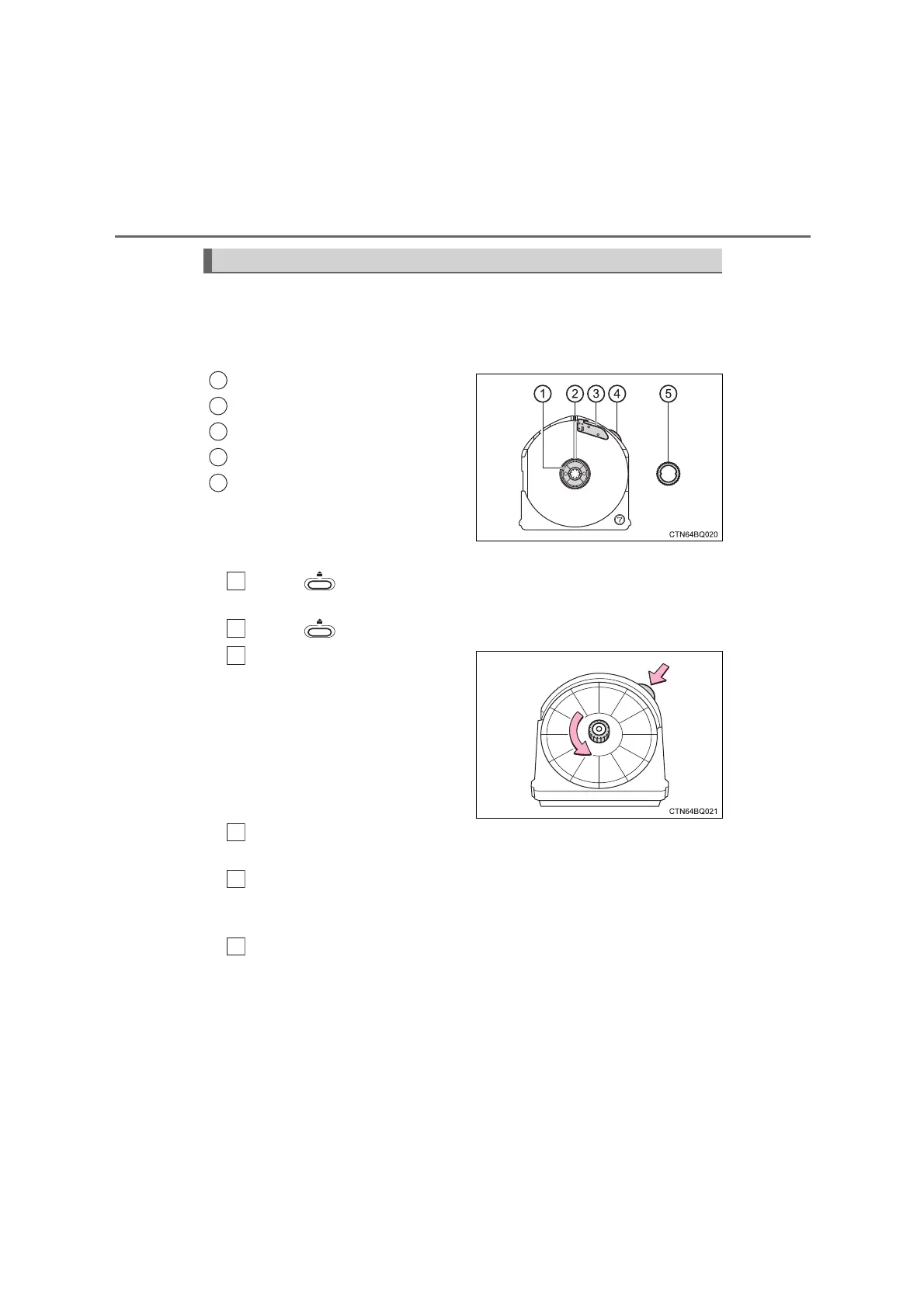
The cartridge holds a 7-day chart set and is installed into the tacho-
graph. When installed, the cartridge will engage with a gear of the
clock inside the tachograph, and the charts will make one complete
rotation every 26 hours.
Chart installation stay
Current time mark
Cutoff knife
Time setting knob
Lock ring
■
Replacing the charts
Press and remove the cartridge.
When removing the cartridge, pull it straight out.
Press to close the front cover.
While pressing the time set-
ting knob, turn the lock ring
(outer ring) counterclockwise
and remove it. Remove the
charts.
If necessary, write information such as the driver number, vehicle
number, date, etc., on the new chart set with a pen, etc.
Set the outer circumference of a new set of charts under the cut-
off knife of the cartridge. Then align the center hole of the charts
with the chart installation stay and install them.
Align the mark on the chart for the current time with the current
time mark of the cartridge.
When the current time is between 22:40 and 24:00, make sure to
place the first chart above the cutoff knife.
Make sure to adjust the charts to the current time immediately before
loading the cartridge into the tachograph.
Chart cartridge
1
2
3
4
5
1
2
3
4
5
6
COASTER_OM_General_OM36742W












 To Next Page