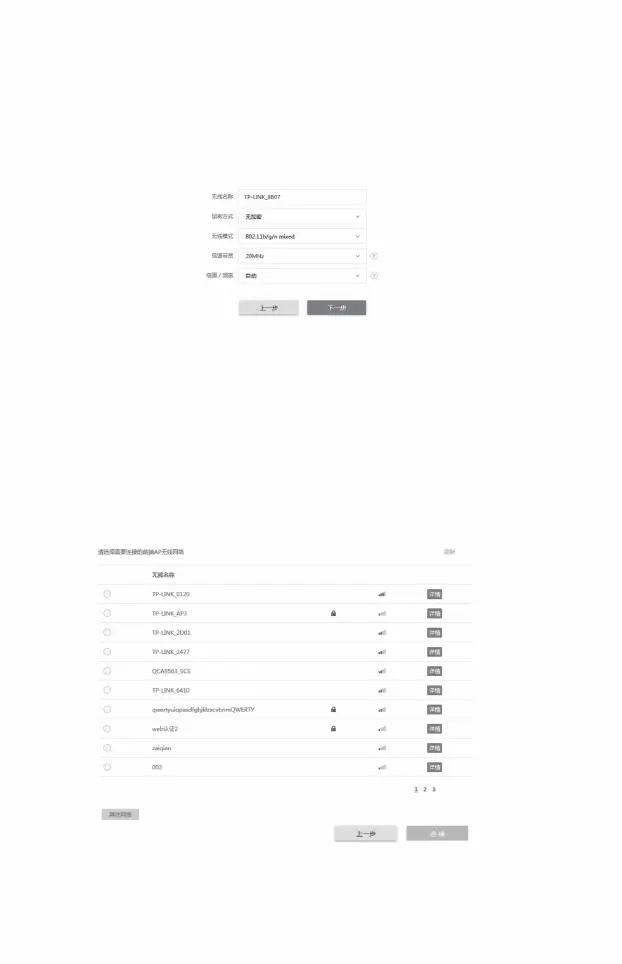
6) Client settings:
7) AP settings: Click the <Next> button
• Encryption algorithm: Select "WPA-PSK/WPA2-PSK" •
PSK key: Enter the PSK key of the Access Point •
Distance setting: Enter the distance from the Access Point. If it is difficult to measure
accurately, it is recommended to enter a minimum integer
larger than the distance . Click the <Next> button
• SSID of the remote AP: Click the <Scan> button and select the Access Point
8) Complete: Click the <Finish> button
SSID and click the <Connect> button
Accurate
measurement • Click the <Next> button
,
16
• PSK key: Set a password for your wireless network, requiring 8 ~ 6 4 hexadecimal
characters or 8 ~ 63 ASCII characters •
Distance setting: Enter the distance between the AP and the farthest access device . If
difficult suggest entering a minimum integer greater than the distance
Machine Translated by Google




 To Next Page