8 2.5Gbps RJ45 ports
Cloud Management Switch Installation Manual
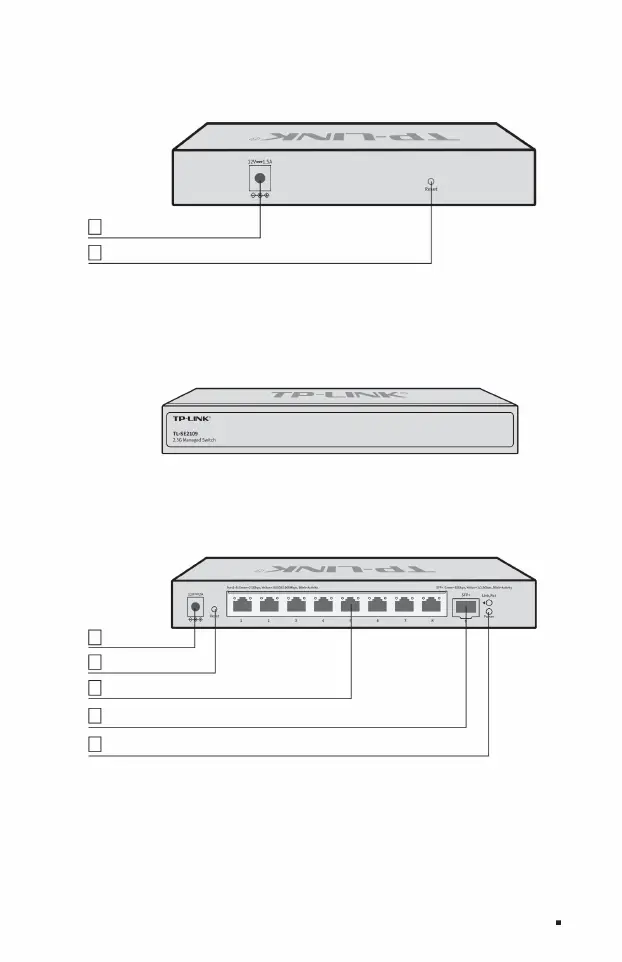
Reset button 2
1 indicator light
1 10Gbps SFP+ port
Power interface
Power interface
Reset button
Product Introduction 03
2
6
6
3
4
ÿ TL-SE2109
The rear panel of TL-SE2106 is shown in Figure 1-3.
The rear panel of TL-SE2109 is shown in Figure 1-5.
The front panel of TL-SE2109 is shown in Figure 1-4.
Figure 1-5 Schematic diagram of the rear panel of TL-SE2109
Figure 1-3 Schematic diagram of the rear panel of TL-SE2106
Figure 1-4 TL-SE2109 front panel diagram
Machine Translated by Google


 To Next Page