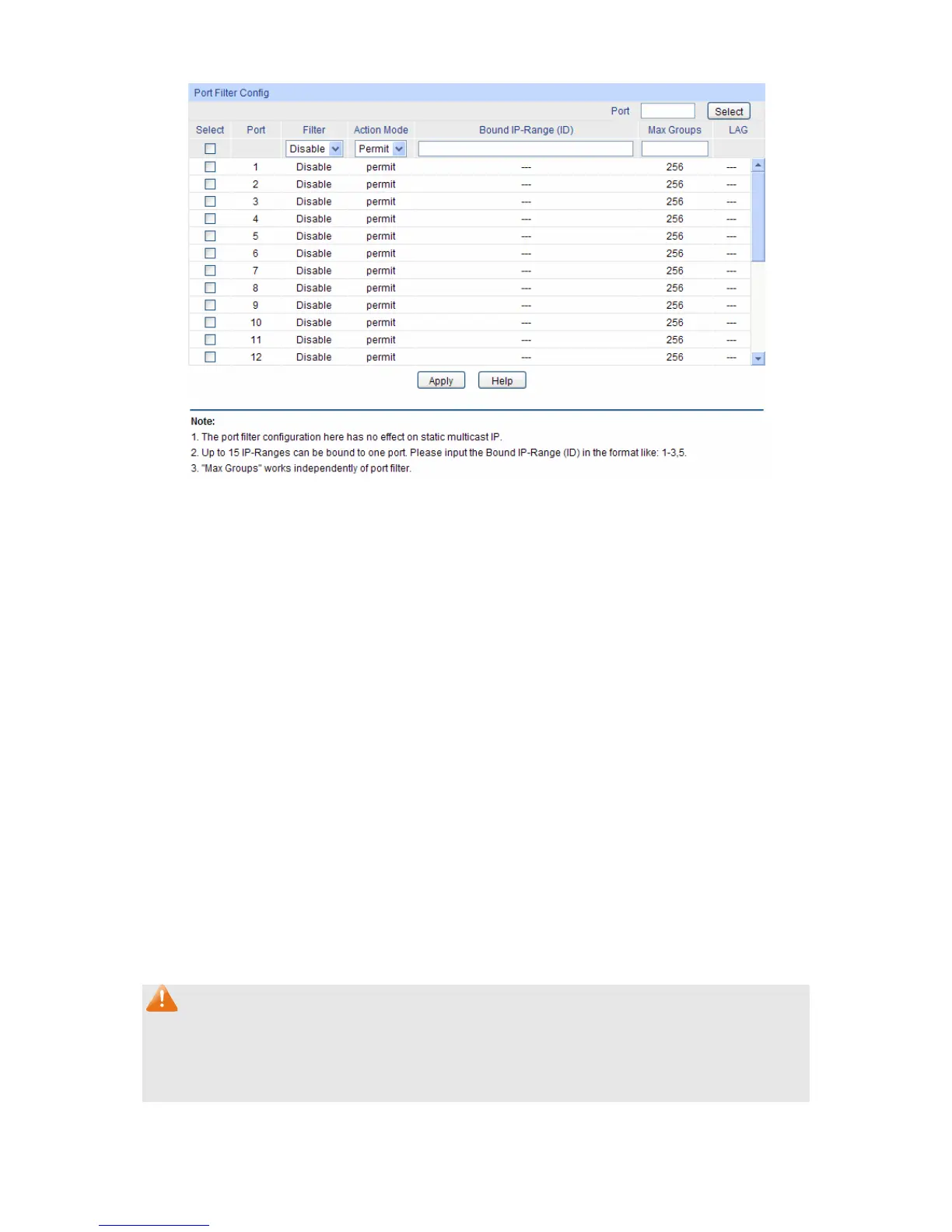
Figure 8-11 Port Filter
The following entries are displayed on this screen:
Port Filter Config
Port Select: Click the Select button to quick-select the corresponding port
based on the port number you entered.
Select: Select the desired port for multicast filtering. It is multi-optional.
Port: Displays the port number.
Filter: Select Enable/Disable multicast filtering feature on the port.
Action Mode: Select the action mode to process multicast packets when the
multicast IP is in the filtering IP-range.
Permit: Only the multicast packets whose multicast IP is in
the IP-range will be processed.
Deny: Only the multicast packets whose multicast IP is not
in the IP-range will be processed.
Bound IP-Range (ID): Enter the IP-rang ID the port will be bound to.
Max Groups: Specify the maximum number of multicast groups to prevent
some ports taking up too much bandwidth.
LAG: Displays the LAG number which the port belongs to.
Note:
1. Multicast Filter feature can only have effect on the VLAN with IGMP Snooping enabled.
2. Multicast Filter feature has no effect on static multicast IP.
3. Up to 15 IP-Ranges can be bound to one port.
Configuration Procedure:
95










 To Next Page