End T
ime: Set the end time of the time-slice.
Time-Slice Table
Index: Displays the index of the time-slice.
Start Time: Displays the start time of the time-slice.
End Time: Displays the end time of the time-slice.
Delete: Click the Delete button to delete the corresponding time-slice.
11.2.3 PoE Holiday Config
Holiday mode is applied as a different secured access control policy from the week mode. On this
page you can define holidays according to your work arrangement.
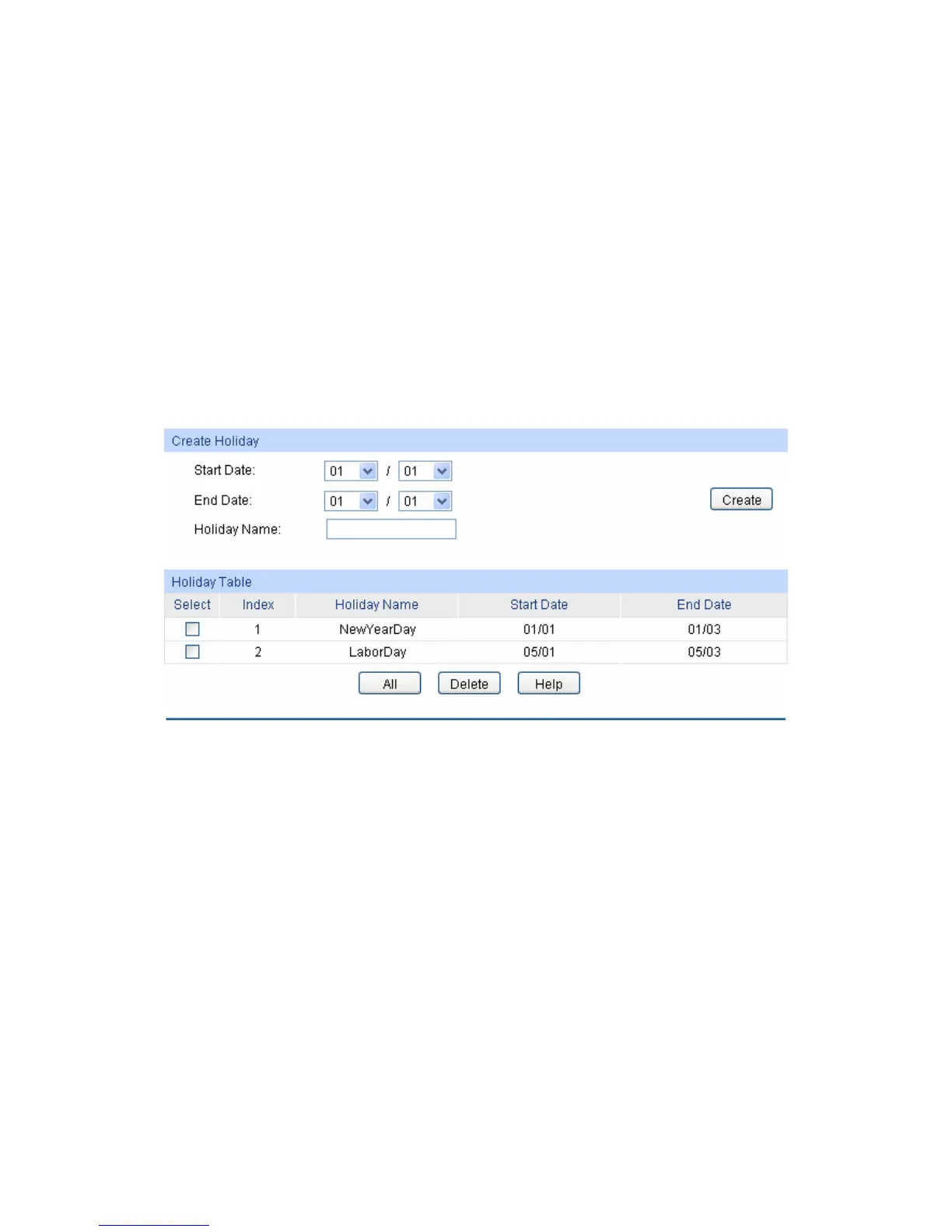
Choose the menu PoE→PoE Time-Range→PoE Holiday Create to load the following page.
Figure 11-5 Holiday Configuration
The following entries are displayed on this screen:
Create Holiday
Start Date: Specify the start date of the holiday.
End Date: Specify the end date of the holiday.
Holiday Name: Enter the name of the holiday.
Holiday Table
Select: Select the desired entry to delete the corresponding holiday.
Index: Displays the index of the holiday.
Holiday Name: Displays the name of the holiday.
Start Date: Displays the start date of the holiday.
128










 To Next Page