Port: Displays the port numbe
r.
Untagged: The port will be an untagged member of the specific VLAN if you
select it.
Tagged: The port will be an tagged member of the specific VLAN if you
select it.
NotMember: The port will not be a member of the specific VLAN if you select it.
PVID: Here you can change the PVID of the specific port.
LAG: Displays the LAG to which the port belongs to.
6.2 Application Example for 802.1Q VLAN
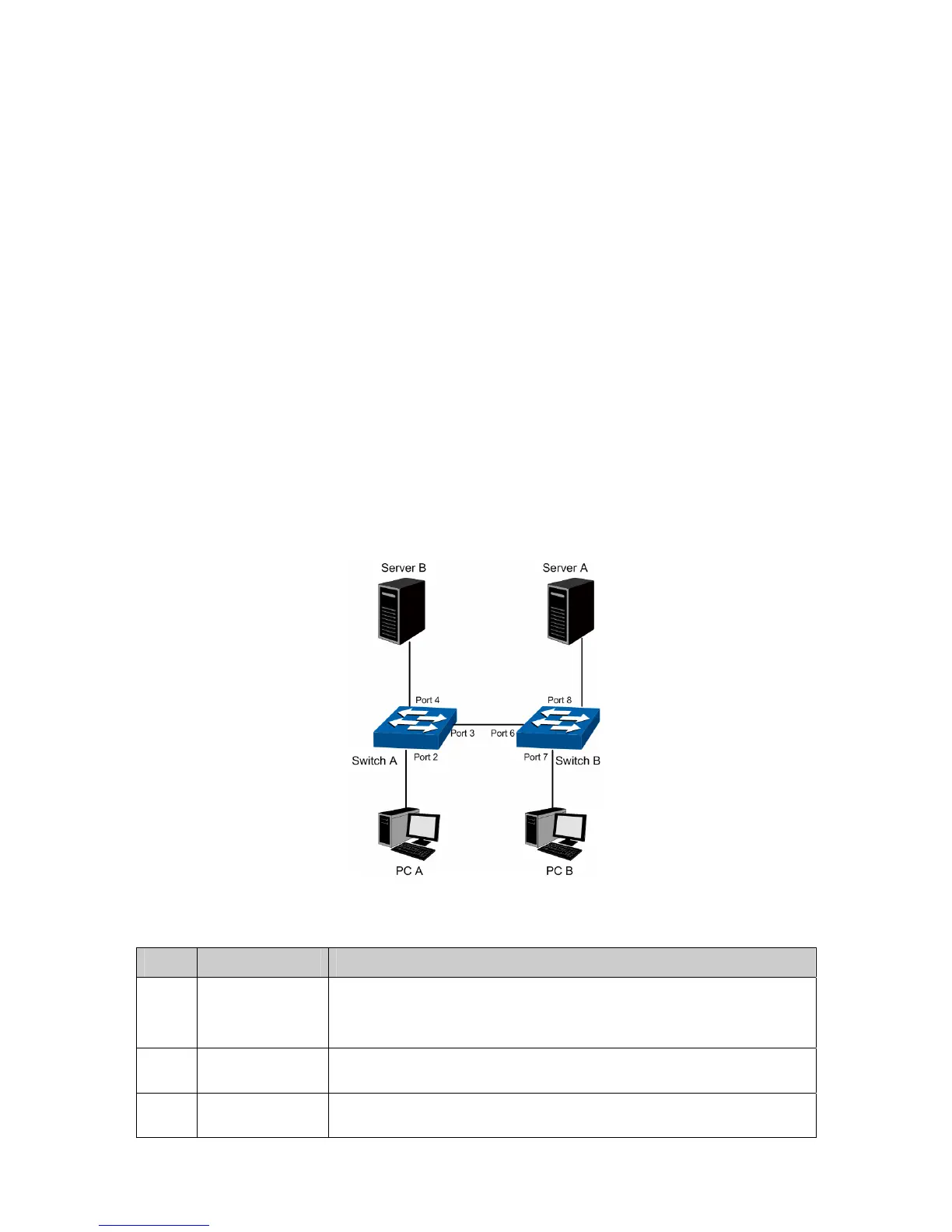
Network Requirements
Switch A is connecting to PC A and Server B;
Switch B is connecting to PC B and Server A;
PC A and Server A is in the same VLAN;
PC B and Server B is in the same VLAN;
PCs in the two VLANs cannot communicate with each other.
Network Diagram
Configuration Procedure
Configure Switch A
Step Operation Description
1 Configure the
Link Type of the
ports
Required. On VLAN→802.1Q VLAN→VLAN Config page, configure
the link type of Port 2, Port 3 and Port 4 as Untagged, Tagged and
Untagged respectively
2 Create VLAN10 Required. On VLAN→802.1Q VLAN→VLAN Config page, create a
VLAN with its VLAN ID as 10, owning Port 2 and Port 3.
3 Create VLAN20 Required. On VLAN→802.1Q VLAN→VLAN Config page, create a
VLAN with its VLAN ID as 20, owning Port 3 and Port 4.
59










 To Next Page