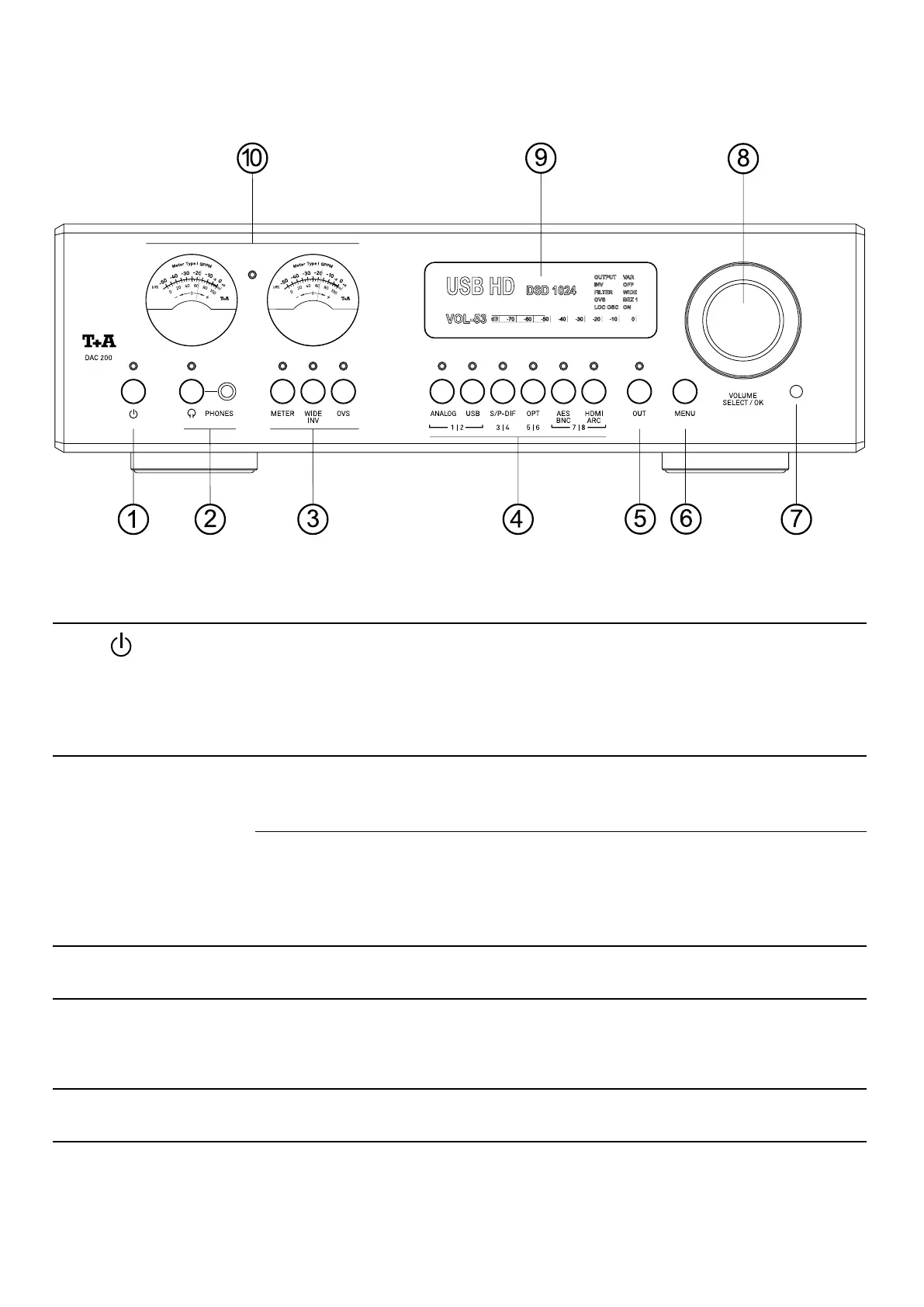
Controls and functions
1
On / Off switch
A brief press on this button switches the device on and off. When the unit is switched
on the indicator LED above the button lights up.
Please note the hints in the chapter Notes on energy saving on page 61.
2
Headphones
Balanced Pentaconn* jack socket 4.4 mm for connecting stereo headphones with an
impedance of at least 16 ohms.
The output can be switched on and off by a brief press on the button.
j
The T+A original accessories range has special high-quality adaptors for connecting
headphones with an unbalanced 6.3 mm jack plug or a balanced XLR 4-pin connector.
3
Function buttons
METER
A brief press on this button toggles between the meter 0 modes. If necessary, press
the button repeatedly to select the desired meter mode.
WIDE
INV
A brief press turns on the WIDE mode (LED lights up). The 60 kHz low-pass lter of
the analog output stage is switched off and the signal can be reproduced with full
bandwidth up to 120 kHz.
A long press inverts the phase of the analog outputs.
OVS By pressing this button repeatedly, the different oversampling types can be selected
in sequence.
*„Pentaconn“ is a registered trademark of NIPPON DICS Co, Ltd. and complies with RC-8141C JEITA standard.
46


 To Next Page