Hygiene Equipment
Designed for People
29
User instructions
TR 900A (Autofill)/-SS, -C, -CW - Showering
- Grab the Shower handle and hold it over the tub.
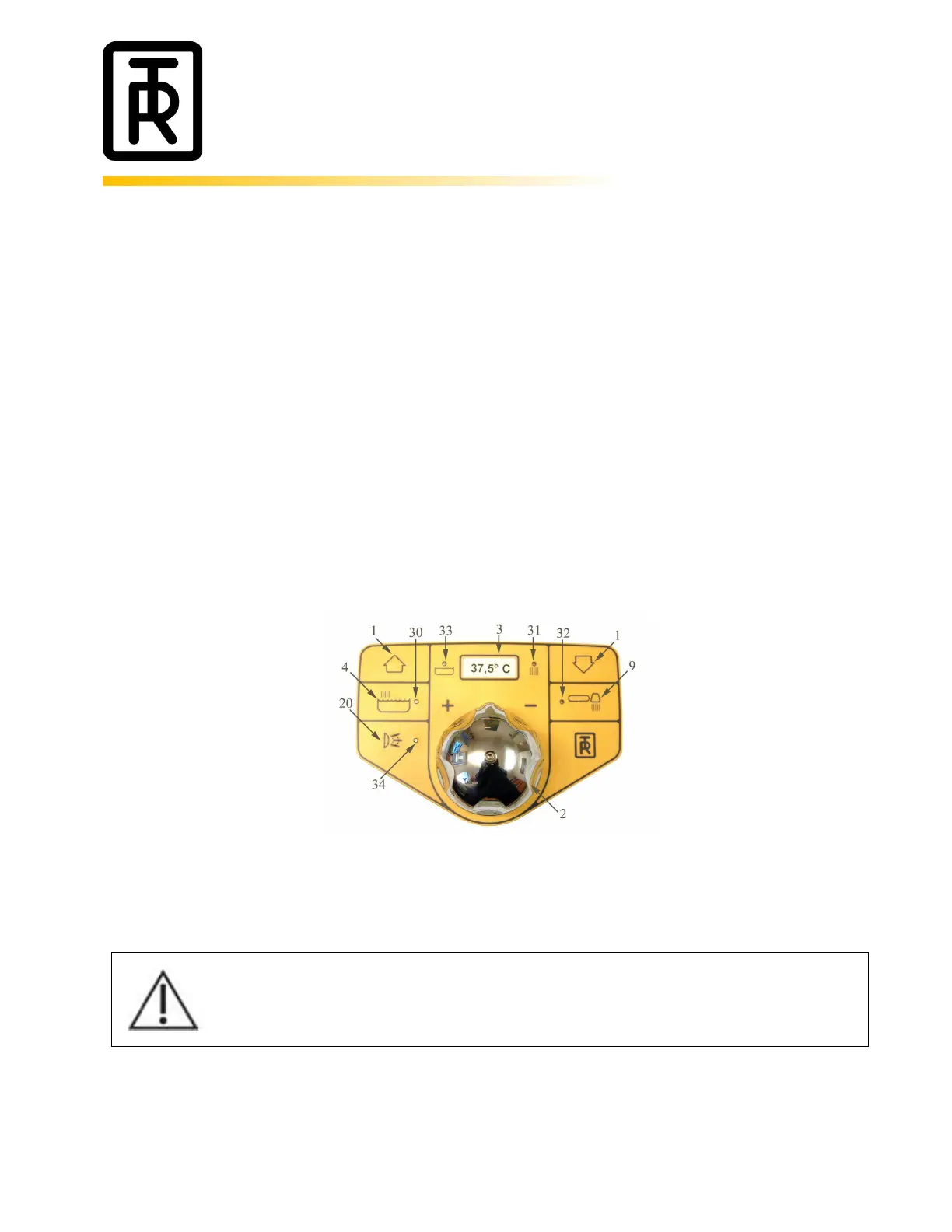
- Start the shower by pressing the showering button (9). The Green light (32) will be lit.
- The Red “running water” light (31) indicates that the temperature shown on the digital
thermometer is the showering temperature.
- If necessary, adjust the water temperature with the temperature adjustment knob (2) on the
panel. Maximum outlet temperature from the thermostatic mixer is factory pre-set to 43°.
- Shut the shower OFF by pressing the shower button (9). The Green light and the Red light will be
switched off at the same time.
- The water flow for the shower can be adjusted with the ball valve on the showering unit inside the
panel.
Always check the water temperature by hand or a bath thermometer before lowering the
patient into the bath. This to prevent patients from being scalded or shocked by hot or cold
water.



 To Next Page