13
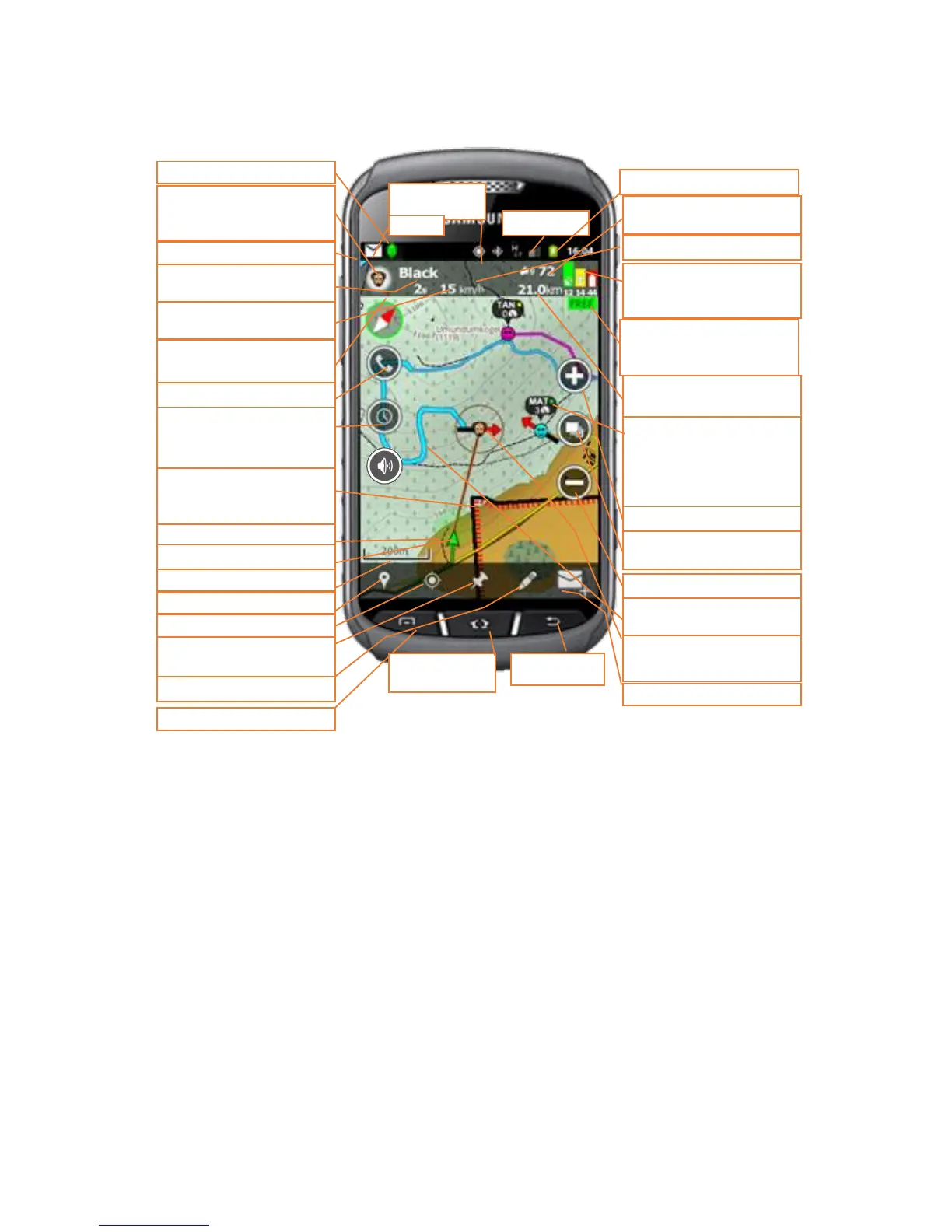
Map view – Tracker display
Tracker Live™ status icon
Barking frequency of the dis-
played target
Position details: GPS status,
GSM-status and battery.
target’s information
Indicator of map loading %
=downloading, 99 = free
maps
Target’s distance to my own
position
Zoom-in (change layer),
** zoom at the same level
Speed of the displayed target
Select the map style – ter-
rain, road, nautical
Other target + basic info:
Name abbrev, position age
(green<1min, yellow1-5min,
red:>5min), speed, barking
frequency
Select as a displayed target
Zoom out (change layer),
** zoom out
Tracks of the dog and the
barking places
Main menu or Android
menu button
Icon of the displayed target
centre to the target
** Ask for single SMS position
Targets name
Go to target’s menu
Position age of displayed tar-
get
Compass and compass ca-
libration mode
Set "real time tracking" OR if
tracking a friend send an in-
stant message
My position and direction
Range boarders which you
can share with friends or
groups
Set your own position or add
and a waypoint
Drawing and measuring tool
Displayed target and its di-
rection
Red italic = command/function. ** = long press
Use in back-
ground - home


 To Next Page
 Loading...