15
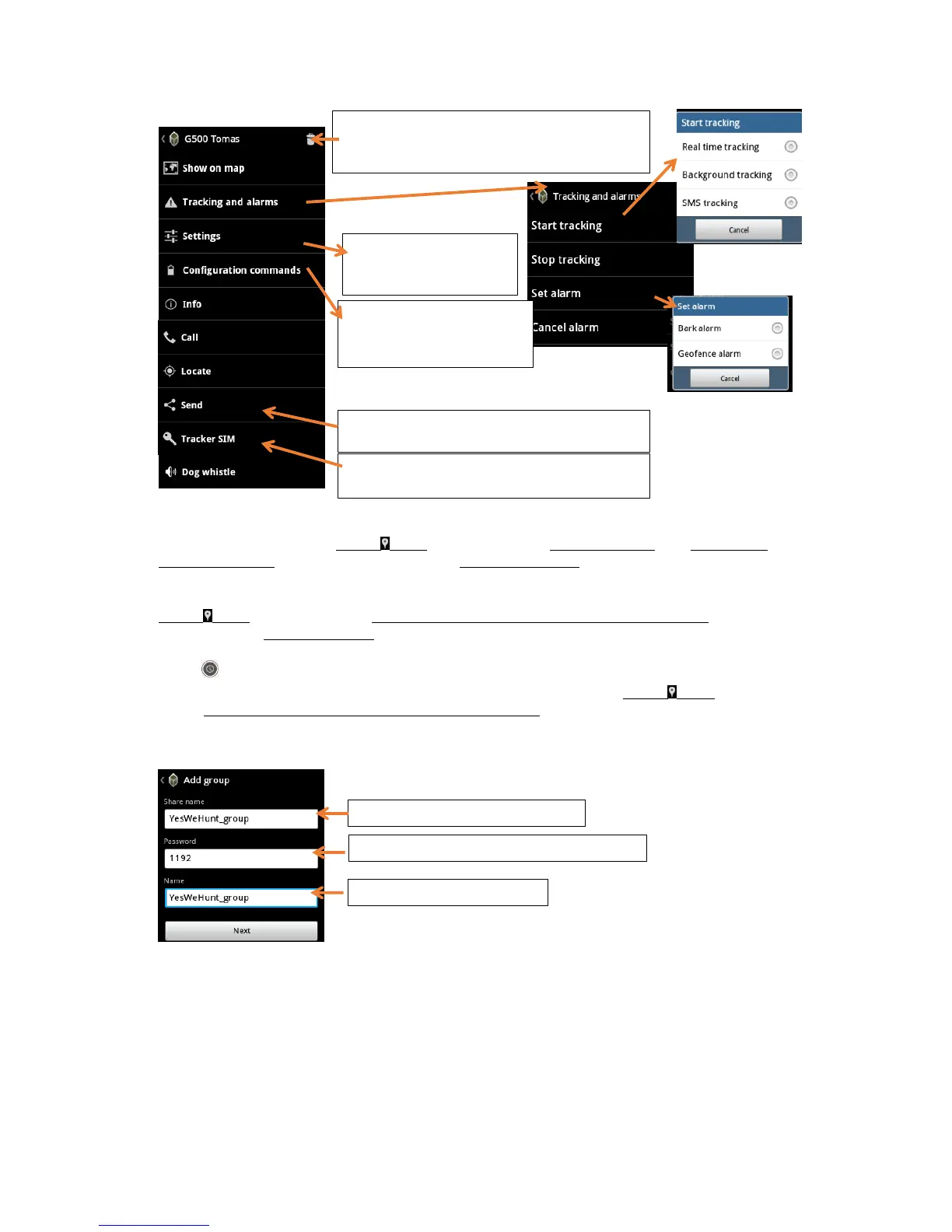
Dog’s menu
Tracking settings
Background Tracking (BGT) is always on, when the collar is On. To start or quit Background Tracking
and to set th e interval, go to Targets > ”All” or (Name of the dog)> GPS Locators > (Name of the dog) >
Tracking and alarms. Select ”Start tracking” and then Background Tracking. You don’t need to switch off the
BGT before you turn off the collar.
Real Time Tracking (RTT) has always a certain period and length. To initiate Real Time Tracking, go to
Targets > ”All” or (Name of the dog)> GPS Locators > (Name of the dog) > Tracking and alarms. Select ”Start
tracking” and then Real Time Tracking, set duration and interval. Wait a moment, and the dog starts “running”
on your screen. The short button for the real time tracking appears on the left side after touching the
screen .
In SMS tracking the position data is sent periodically to the hunter. Choose Targets > ”All” or (Name of
the dog)> GPS Locators > (Name of the dog) > Tracking and alarms. Select ”Start tracking” and then “SMS track-
ing”. Set the amount and the interval of the wanted tracking responses.
Group function
Delete the target. You will be asked in the next
step, if you want to unregister the target from
Tracker Live or just delete from your local targets.
Restart the device, set A-GPS
(update if expiring), GPS/ GSM
power and barking volume


 To Next Page
 Loading...