17
Replay – function
The sophisticated development of Tracker for Android allows you replay your hunt on any day again. Just
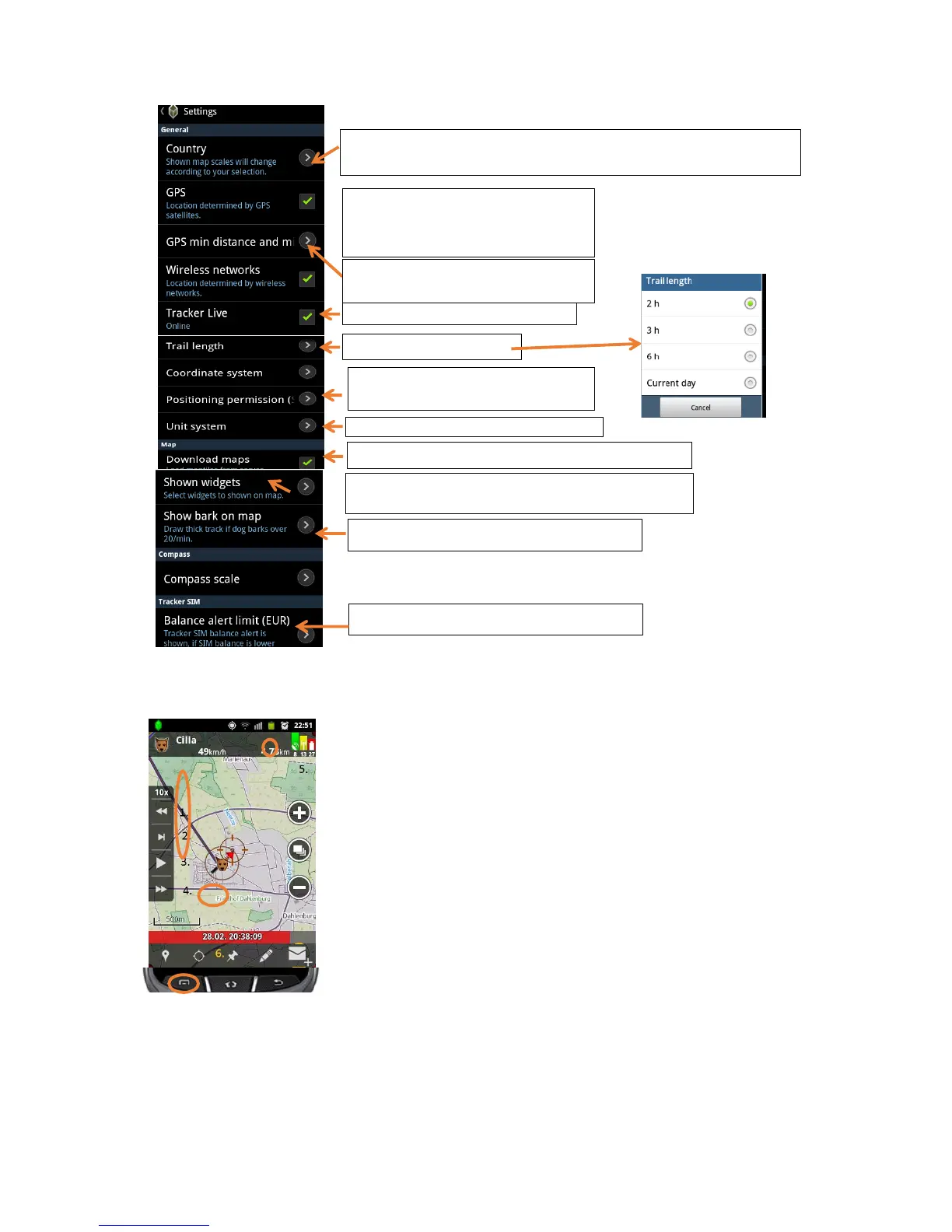
click on the function “Replay” in the Main menu, select time & date and desired
targets and you can experience your hunt again.
You can directly replay and show your friends any hunt you have done.
1. Moves 1hour backwards
2. Moves 1 Minute forwards (by pressing for 2 seconds it changes to 1 min
backwards
3. Play (by pressing 2 seconds you can select replay speed)
4. Moves 1 hour forwards
5. Replay statistics
6. Add a reset point (statistics starts to count from 0)
Tracker Live™ - active / deactivate
Location via
1. A-GPS wireless networks
2. GPS-satellites
Updating frequency of your position to
Tracker Live™
Trail lenght of the track
Allow or deny SMS position replies to
requests from other users
Show compass, coordinates, or scale bar on the main
display
Make barking visible on the track (thick line)
Set the Tracker SIM balance alert
Allow or deny downloading of maps
Changing the country will enable different map layers (from local providers
like IGN, BKG…)
Change the metric systems to e.g. mph


 To Next Page
 Loading...