9
Tracker for Android™ icon was created into your mobile phone menu during the installation.
The location of the icon varies depending on your phone model. Find the icon and start the software by
clicking on the Tracker for Android™ icon.
Step 2: Registering the software
You can active a Try & Buy license if you haven’t purchased the license so far. If you already purchased the
license, insert the license code.
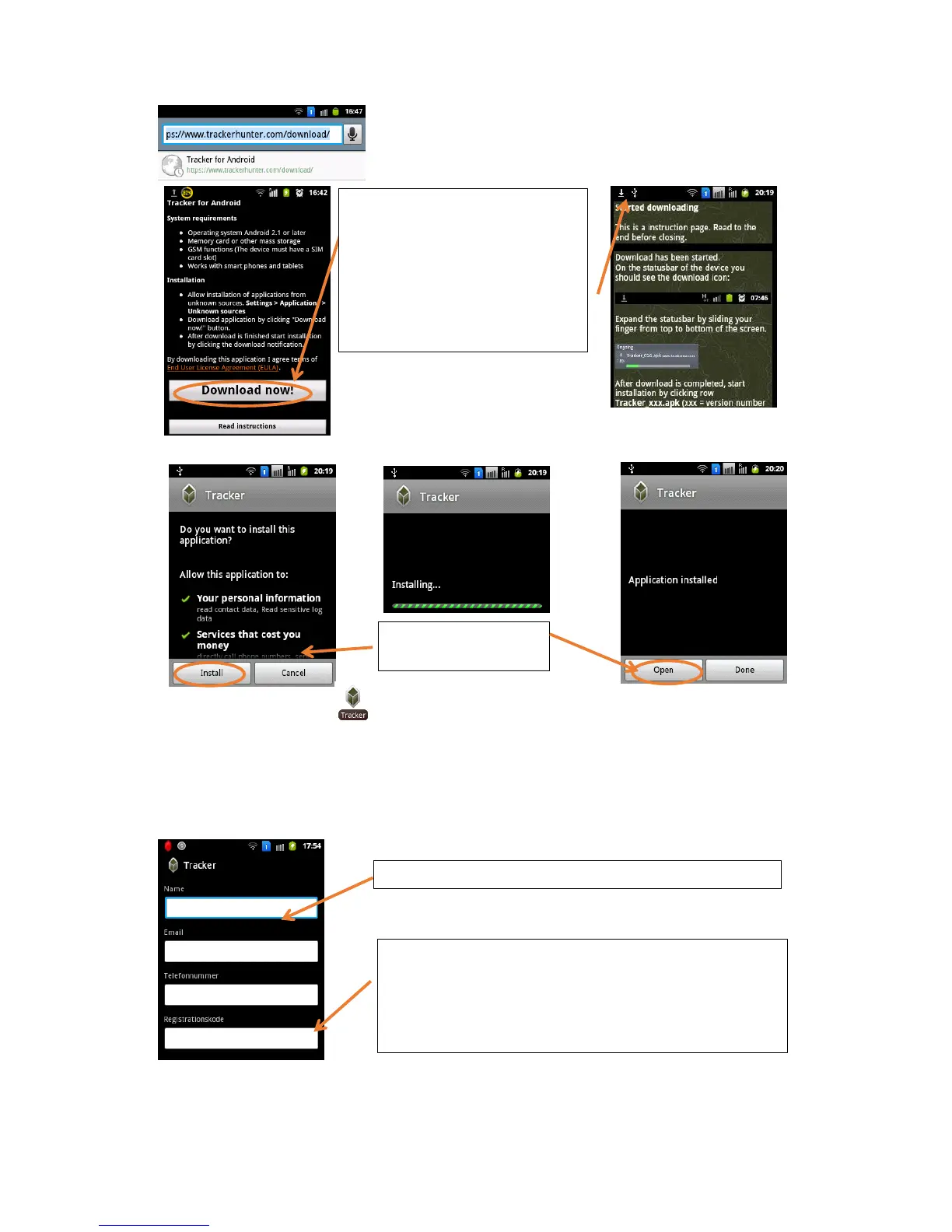
1. Click on download
2. Expand then the status bar by slid-
ing your finger from the top to bot-
tom.
3. Click on the App after appears
“download completed”
4. If you have trouble please click on
“read instructions”
Fill in your name and contact data, which are required.
Registration code: The registration code for installing the soft-
ware is marked on the sticker for the package. In electronic de-
liveries, it is in the delivery mail or on the webpage. Send the
registration code by selecting the left soft key (left selection key).
NOTE! The code is case-sensitive. You may install the Try
& Buy version, which is valid for two weeks.
Confirm the installation
and open the application


 To Next Page
 Loading...