8
Getting started with Tracker for Android™
Please follow the instructions carefully when installing your new application. A GPRS connection is re-
quired to install this application and download maps. Ensure that you have a suitable GPRS data plan from
your operator.
Compatibility
Tracker for Android™ runs in certain Android based mobile phones.
You can check the up-to-date list of compatible phones from www.trackerhunter.com/android Choose Prod-
ucts > Tracker for Android, scroll down and check Compatible mobile phones.
Check that your mobile is connected to Internet and that it can connect to GPS satellites. You can use ei-
ther the GPS built in the mobile phone or an external GPS device that connects to your mobile phone with
Bluetooth connection.
Check that the date and time on the phone are correct. We recommend that you switch your
phone to use automatic Network operator time.
Important settings before downloading Tracker for Android from other sources then Google Play
Store:
allow downloading from unknown sources => Applications > Unknown sources
In case the app is not available in Google Play Store in your country and you have troubles by
installing Tracker for Android with Android 4.x, please download an app called “Apk installer”
from Google Play Store
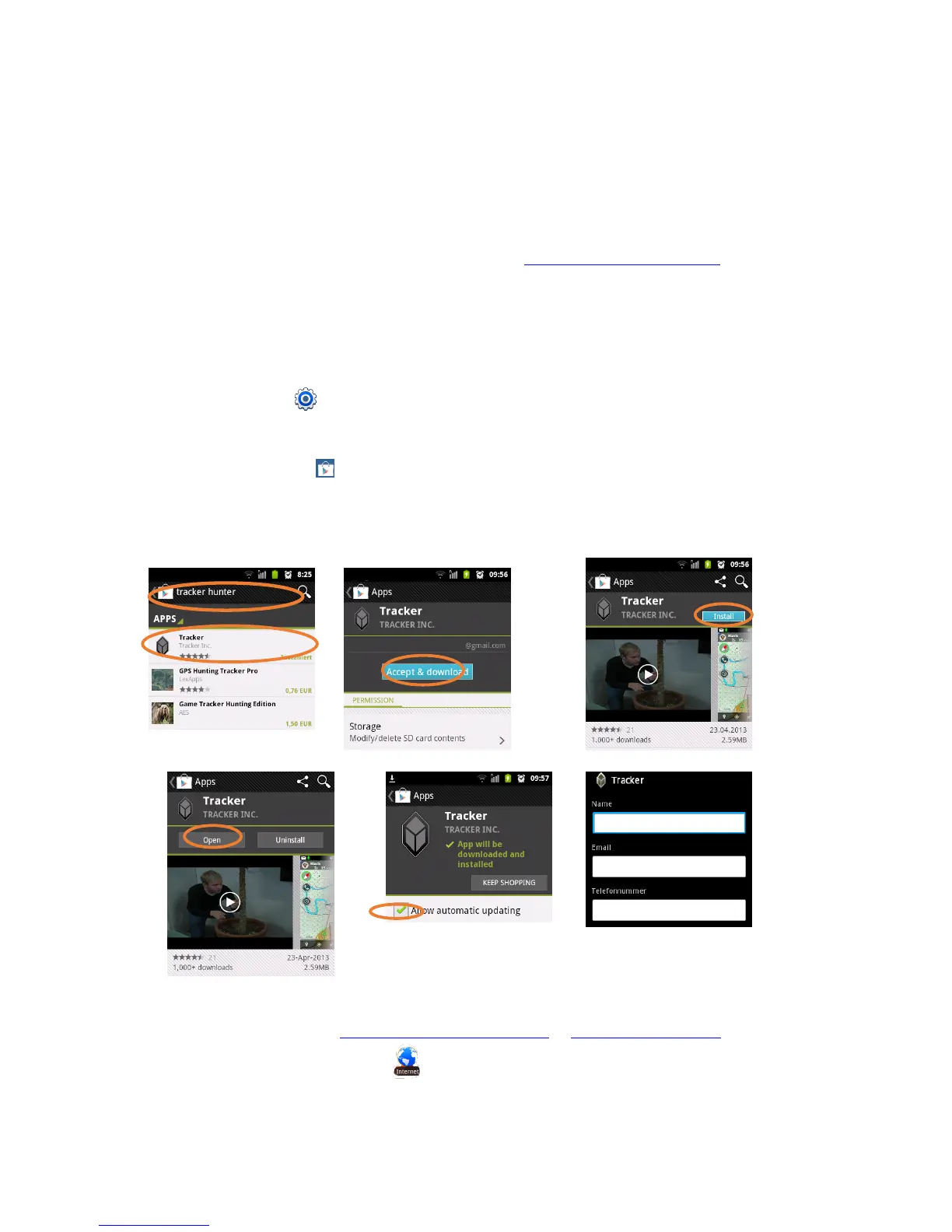
Step 1: Downloading and installing the application
Downloading the software from Google Play
Downloading the software without Google Play account
Access the installation page at www.trackerhunter.com/download or www.tracker.fi/download by using the
mobile phone’s Internet browser, OR send an SMS to +358400112236 with a text: HUNTER


 To Next Page
 Loading...