MS-SVU50A-TH8
Control
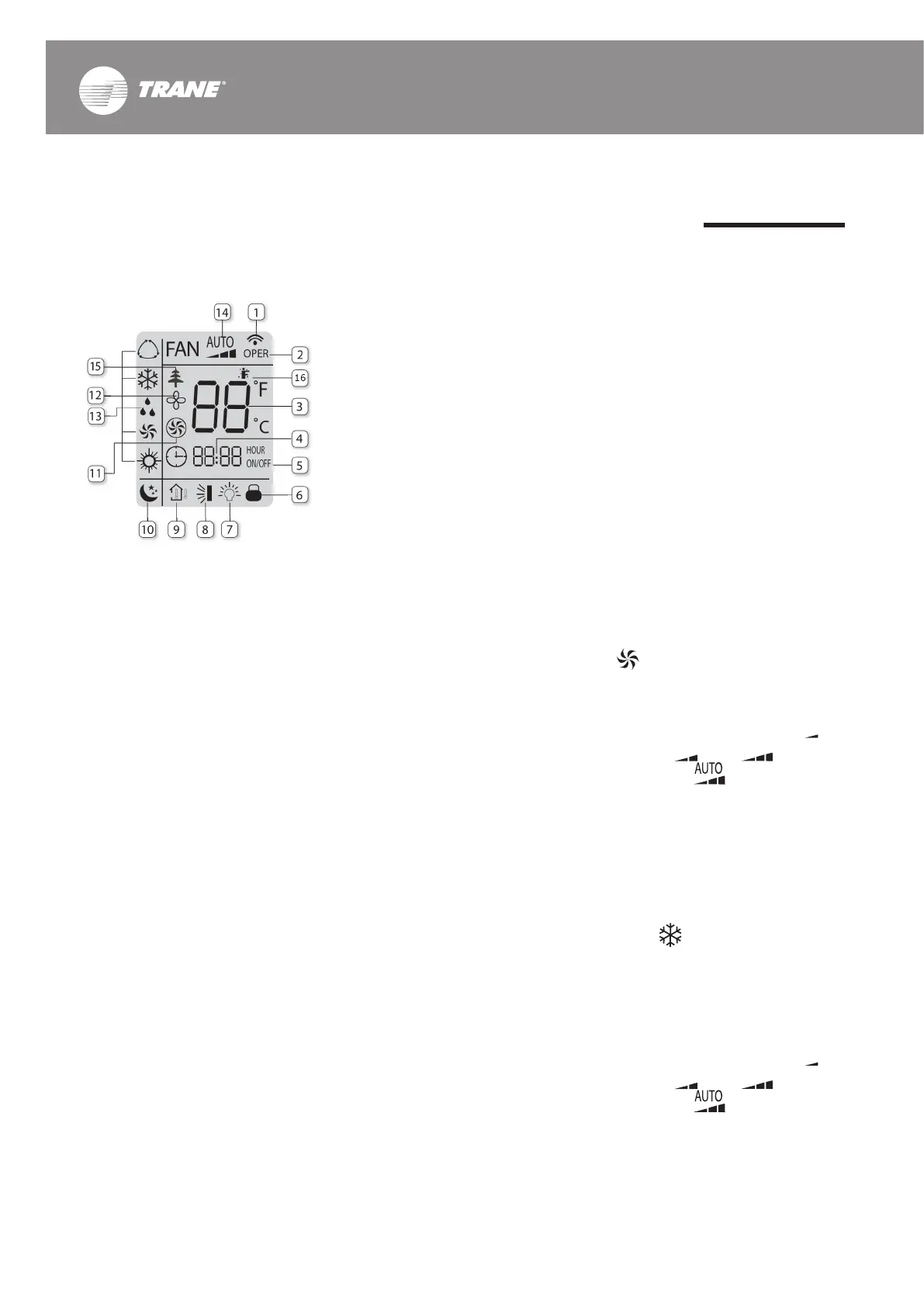
Icons on Display Screen
1. Signal Sender
Always displays when the
signal is sent from the remote
control to the indoor unit.
2. Operating Status of FCU
(OPER)
Displays when the unit is under
operation.
3. Temperature
Displays the setting temp.
4. Clock
Displays the setting time.
5. Automatic Timer ON/OFF
Displays when automatic timer
is operated.
6. Remote Control Lock
Displays when a remote control
lock is operated.
7. Temp. Light at FCU
Displays when the temp. is set
to display at the front panel.
8. Automatic Up & Down Swing
Displays when the cool air is set
to distribute automatically.
9. Temp. Display Type
Identies the setting temp. or
the room temp. to show on the
remote control display
10. Sleep Mode
Displays when the unit is under
SLEEP MODE.
11. Turbo Mode
Displays when the unit is under
TURBO MODE.
12. Dehumidication Mode
Displays when the unit is under
dehumidication mode after
turn the unit off.
13. Operation Mode
Displays the operation status:
Auto, Cool, Dry and Fan.
14. Fan Speed Mode
Displays the selected fan speed
level: AUTO, LOW, MED & HIGH.
15. PLASMA System
Displays when the PLASMA air
ltration system is under
operation.
16. I FEEL Function
Displays when I FEEL function is
under operation.
How to Select an Operation
Mode
FAN Mode
• Press ON/OFF buttom to display
the last set temp.
• Press MODE button until this icon
is displayed.
• Press FAN button then the
display will show these icons
which are up to speed: Low ,
Medium , High and
Automatic
COOL Mode
• Press ON/OFF buttom to display
the last set temp.
• Press MODE button until this
icon is displayed.
• Press + or - to set the required
temp. in between 16-30 °C.
• Press FAN button then the
display will show these icons
which are up to speed: Low ,
Medium , High and
Automatic



 To Next Page