7MS-SVU50A-TH
Control
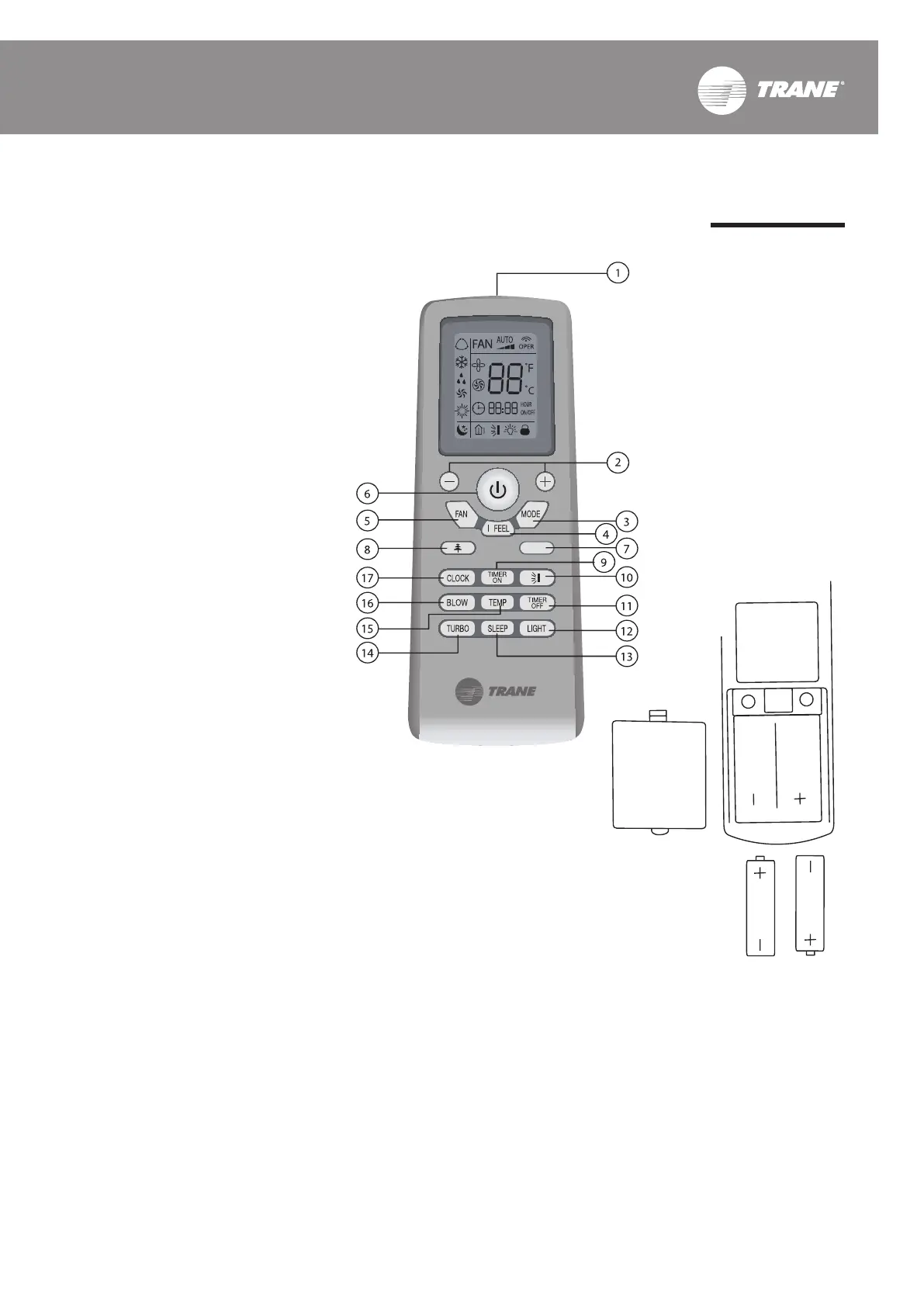
Name and Function of the Buttons
1. Infrared signal sender
Send the infrared signal to an
indoor unit.
2. TEMP
+ Press to increase temp.
- Press to decrease temp.
3. MODE
Press to select operation mode:
Automatic (AUTO), Cooling
(COOL), Dehumidifying (DRY)
and Blow (FAN).
4. I FEEL
Press to select I FEEL function
for automatic temperature
control.
5. FAN SPEED
Press to select the fan velocity
level.
6. ON/OFF
Press to turn on/off operation.
7. Blank button
A unit will NOT respond.
8. PLASMA
Press to on/off the PLASMA air
ltration operation.
9. TIMER ON
Press to set the automatic
turn-on time.
10. SWEEP
Press to distribute the cool air
by automatically vertical
direction.
11. TIMER OFF
Press to set the automatic
turn-off time.
12. LIGHT
Press to turn off the LED display
light on the indoor unit.
13. SLEEP
Press to automatically control
temperature while sleeping.
14. TURBO
Press to accelerate the cooling
performance.
15. TEMP
Press to select for different
temperature display e.g set
temp., room temp.
16. X-FAN
Press it prior turn off the unit
to dry the evaporator coil after
the unit operation stops.
17. CLOCK
Press to set the time of the
remote control clock.
Procedures of Battery Change
1. Remove the battery lid at the
remote control’s back by sliding.
2. Insert 2 pieces of the alkaline
dry batteries AAA.
3. Close the lid back. Should
remove the batteries when not
using an air conditioner for long
time.



 To Next Page