16 BAS-SVX10F-EN
Installation and Configuration: Display Sensor
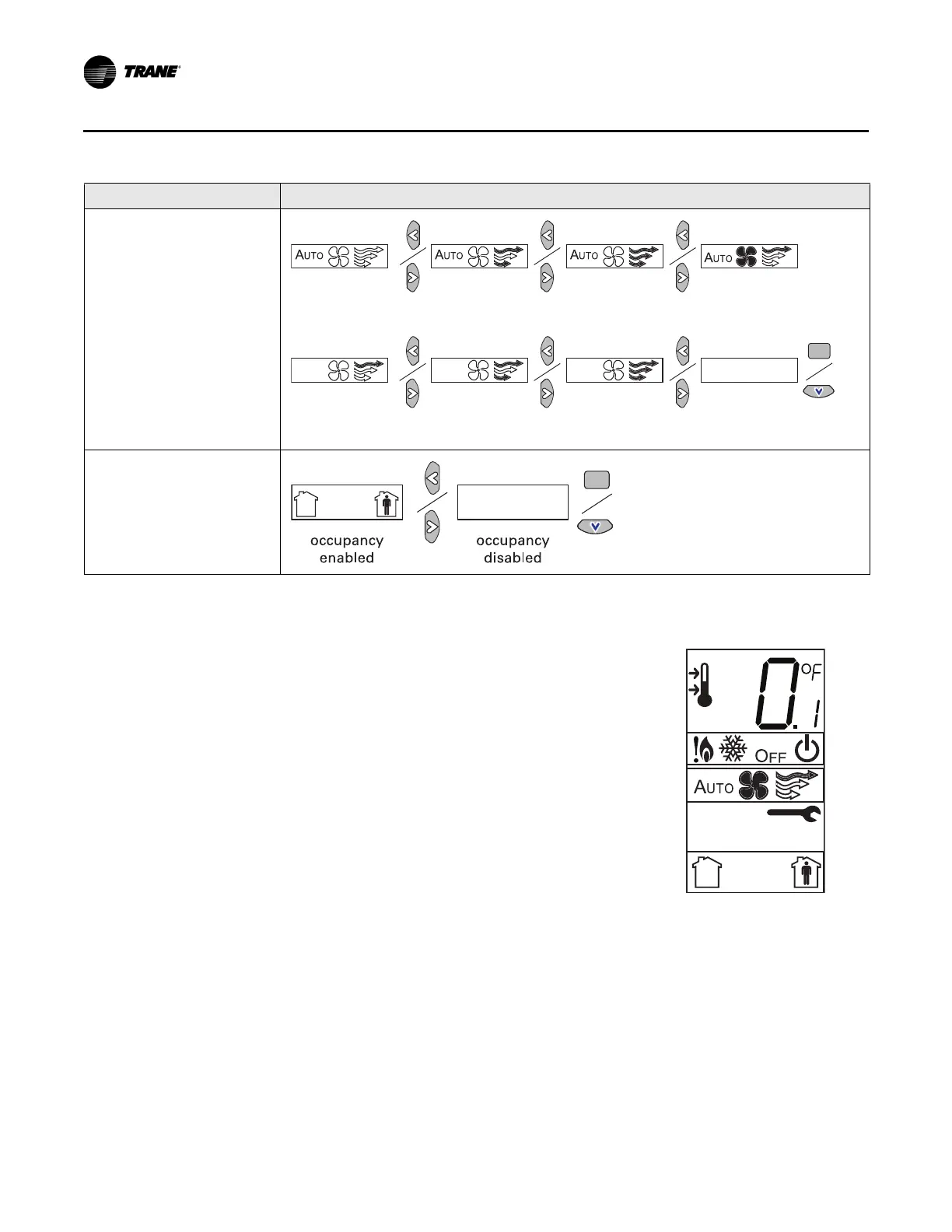
1. Review the display to ensure that you have selected the correct configuration options.
2. To return the display to operating mode, press the configuration button (see step 1, p. 14).
Note: The sensor will revert to operating mode if no buttons are pressed for 10 minutes.
Fan
Note: Not all fan options are
available for all systems.
Occupancy (timed override)
Setting Configuration options
auto/off/low
med/high
auto/off/
low/high
auto/off
off/high (on)
off/low/high off/low/
med/high
no fan options
enabled
auto/high (on)
The example shows a display that has been configured for:
• Dual setpoint
• Temperature units (Fahrenheit)
• Temperature resolution to tenths of a degree
• System settings: Emergency Heat, Heat, Cool, Off
• Fan settings: Auto or On
• Occupied/unoccupied option enabled


 To Next Page