13
* If the keypad is locked and a diagnostic occurs,
the alarm light will flash if applicable but the
diagnostic screen will not be displayed until the
keypad is unlocked.
** Once the keypad is locked the “PREVIOUS” and
“ENTER” key need to be pressed simultaneously
to unlock the keypad.
Default = Disable
The optional under/over voltage transformer is
needed for this feature.
Default = 460
Selections = 200, 220, 230, 346, 380, 415, 460, 500,
575.
Default = 120 seconds
select = 30 to 120 seconds
The time period between power-up or stop and the
initiation of the compressor start sequence, when
there is a call for cooling.
Default = Disable
[UNITS]
SI
English
[LANGUAGE]
English / Français / Espanol / Nippon / Italiano /
Deutsch / Nederlands
Default = 1
Select = 1 to 12
Default = Disable
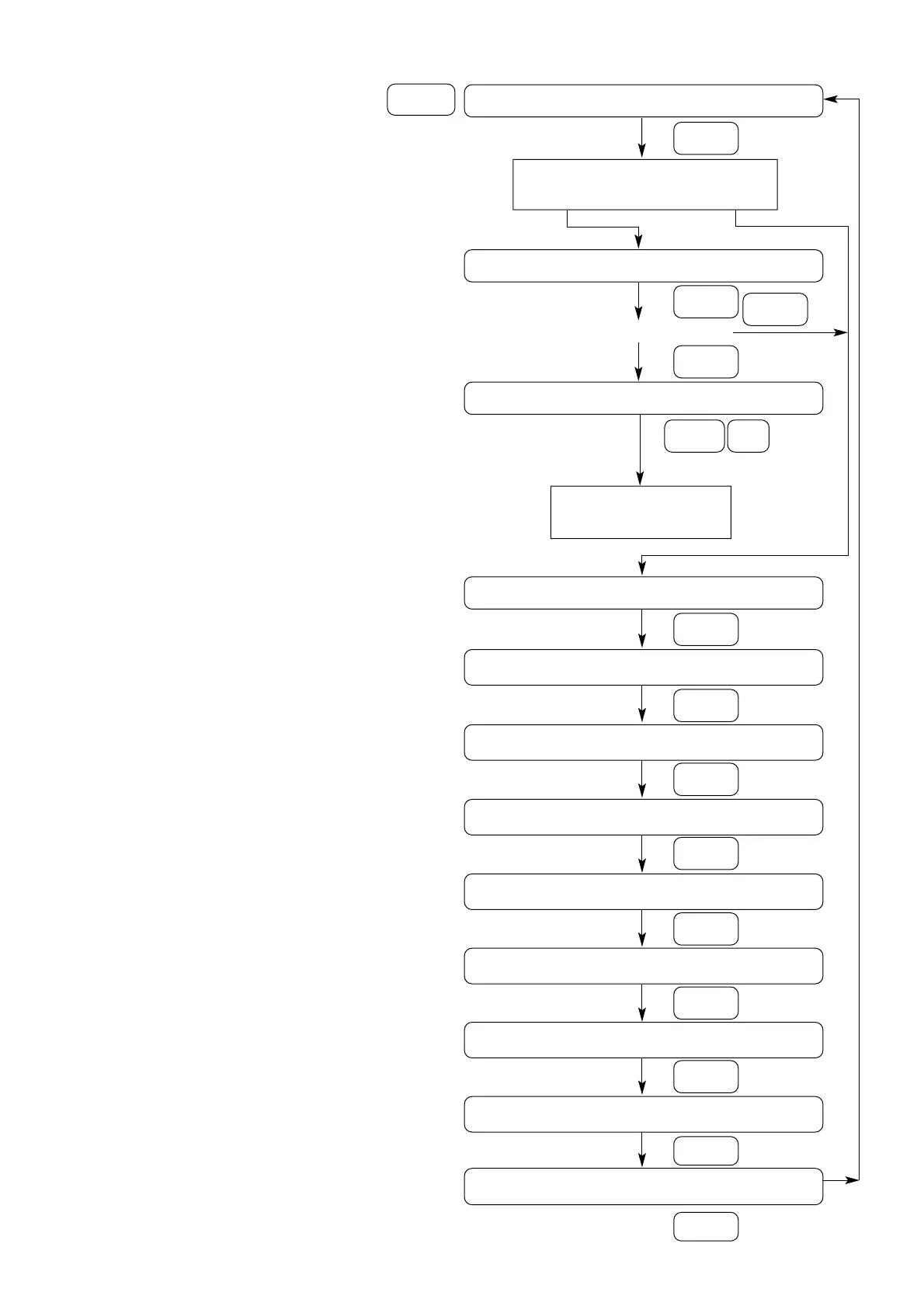
Service settings
Service
settings
*
Service settings, enable and units
“Press (Next) (Previous) to continue”
Next
Status of keypad/display lock feature
(Service setting menu)
Enable Disable
“Press (Enter) to lock display and keypad”
password will be required to unlock
Next
Next
Depress either Enter or Next
Enter
***DISPLAY AND KEYPAD ARE LOCKED ***
*** ENTER PASSWORD TO UNLOCK ***
** Previous Enter
Display will return to
“Chiller operating mode”
under chiller report
Under/Over voltage protection [Disable/Enable]
“Press (+) (-) to change setting”
Next
Unit line voltage [VOLT] V
“Press (+) (-) to change setting”
Next
Restart inhibit time XXX SEC
“Press (+) (-) to change setting”
Next
Balanced compressor start and hours [Disable/Enable]
“Press (+) (-) to change setting”
Next
Display units [UNITS]
“Press (+) (-) to change setting”
Next
Language [LANGUAGE]
“Press (+) (-) to change setting”
Next
** Programmable relay setup XX
“Press (+) (-) to change setting”
Next
External circuit lockout [Disable/Enable]
“Press (+) (-) to change setting”
Next
*** Password required for further access
“Please enter password”
Next



 To Next Page