ARTC-SVX013A-EN
27
Table 8. HMI main menu screens (continued)
Screen User Interface Function Access
Display:
display is
different
based on
whether it is
Air-Cooled or
Water-Cooled
Chiller. Both
versions
displayed
here.
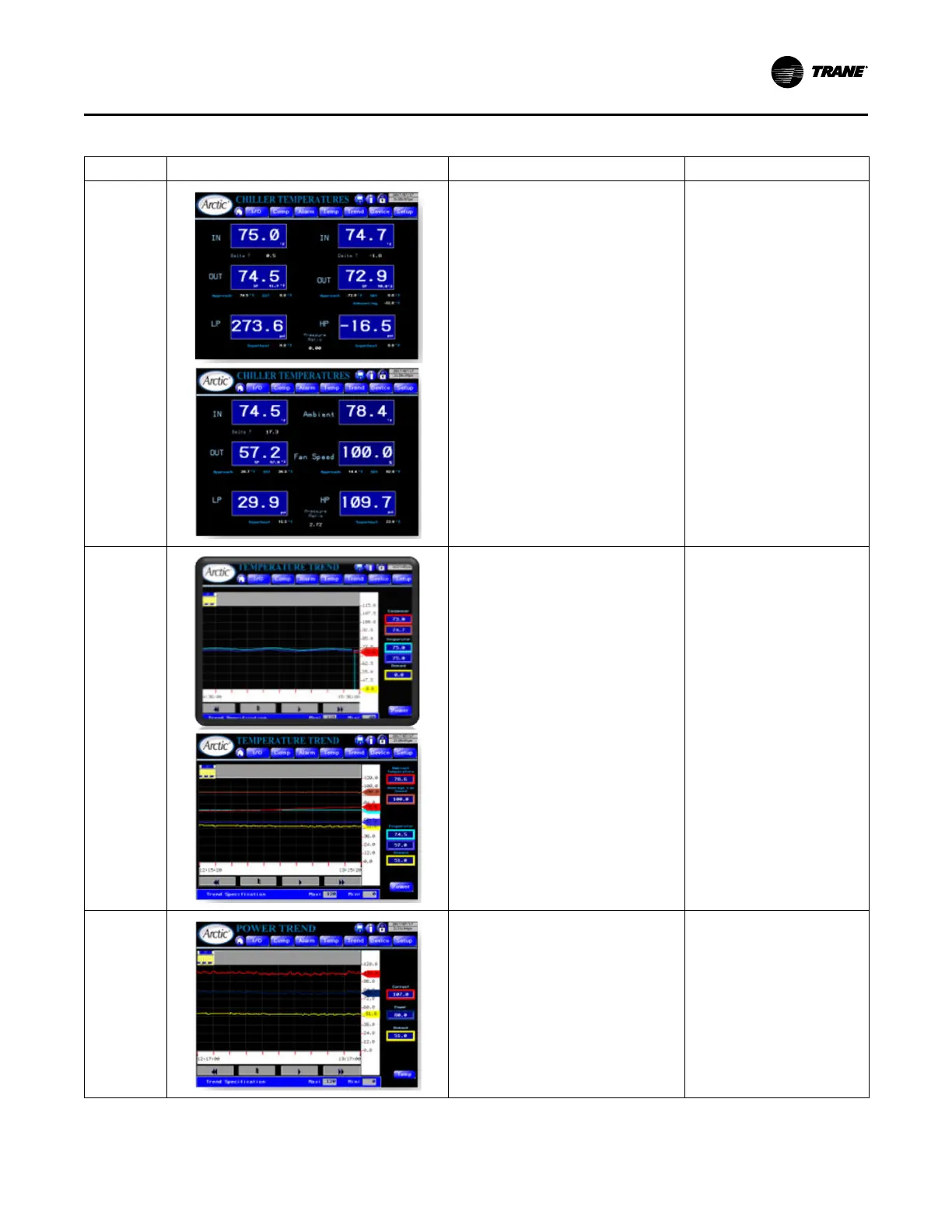
Displays water temperatures and system
pressures in large font for easy long-distance
reading. Air-cooled configuration replaces
condenser water temperatures with ambient
temperature and fan speed.
Main Menu > Temp
Water Temp
(trend):
Context-
Sensitive to
Air- or Water-
Cooled
configuration.
• Displays trend of the last hours data.
– Evaporator water temperatures in
and out.
– Water-cooled: Condenser water in
and out temperatures.
– Air-cooled: Ambient temperature
and fan speed (%).
– Demand (%).
• Has Y-axis runtime zoom.
• Provides access to power trend.
Main Menu > Trend
Power Trend
• Displays trend of the last hours data.
– Calculated power (kWs)
– Measured 3-phase current (amps)
– Air-cooled: Ambient temperature
and fan speed (%).
– Demand (%).
• Has Y-axis runtime zoom.
• Provides access to Temperature Trend.
Main Menu > Trend > Power
Operating Procedures


 To Next Page