Installation (for qualified installers only) 19
© Travis Industries 4090812 100-01232_001
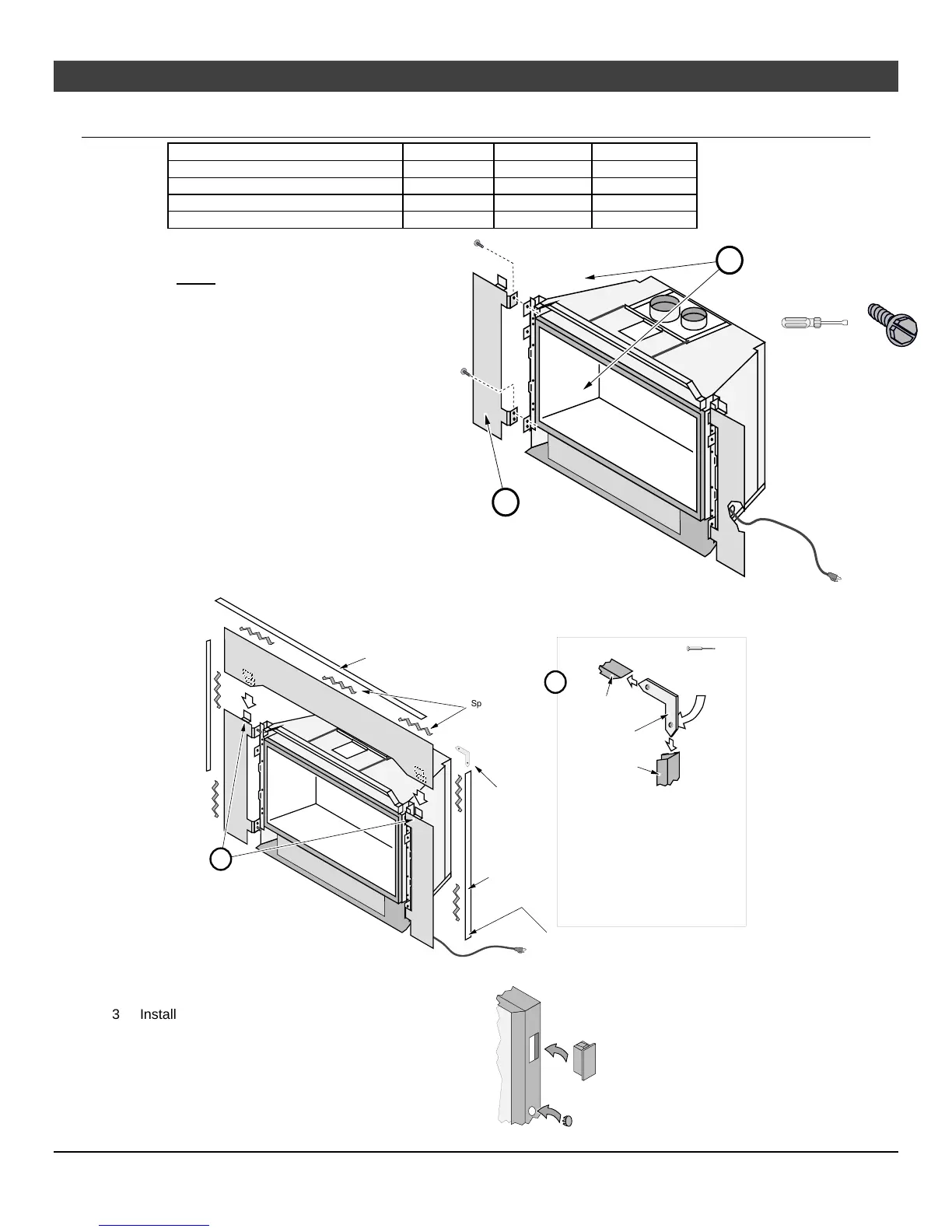
Surround Panel Installation
PANEL SIZE WIDTH HEIGHT PART #
8" x 10" Rectangular 40-3/8" 28-7/8" 96100301
Arched (8” x 10”) 40-3/8" 28-7/8" 98500605
10” x 13” Rectangular 44-3/8" 31-7/8" 96100302
4” x 6” Rectangular 37-1/8” 25” 96100300
NOTE: The insert may be installed
without surround panels.
1 Follow the directions to the
right to install the side panels.
2 Follow the directions below to
install the top panel.
Line up each side surround
panel and insert two screws from
the inside to secure in place.
5/16" Nutdriver
Pre-thread the holes on the surround
panels with the screws included in the
surround panel kit.
b
a
Run the power cord to
the right of the insert.
Top
Panel
Top Trim
"L" Bracket
Right Side Trim
"L" Bracket
Right Side
Trim
Top Trim
Trim Installation:
Insert one leg of each "L" bracket into the top
and side trim piece. Align the trim to form a
precise corner, then tighten the two set
screws with a small standard screwdriver.
Slide the trim over the panels. Place the
spring clips behind the panels at the locations
shown. This keeps the trim tight against the
panel.
Micro (1/16”)
Standard
Screwdriver
Spring
Clips
Optional Knock-Out
An optional knock-out is provided if the power cord is
routed behind the surround panel.
Install the top panel so
the tabs insert into the
joggle clips on the top
panel
b
a
3 Install the rectangular plug and button plug
into the surround panel trim to conceal the
two holes on the surround panel trim.



 To Next Page